
Build the net of a pyramid
Loading the math board and drawing, please wait…
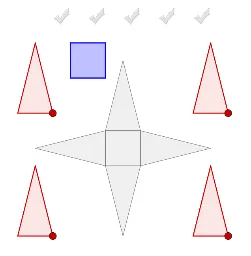
This example demonstrates how to construct the net of a pyramid by dragging red and blue faces onto the grey net. It involves core math concepts like polygons, solid geometry, and geometric construction. Construction highlights include using commands/objects such as Polygon, Point, Midpoint, Intersect, Pyramid, Net. Suitable for high school students learning solid geometry and geometric construction.
GeoGebra Commands & Parameters
Polygon(M, N, C_1) → poly3, n, q, rPoint(Circle[K_5, 1]) → L_5Polygon(K_5, L_5, M_5) → Vieleck1, m_5, k_5, l_5Point(Circle[N_5, 1]) → O_5Polygon(N_5, O_5, P_5) → Vieleck2, p_5, n_5, o_5Point(Circle[Q_5, 1]) → R_5Polygon(Q_5, R_5, S_5) → Vieleck3, s_5, q_5, r_5Point(Circle[T_5, 1]) → U_5Polygon(T_5, U_5, V_5) → Vieleck4, v_5, t_5, u_5Point(Circle[V_4, 2]) → W_4Midpoint(A_5, V_4) → J_5Point(Circle[F_4, 2]) → G_4Midpoint(I_4, F_4) → I_5Point(Circle[J_4, 2]) → K_4Midpoint(U_4, J_4) → H_5Midpoint(Z_4, W_4) → G_5Midpoint(H_4, G_4) → F_5Point(Circle[B_4, 2]) → C_4Midpoint(B_4, E_4) → E_5Midpoint(T_4, K_4) → D_5Intersect(zAxis, xAxis) → APoint(xAxis) → BPolygon(A, B, 4, xOyPlane) → poly1, f, g, h, i, C, DPyramid(poly1, 2) → a, E, Fläche1, Fläche2, Fläche3, Fläche4, Kante1, Kante2, Kante3, Kante4Point(Circle[B, Distance[A, B], Segment[A, B]]) → INet(a, c) → d, V_1, G_2, H_2, I_2, J_2, K_2, face1, face2, face4, face5, face3, W_1, face6, edge1, edge5, edge8, edge2, edge3, edge13, edge6, edge7, edge16, Z_1, edge9, edge10, edge17, edge11, edge12, edge18, edge4, edge15, A_2, B_2, C_2, D_2, E_2, F_2Net(a, o) → p, H_3, Q_3, R_3, S_3, T_3, U_3, face13, face14, face16, face17, face15, I_3, face18, edge39, edge43, edge46, edge40, edge41, edge51, edge44, edge45, edge54, J_3, edge47, edge48, edge55, edge49, edge50, edge56, edge42, edge53, K_3, L_3, M_3, N_3, O_3, P_3Polygon(Z_2, A_3, 4) → poly7, m_1, n_1, p_1, q_1, B_3, C_3Polygon(C_4, D_4, E_5) → poly9, j_1, k_1, l_1Polygon(G_4, H_4, I_5) → poly10, b_1, c_1, d_1Polygon(V_3, W_3, 4) → poly8, r_1, s_1, t_1, a_1, Z_3, A_4Polygon(W_4, Z_4, J_5) → poly12, e_1, f_2, g_2Polygon(K_4, T_4, H_5) → poly11, m, h_1, i_1Polygon(K, L, M) → poly2, j, k, lPolygon(L, O_2, Q_2) → poly4, e, f_1, g_1Polygon(N, O_2, R_2) → poly5, s, t, bPolygon(L, O_2, N, M) → poly6, l_2, o_3, n_4, m_3Polygon(T_2, U_2, P_2, Q_2) → poly13, t_2, u_2, p_3, q_3AreEqual(poly7, poly8) → CheckSquaresAreEqual(poly6, poly7) → check5Vector(B_5, C_5) → uVector(F, G) → v
AI Drawing Prompt Reference
Draw the net of a square pyramid. Start with a square base and a vertex above its center to form the pyramid. Then unfold the pyramid into a flat net consisting of four triangular faces and one square base, all connected along shared edges. Around the net, place several draggable colored triangular and square faces that match the shapes of the net's faces, for assembly practice. Also include some auxiliary circles and points near the net to help position these faces. The scene illustrates the transformation from a 3D pyramid to its 2D net, suitable for geometry construction exercises.
The prompt above was compiled from the original drawing commands and is for reference only.