
Area of a Triangle (Discovery)
Loading the math board and drawing, please wait…
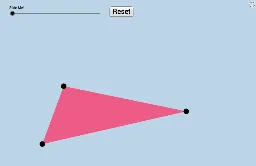
① This applet allows students to meaningfully discover the formula for the area of a triangle by dragging its vertices to any location. ② The core mathematical concept is the relationship between a triangle's area and its base and height, demonstrated through geometric transformations and area conservation. ③ Construction details: using GeoGebra commands such as Polygon to create triangle ABC, Midpoint to find midpoints, Rotate to rotate parts of the triangle, and Segment to draw auxiliary lines, forming a composite shape that visually proves the area equals half the base times height. ④ Suitable for middle school geometry classes or upper elementary exploratory activities, and useful for teachers to demonstrate a hands-on proof of the area formula, encouraging conceptual understanding rather than rote memorization.
GeoGebra Commands & Parameters
Polygon(A, B, C) → poly1, c, a, bMidpoint(b) → DRotate(A, (-α), D) → A'Rotate(B, (-α), D) → B'Rotate(C, (-α), D) → C'Polygon(A', B', C') → poly1', c', a', b'Segment(A, D) → iSegment(D, C) → jSegment(C, B) → kSegment(B, A) → lSegment(A', B') → gSegment(B', C') → m
AI Drawing Prompt Reference
Draw a triangle that can be resized by moving its vertices. Show how rotating a part of the triangle around the midpoint of one side and connecting the points creates a composite shape that visually demonstrates the area formula: half the base times the height, useful for teaching and exploring geometric concepts.
The prompt above was compiled from the original drawing commands and is for reference only.