
Binomial Triangle (Pascal's Triangle) - Interactive Demo
Loading the math board and drawing, please wait…
In collections
Probability Applets
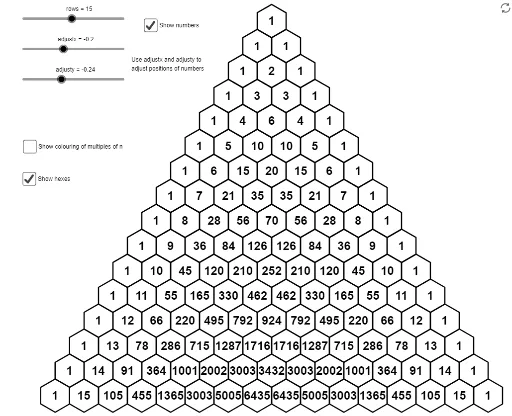
This example demonstrates the construction and properties of the Binomial Triangle (Pascal's Triangle) interactively. It involves core mathematical concepts like combinations, sequences, and geometric constructions. GeoGebra commands and objects used include Intersect, Point, Polygon, Vector, Sequence, Element, and Translate. Suitable for high school mathematics education to help students understand combinatorial mathematics and geometric intuition.
GeoGebra Commands & Parameters
Intersect(xAxis, yAxis) → APoint(yAxis) → BPolygon(B, A, 6) → poly1, f, F, g, h, i, j, k, C, D, EVector(F, A) → uVector(A, D) → vSequence(Sequence[nCr[P, Q], Q, 0, P], P, 0, rows) → pasclistElement(Element[pasclist, 3], 2) → aSequence(Sequence[Polygon[A + (P * u) + (Q * v) + (0, 1), A + (P * u) + (Q * v), 6], Q, 0, P], P, 0, rows) → sierpSequence(Sequence[Text[Element[Element[pasclist, P + 1], Q + 1], A + (P * u) + (Q * v) + (1; 30°) + (0, adjusty) + ((adjustx * (1, 0)) * ceil(log(10, 0.01 + Element[Element[pasclist, P + 1], Q + 1])))], Q, 0, P], P, 0, rows) → L_1Sequence(Sequence[If[Mod[Element[Element[pasclist, P + 1], Q + 1], n] ≟ 0, Polygon[A + (P * u) + (Q * v) + B, A + (P * u) + (Q * v), 6]], Q, 0, P], P, 0, rows) → sierp2Translate(sierp, (0, -1)) → sierp'