
Easing Functions Demo: Animated Comparison of Mathematical Functions
Loading the math board and drawing, please wait…
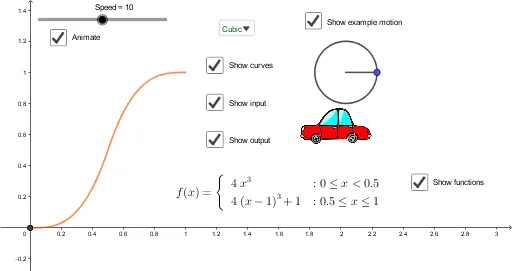
This GeoGebra example demonstrates a variety of easing functions through dynamic animations, visually comparing how different mathematical functions affect the speed of motion. The core mathematical concepts include linear, quadratic, cubic, quartic, quintic, sine, and piecewise functions, which are used to control the velocity of an animated object, producing effects such as ease-in, ease-out, and ease-in-out. The construction uses GeoGebra commands such as Element, SelectedIndex, LaTeX, Circle, Translate, Rotate, and Segment, along with multiple function objects like inoutquad, inoutcubic, inoutquart, inoutquint, and inoutsine. A slider (Speed) and a selector (chosen) allow users to switch between different easing functions, while points, segments, and circles illustrate the motion path. This example is suitable for high school to university students learning about function graphs, function properties, and the mathematical foundations of animation design, bridging mathematics and computer graphics.
GeoGebra Commands & Parameters
Element(l2, SelectedIndex[l1]) → chosenSelectedIndex(l1) → opLaTeX(Element[l2, op]) → text2Circle(D, 0.2) → eTranslate(D, (0.2, 0)) → D'Rotate(D', ((2 * π) * chosen(X)), D) → D''Segment(D, D'') → i
AI Drawing Prompt Reference
Create a dynamic visualization of easing functions. A central dot moves along a horizontal path, with its position determined by the currently selected easing function. A dropdown selector on the left allows switching between linear, quadratic, cubic, quartic, quintic, sine, and piecewise functions. As the dot moves, a segment is drawn from the start point to its current position, and a small ring around the dot rotates with an angle proportional to the function value. The current function's formula is displayed at the top. The scene uses a clean coordinate grid to emphasize how each function affects motion speed.
The prompt above was compiled from the original drawing commands and is for reference only.