
Geogebra Step 3: Iterating a Fractal Tree
Loading the math board and drawing, please wait…
In collections
How to make a fractal tree?
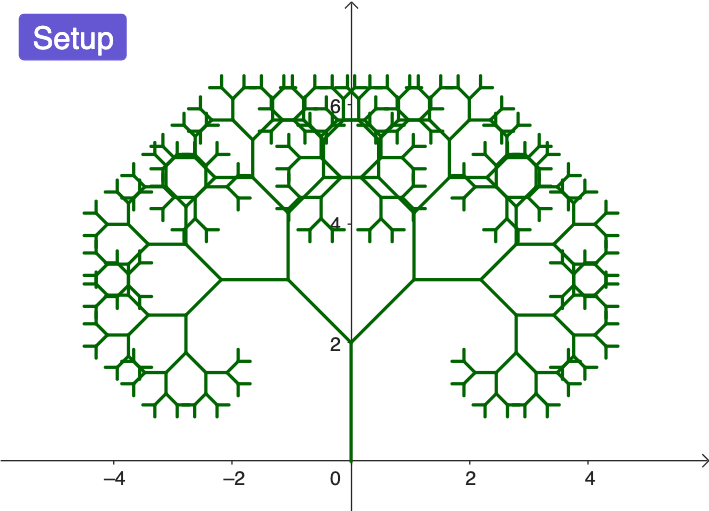
This example demonstrates how to generate a fractal tree in GeoGebra by repeatedly applying geometric transformations, illustrating the way self-similar structure emerges as iterations increase. It focuses on the recursive/iterative idea behind fractal geometry, the use of geometric similarity via scaling (dilation), and the programmatic control of construction using an iteration list or sequence of parameters. The construction starts with Segment to create the basic trunk/branch line, uses Point to define key endpoints, applies Dilate to scale and place each new branch relative to the previous one, and leverages IterationList to automatically build successive layers according to the generated iteration data. Objects such as Setup, f, A, B, C, D, along with ListOutPut and ListAll, help manage intermediate values and collect the final geometry. Suitable for advanced secondary education, STEM outreach, and introductory university courses covering iterative processes, transformation geometry, and fractal visualization.
GeoGebra Commands & Parameters
Segment((0, 0), (0, 2)) → fPoint(f, 0) → APoint(f, 1) → BDilate(Rotate[A, pi + pi / 4, B], 0.75, B) → CDilate(Rotate[A, pi - pi / 4, B], 0.75, B) → DIterationList(Flatten[Zip[Grow[s], s, level]], level, {{f}}, 8) → ListAll
AI Drawing Prompt Reference
Draw a fractal tree: start with a vertical trunk segment, with its two endpoints as base and tip. At the tip, rotate the trunk by 135 degrees clockwise and counterclockwise, then scale each rotated segment to 75% of its length, creating two branches. Repeat this rotation-and-scaling process on every new branch, iterating 8 levels. The result is a symmetric, self-similar tree where each branch sprouts from the tip of the previous one, with branches shrinking progressively.
The prompt above was compiled from the original drawing commands and is for reference only.