
Construct a Fractal Tree via Recursive Branching
Loading the math board and drawing, please wait…
In collections
How to make a fractal tree?
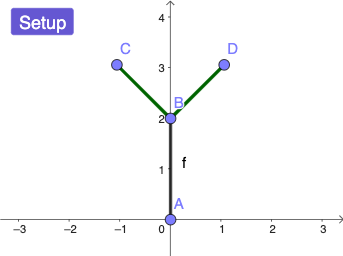
This example demonstrates how to generate a fractal tree by repeatedly transforming line segments and creating branching structure step by step. It highlights the recursive idea behind fractal geometry, the use of geometric similarity (scaling/dilation), and the broader context of functions and limits when branch rules depend on parameters. Construction-wise, the GeoGebra workflow uses Segment to create the initial segment, Point to mark essential endpoints for each branch, and Dilate to scale segments (and their endpoints) to produce the next level of growth. Key intermediate objects such as Setup and functions/points (e.g., f, A, B, C, D) organize the geometry, while ListOutPut collects the generated results across iterations. Suitable for secondary school and above, especially for lessons on transformation geometry, recursive construction, and interactive graphing.
GeoGebra Commands & Parameters
Segment((0, 0), (0, 2)) → fPoint(f, 0) → APoint(f, 1) → BDilate(Rotate[A, pi + pi / 4, B], 0.75, B) → CDilate(Rotate[A, pi - pi / 4, B], 0.75, B) → D
AI Drawing Prompt Reference
Draw a vertical line segment from (0,0) to (0,2). Mark two key points along this segment: one near the position corresponding to the lower endpoint and another at the mid position. Use the upper/mid point as the center of rotation, and create two new branch directions by rotating the segment configuration around this point by angles of π plus and π minus a small offset (described using π ± π/4). After each rotation, scale the rotated segment (including its endpoints) uniformly to 0.75 times its original length. The resulting two scaled branches form the first visible split of a recursive fractal tree.
The prompt above was compiled from the original drawing commands and is for reference only.