
Area with Parametric Curves
Loading the math board and drawing, please wait…
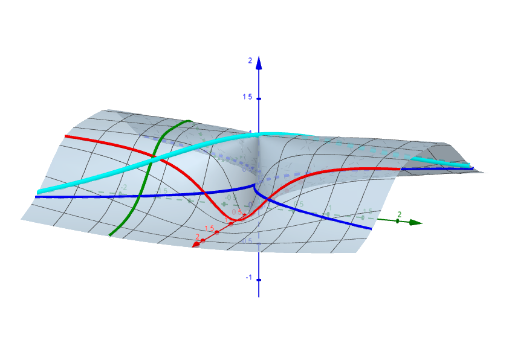
This example demonstrates how to draw curves using parametric equations and calculate their area. Key mathematical concepts include parametric curves, integration, and geometric area. Construction involves GeoGebra commands like CurveCartesian, parameter objects a, f, k, etc. Suitable for high school students or college freshmen learning analytic geometry and calculus basics.
GeoGebra Commands & Parameters
CurveCartesian((u, (a * u), a^(2) / (u^(2) + a^(2))), u, -10, 10) → kCurveCartesian(u, (u^(2) * sqrt(t_z) / sqrt(1 - t_z)), t_z, u, -10, 10) → gl1CurveCartesian(u, ((-u^(2)) * sqrt(t_z) / sqrt(1 - t_z)), t_z, u, -10, 10) → gl2CurveCartesian(u, t_y, t_y^(2) / (u^(4) + t_y^(2)), u, -10, 10) → k_yCurveCartesian(t_x, u, u^(2) / (t_x^(4) + u^(2)), u, -10, 10) → k_x
AI Drawing Prompt Reference
Draw a set of parametric curves that illustrate the area enclosed by them. Start with a main curve where the x-coordinate is the parameter and the y-coordinate combines a linear term with a rational fraction, over a parameter range from -10 to 10. Then add two symmetric curves, one curving upward and one downward, generated by the same parameter, forming a symmetric opening. Finally, add two crossing curves, one parameterized by the y-coordinate and the other by the x-coordinate, with similar shapes but different orientations, together enclosing a region. All curves share the same coordinate system, and adjusting parameters changes the enclosed area.
The prompt above was compiled from the original drawing commands and is for reference only.