
Area: Unit Squares Unknown Shape- Lesson 7
Loading the math board and drawing, please wait…
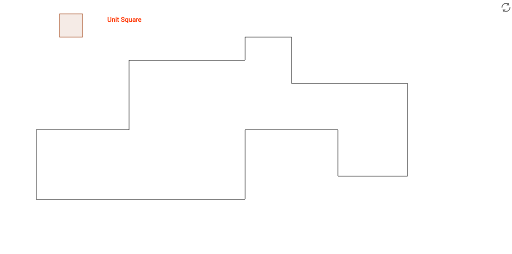
This example demonstrates how to calculate the area of an unknown shape using unit squares. Key mathematical concepts include area calculation and geometric construction. Using GeoGebra commands such as Polygon, Segment, and Point, complex geometric shapes can be constructed. Suitable for middle school and above students to learn area calculation and geometric construction.
GeoGebra Commands & Parameters
Polygon(O, P, Q, R) → poly1, o, p, q, rSegment(A_1, B_1) → a_1Segment(B_1, C_1) → b_1Segment(C_1, D_1) → c_1Segment(D_1, E_1) → d_1Segment(E_1, F_1) → e_1Segment(F_1, G_1) → f_1Segment(H_1, I_1) → h_1Segment(I_1, J_1) → i_1Segment(J_1, A_1) → j_1Point(h_1) → SSegment(S, T) → aSegment(T, U) → bSegment(U, V) → cSegment(V, W) → dSegment(W, Z) → eSegment(Z, O_1) → f
AI Drawing Prompt Reference
Draw an irregular quadrilateral with four vertices, filled with unit squares to show area calculation. Outside the quadrilateral, connect a series of points with straight segments to form a closed polygonal outline, with segments joined end-to-end. Inside this outline, select one point and draw multiple segments from it to several vertices on the outline, creating internal dividing lines that partition the shape into regions. The whole figure includes the main quadrilateral, an outer polygonal frame, and internal connecting segments, all as straight lines with visible points.
The prompt above was compiled from the original drawing commands and is for reference only.