
Area of a Trapezoid by Tim Brzezinski
Loading the math board and drawing, please wait…
In collections
Area of a Trapezoid: Intuitive Discovery
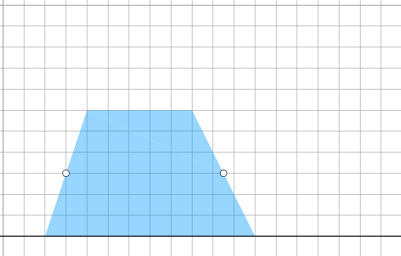
This example demonstrates the calculation of the area of a trapezoid and its geometric construction. The key mathematical concepts involved include the trapezoid area formula, similarity transformations, and geometric construction. The construction involves using GeoGebra commands such as Point, Polygon, OrthogonalLine, and others to create the trapezoid shape and compute its area. It is suitable for middle or high school mathematics learning to understand area calculation and the application of geometric transformations.
GeoGebra Commands & Parameters
Point(Ray[A, A + (1, 0)]) → BPointIn(d) → CPolygon(A, B, C) → t1, f, a, bOrthogonalLine(C, g) → hIntersect(g, h) → C_{1}Point(Ray[C, C + (1, 0)]) → DDilate(C, If[0 < c ≤ 1, 1 - c, 0], D) → F'Dilate(D, If[1 < c ≤ 2, 2 - c, 0], C_{1}) → D'Rotate(C, If[2 < c ≤ 3, ((c - 2) * pi), pi], D) → F'_{1}Rotate(F', If[2 < c ≤ 3, ((c - 2) * pi), pi], D) → F''Angle(C, B, A) → βAngle(B, A, C) → γIf(γ ≟ pi / 2, 12, 16) → oMidpoint(B, D) → EPolygon(A, B, E, C) → q1, a_1, b_1, e, c_1Polygon(E, D, C) → t2, c_2, e_1, d_1Dilate(D, If[0 < c ≤ 1, 1 - c, 0], E) → D'_{1}Segment(D, D'_{1}) → iRotate(D, If[1 < c ≤ 2, ((-(c - 1)) * pi), (-pi)], E) → D'_{2}Rotate(D'_{1}, If[1 < c ≤ 2, ((c - 1) * pi), pi], E) → FSegment(D'_{2}, F) → i'Segment(C, D) → jSegment(A, C) → kDilate(C, If[2 < c ≤ 3, 3 - c, 0], E) → C'Segment(C, C') → lRotate(E, If[4 < c ≤ 5, ((-(c - 4)) * pi), (-pi)], E) → E'Rotate(D, If[4 < c ≤ 5, ((-(c - 4)) * pi), (-pi)], E) → D'_{3}Rotate(C, If[4 < c ≤ 5, ((-(c - 4)) * pi), (-pi)], E) → C'_{1}Polygon(E', D'_{3}, C'_{1}) → t2', c'_{1}, e', d'_{3}Segment(C'_{1}, D'_{3}) → mSegment(D'_{3}, E) → nSegment(C'_{1}, E) → pAngle(E, C'_{1}, D'_{3}) → αOrthogonalLine(C, g) → qIntersect(g, q) → GMidpoint(C, G) → HDilate(C, If[6 < c ≤ 7, 7 - c, 0], H) → C'_{2}Segment(C, C'_{2}) → rDilate(H, If[7 < c ≤ 8, 8 - c, 0], G) → H'Segment(H, H') → sRotate(C, If[8 < c ≤ 9, ((-(c - 8)) * pi), (-pi)], H) → C'_{3}Rotate(C'_{2}, If[8 < c ≤ 9, ((-(c - 8)) * pi), (-pi)], H) → ISegment(C'_{3}, I) → r'Midpoint(k) → JDilate(E, If[9 < c ≤ 10, 10 - c, 0], H) → E'_{1}Dilate(J, If[9 < c ≤ 10, 10 - c, 0], H) → J'Segment(J, J') → tSegment(E, E'_{1}) → f_1Polygon(A, C'_{1}, E, J) → q2, a_2, g_1, e_2, j_1Polygon(E, C, J) → t3, j_2, e_3, c_3Rotate(E, If[11 < c ≤ 12, ((-(c - 11)) * pi), (-pi)], E) → E'_{2}Rotate(C, If[11 < c ≤ 12, ((-(c - 11)) * pi), (-pi)], E) → C'_{4}Rotate(J, If[11 < c ≤ 12, ((-(c - 11)) * pi), (-pi)], E) → J'_{1}Polygon(E'_{2}, C'_{4}, J'_{1}) → t3', j'_{1}, e'_{2}, c'_{4}Segment(J'_{1}, C'_{4}) → h_1Segment(C'_{4}, E) → i_1Segment(E, J'_{1}) → k_1Segment(A, J) → l_1Segment(J, C) → m_1OrthogonalLine(C'_{1}, g) → n_1Intersect(n_1, p_1) → KOrthogonalLine(J'_{1}, g) → q_1Intersect(q_1, g) → LDilate(J'_{1}, If[13 < c ≤ 14, 14 - c, 0], L) → MSegment(J'_{1}, M) → r_1Dilate(C'_{1}, If[13 < c ≤ 14, 14 - c, 0], K) → NSegment(C'_{1}, N) → s_1Polygon(A, L, J'_{1}, J) → q3, a_3, l_2, t_1, j_3Polygon(L, C'_{1}, J'_{1}) → t4, f_2, l_3, g_2Dilate(J'_{1}, If[15 < c ≤ 16, 16 - c, 0], J) → OVector(J'_{1}, O) → uTranslate(L, u) → L'Translate(C'_{1}, u) → PTranslate(J'_{1}, u) → QPolygon(L', P, Q) → t4', q_2, l', p_2Segment(P, O) → h_2Segment(O, L') → i_2Polygon(A, C'_{1}, K, J) → q4, a_4, k_2, k_3, j_4Polygon(C'_{1}, J'_{1}, K) → t5, k_4, m_2, n_2Translate(C'_{1}, u) → RTranslate(J'_{1}, u) → STranslate(K, u) → K'Polygon(R, S, K') → t5', k', r_2, s_2Segment(R, Q) → t_2Segment(R, K') → b_2
AI Drawing Prompt Reference
Draw a trapezoid using geometric transformations. Include points A, B, C, D forming the trapezoid, and point E as a midpoint. The construction order: first draw points A and B, then C and D, use parallel lines to form the trapezoid, then apply scaling and rotation to create auxiliary figures, and finally compute the area. Key objects include the trapezoid vertices, parallel lines, and point E.
The prompt above was compiled from the original drawing commands and is for reference only.