
Area of a Rhombus: Geometric Construction and Formula
Loading the math board and drawing, please wait…
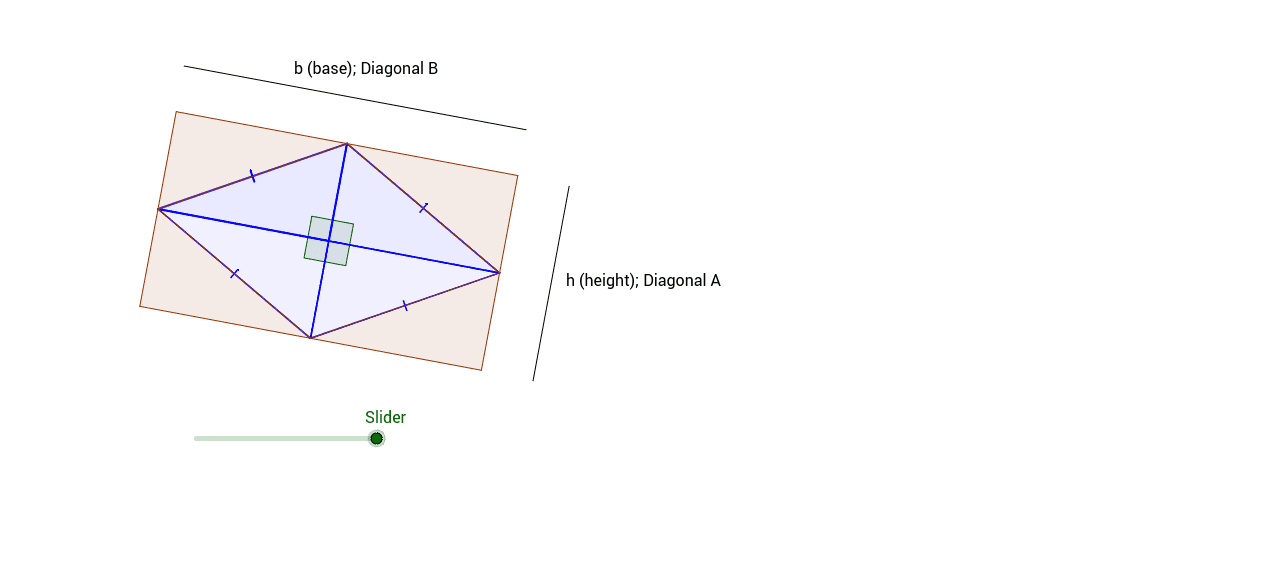
①This GeoGebra example dynamically demonstrates how to compute the area of a rhombus and visualizes the relationship between the area, diagonals, side length, and angles. ②Core mathematical concepts include the definition of a rhombus (all sides equal), area formulas (half the product of diagonals, or base times height), and the use of transformations such as translation and rotation to create equivalent-area figures, involving arithmetic mean and parallelogram area. ③Construction details: using commands like Point, Segment, Line, Intersect, Midpoint, Polygon, Angle, Vector, Translate, and Rotate, the rhombus is built with its vertices and diagonals, then decomposed or rearranged into rectangles or parallelograms to verify the area formula. ④Suitable for middle school to high school students learning plane geometry area calculations, and for teachers to illustrate formula derivation and geometric transformation ideas in class.
GeoGebra Commands & Parameters
Point(Circle[A, 4]) → BSegment(A, B) → aPoint(Circle[B, 4]) → CSegment(B, C) → bLine(C, a) → cLine(A, b) → dIntersect(c, d) → DSegment(A, D) → eMidpoint(D, B) → EPolygon(A, D, E) → poly1, e_1, a_1, d_1Polygon(D, C, E) → poly2, e_2, d_2, c_1Polygon(C, B, E) → poly3, e_3, c_2, b_1Polygon(B, A, E) → poly4, e_4, b_2, a_2Angle(D, E, A) → αAngle(A, E, B) → βAngle(B, E, C) → γAngle(C, E, D) → δMidpoint(e_4) → FMidpoint(e_2) → GMidpoint(e_3) → HMidpoint(e_1) → ISegment(F, G) → fPoint(f) → JVector(F, J) → uTranslate(B, u) → B'Translate(A, u) → A'Translate(E, u) → E'Polygon(B', A', E') → poly4', e', b', a'Rotate(B', g, J) → B''Rotate(A', g, J) → A''Rotate(E', g, J) → E''Polygon(B'', A'', E'') → poly4'', e'', b'', a''Rotate(C, g, H) → C'Rotate(B, g, H) → B'_1Rotate(E, g, H) → E'_1Polygon(C', B'_1, E'_1) → poly3', e'_1, c', b'_1Midpoint(e_2) → KRotate(D, g, K) → D'Rotate(C, g, K) → C'_1Rotate(E, g, K) → E'_2Polygon(D', C'_1, E'_2) → poly2', e'_2, d', c'_1Rotate(A, g, I) → A'_1Rotate(D, g, I) → D'_1Rotate(E, g, I) → E'_3Polygon(A'_1, D'_1, E'_3) → poly1', e'_3, a'_1, d'_1Point(Circle[L, 6.96]) → MSegment(L, M) → iLine(N, c') → hPoint(Circle[N, abs(3.96)]) → OSegment(N, O) → j
AI Drawing Prompt Reference
Draw a rhombus with its diagonals intersecting at a point, dividing it into four congruent triangles. Connect the midpoints of the diagonals with dashed lines to form a parallelogram. Then, translate and rotate one of the triangles to match another, demonstrating the area formula. Finally, draw one side of the rhombus as the base and mark the corresponding height, showing that the area equals the base times the height.
The prompt above was compiled from the original drawing commands and is for reference only.