
Area of a Parallelogram: Transforming It into a Rectangle
Loading the math board and drawing, please wait…
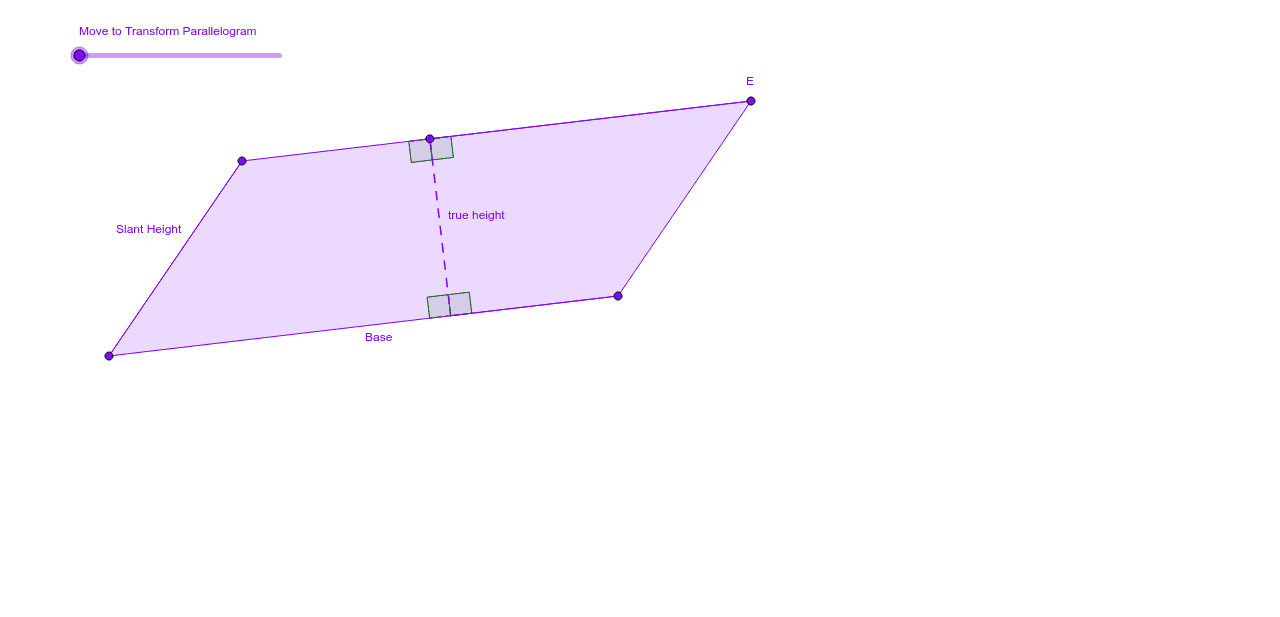
This GeoGebra example demonstrates how a draggable parallelogram can be transformed into a rectangle to reveal that its area equals base times height. It develops concepts such as parallelogram, rectangle, area, base, height, perpendicular distance, congruent pieces, equal-area transformation, vector translation, and angle measurement. The construction uses Segment, Line, Intersect, Point, OrthogonalLine, Vector, Polygon, Length, Translate, and Angle commands to create vertices A, B, D, F, G, polygons poly1 and poly2, height lines, translated copies, and labels for lengths and angles. It is suitable for middle-school geometry lessons on area formulas, high-school review of vectors and geometric transformations, and inquiry-based classroom exploration.
GeoGebra Commands & Parameters
Segment(A, B) → aSegment(A, D) → bLine(D, a) → cLine(B, b) → dIntersect(c, d) → ESegment(D, E) → eSegment(E, B) → fPoint(e) → FOrthogonalLine(F, a) → gIntersect(g, a) → GVector(A, B) → uPolygon(G, B, E, F) → poly2, g_2, b_1, e_1, f_2Length(u) → wTranslate(A, Vector[(t / w * u)]) → A'_1Translate(G, Vector[(t / w * u)]) → G'_1Translate(F, Vector[(t / w * u)]) → F'_1Translate(D, Vector[(t / w * u)]) → D'_1Polygon(A'_1, G'_1, F'_1, D'_1) → poly1', a'_1, g'_1, f'_1, d'_1Angle(G, F, E) → αAngle(F, G, A) → βSegment(F, G) → hSegment(F'_1, G'_1) → iAngle(B, G, F) → γAngle(D, F'_1, G'_1) → δAngle(F'_1, G'_1, A) → ε
AI Drawing Prompt Reference
Draw a draggable parallelogram and transform it into a rectangle to show that its area equals base times height. The drawing should include a parallelogram, a rectangle, base, height, perpendicular distance, and related elements. The construction order should be: first draw the parallelogram, then find the intersection point using perpendicular lines, construct the rectangle, and finally use translation to transform the parallelogram into the rectangle.
The prompt above was compiled from the original drawing commands and is for reference only.