
Area of a Parallelogram and Cross Product by John Rodgers
Loading the math board and drawing, please wait…
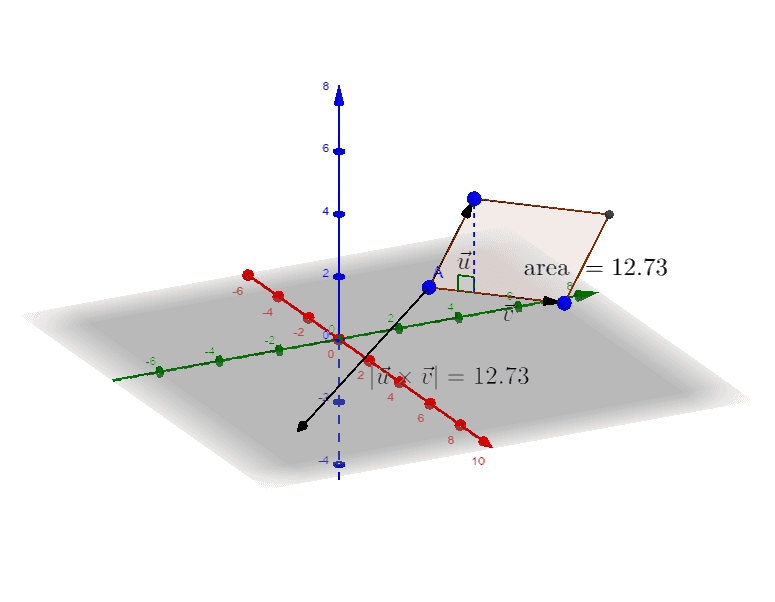
This example demonstrates how to calculate the area of a parallelogram using the cross product of vectors. Key math concepts include vector cross product, parallelogram area formula, and vector magnitude. Construction highlights involve GeoGebra commands like Vector, Line, Intersect, Segment, Polygon, OrthogonalLine, Angle, Midpoint, Distance, and PointIn, with objects A, B, C, u, v, etc. Suitable for high school and university mathematics education, this visualization aids in understanding vector cross products and geometric area calculations.
GeoGebra Commands & Parameters
Vector(A, B) → uVector(A, C) → vLine(B, v) → fLine(C, u) → gIntersect(g, f) → DSegment(C, D) → hSegment(B, D) → iPolygon(A, B, D, C) → poly1, a, b, d, cVector(A, E) → wOrthogonalLine(C, a, space) → jIntersect(j, a) → FSegment(C, F) → kAngle(C, F, A) → αMidpoint(A, C) → GMidpoint(A, B) → IDistance(A, E) → distanceAEPointIn(poly1) → Pointpoly1Midpoint(C, B) → HMidpoint(E, A) → J
AI Drawing Prompt Reference
Draw a parallelogram using two vectors to represent its opposite sides and demonstrate how to calculate its area using the cross product of vectors. Start by plotting two vectors, then use them to construct the parallelogram. Next, draw a perpendicular line from one vertex of the parallelogram and mark its foot. Finally, display the parallelogram, vectors, perpendicular line, and angles to illustrate the relationship between vector cross products and area calculations.
The prompt above was compiled from the original drawing commands and is for reference only.