
Area Model and Factored Form
Loading the math board and drawing, please wait…
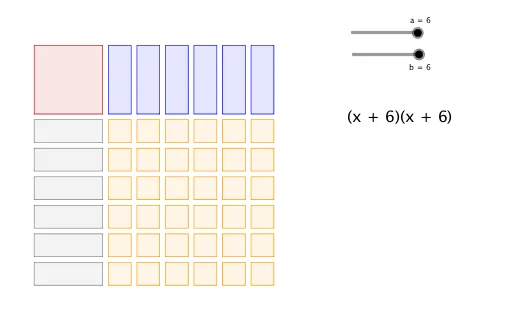
This example visually demonstrates the relationship between the area model and the factored form of a quadratic function. It involves core concepts like quadratic functions, area models, and factoring. GeoGebra commands used include Polygon and Sequence. Suitable for high school mathematics education to help students understand different representations of quadratic functions.
GeoGebra Commands & Parameters
Polygon(A, B, D, C) → poly1, a_1, e, d, cSequence(Polygon[(3.25 + (1.25 * n), 3), (4.25 + (1.25 * n), 3), (4.25 + (1.25 * n), 0), (3.25 + (1.25 * n), 0)], n, 0, a - 1, 1) → list1Sequence(Polygon[(0, -0.25 - (1.25 * n)), (0, -1.25 - (1.25 * n)), (3, -1.25 - (1.25 * n)), (3, -0.25 - (1.25 * n))], n, 0, b - 1, 1) → list2Sequence(Sequence[Polygon[(3.25 + (1.25 * n), -0.25 - (1.25 * m)), (4.25 + (1.25 * n), -0.25 - (1.25 * m)), (4.25 + (1.25 * n), -1.25 - (1.25 * m)), (3.25 + (1.25 * n), -1.25 - (1.25 * m))], n, 0, a - 1, 1], m, 0, b - 1, 1) → list3
AI Drawing Prompt Reference
Draw a visual representation showing the relationship between the area model and the factored form of a quadratic function, highlighting core concepts. Start by creating a quadrilateral, then generate a series of rectangles stacked from top to bottom and arranged from left to right to form the area model. Next, create another series of rectangles stacked from top to bottom and arranged from left to right to form the factored form. These shapes illustrate the different representations of a quadratic function and their connection.
The prompt above was compiled from the original drawing commands and is for reference only.