
Animation of Cube and Prism
Loading the math board and drawing, please wait…
In collections
CCSS High School: Geometry (Circle equations)
CCSS High School: Geometry Circle Equations
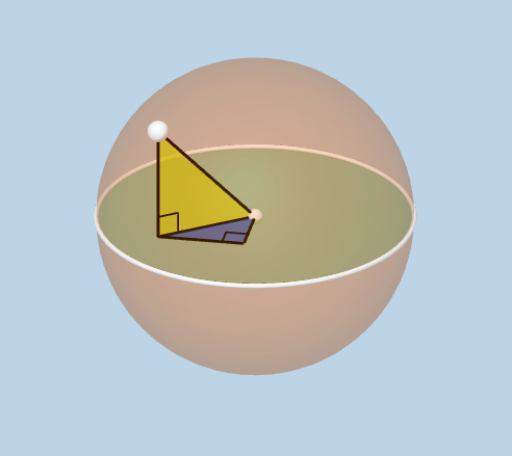
This example demonstrates an animation of a cube and a prism. The core mathematical concepts involved are solid geometry and geometric construction. Using GeoGebra commands such as OrthogonalLine, Intersect, Polygon, etc., the models of the cube and prism are constructed, and their relationships are shown. Suitable for high school mathematics teaching and learning solid geometry.
GeoGebra Commands & Parameters
OrthogonalLine(C, xOyPlane) → gIntersect(g, xOyPlane) → DIntersect(f, h) → BPolygon(A, B, D) → poly1, d, a_1, bPointIn(poly1) → ESphere(E, C) → cCircle(E, Distance[A, C], xOyPlane) → kAngle(D, B, E) → αDilate(A, If[0 < i ≤ 1, 1 - i, 0], B) → A'Segment(E, A') → jDilate(B, If[1 < i ≤ 2, 2 - i, 0], D) → B'Segment(B, B') → lDilate(D, If[2 < i ≤ 3, 3 - i, 0], A) → D'Segment(D, D') → mDilate(D, If[3.5 < i ≤ 4.5, 4.5 - i, 0], C) → D'_1Segment(D, D'_1) → nAngle(C, D, E) → βDilate(C, If[4.5 < i ≤ 5.5, 5.5 - i, 0], A) → C'Segment(C, C') → pPolygon(A, D, C) → poly2, c_1, a_2, d_1Distance(A, A') → distanceAA'Distance(A', B') → distanceA'B'
AI Drawing Prompt Reference
Draw an animation of a cube and a prism. Start by drawing the base of the cube, then construct the base of the prism. Use rotation and scaling operations to show the relationship between the cube and the prism. Finally, add angle markings and distance measurements to demonstrate their geometric properties.
The prompt above was compiled from the original drawing commands and is for reference only.