
Animation Demonstrating Isosceles Triangles and Geometric Transformations
Loading the math board and drawing, please wait…
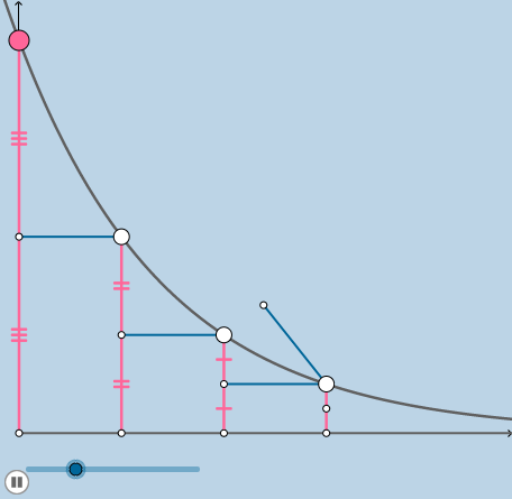
This example demonstrates geometric transformations and properties of isosceles triangles through animation. It involves core math concepts like isosceles triangles, vectors, and geometric transformations (rotation, translation, dilation). Construction uses GeoGebra commands such as Textfield, Intersect, Segment, Midpoint, Dilate, Rotate, Vector, Translate, Integral, Ray. Suitable for high school mathematics teaching to understand geometric transformations and isosceles triangle properties.
GeoGebra Commands & Parameters
Textfield(a_0) → InputBox1Textfield(k) → InputBox2Intersect(A, b, (279.99999999999994, 550.5514774506812)) → DIntersect(A, c, (560, 275.27573872534055)) → EIntersect(A, d, (840, 137.63786936267027)) → FIntersect(A, e, (1120, 68.81893468133514)) → GTextfield(f) → InputBox3Intersect(b, h) → HSegment(H, D) → iIntersect(c, j) → IIntersect(d, l) → JSegment(I, E) → mSegment(J, F) → nSegment(D, I) → pSegment(E, J) → qIntersect(h, s) → KIntersect(r, t) → LSegment(K, C) → f_1Segment(C, L) → g_1Midpoint(M, B) → NDilate(M, If[0 < o ≤ 1, 1 - o, 0], N) → M'Rotate(M, If[1 < o ≤ 2, ((o - 1) * π), π], N) → M'_1Rotate(M', If[1 < o ≤ 2, ((o - 1) * π), π], N) → M''Dilate(N, If[2 < o ≤ 3, 3 - o, 0], D) → N'Segment(N, N') → j_1Midpoint(D, O) → RDilate(B, If[0 < o ≤ 1, 1 - o, 0], N) → B'Segment(B, B') → h_1Rotate(B, If[1 < o ≤ 2, ((-(o - 1)) * π), (-π)], N) → B'_1Rotate(B', If[1 < o ≤ 2, ((-(o - 1)) * π), (-π)], N) → B''Segment(B'_1, B'') → i_1Dilate(D, If[3 < o ≤ 4, 4 - o, 0], R) → D'Segment(D, D') → k_1Dilate(R, If[4 < o ≤ 5, 5 - o, 0], O) → R'Segment(R, R') → l_1Rotate(D, If[5 < o ≤ 6, ((-(o - 5)) * π), (-π)], R) → D'_1Rotate(D', If[5 < o ≤ 6, ((-(o - 5)) * π), (-π)], R) → D''Segment(D'_1, D'') → m_1Rotate(N, If[6 < o ≤ 7, ((-(o - 6)) * π), (-π)], D) → N'_1Rotate(N', If[6 < o ≤ 7, ((-(o - 6)) * π), (-π)], D) → N''Segment(N'_1, N'') → n_1Dilate(D, If[7 < o ≤ 8, 8 - o, 0], R) → D'_2Vector(D, D'_2) → uTranslate(N'_1, u) → STranslate(N'', u) → N'''Segment(S, N''') → p_1Midpoint(P, E) → TDilate(E, If[8 < o ≤ 9, 9 - o, 0], T) → E'Segment(E, E') → q_1Dilate(T, If[9 < o ≤ 10, 10 - o, 0], P) → T'Segment(T, T') → r_1Rotate(E, If[10 < o ≤ 11, ((-(o - 10)) * π), (-π)], T) → E'_1Rotate(E', If[10 < o ≤ 11, ((-(o - 10)) * π), (-π)], T) → E''Segment(E'_1, E'') → s_1Rotate(S, If[11 < o ≤ 12, ((-(o - 11)) * π), (-π)], E) → S'Rotate(N''', If[11 < o ≤ 12, ((-(o - 11)) * π), (-π)], E) → USegment(S', U) → t_1Dilate(E, If[12 < o ≤ 13, 13 - o, 0], T) → E'_2Vector(E, E'_2) → vTranslate(S', v) → S''Translate(U, v) → U'Segment(S'', U') → a_1Midpoint(F, Q) → VDilate(F, If[13 < o ≤ 14, 14 - o, 0], V) → F'Segment(F, F') → b_1Dilate(V, If[14 < o ≤ 15, 15 - o, 0], Q) → V'Segment(V, V') → c_1Rotate(F, If[15 < o ≤ 16, ((-(o - 15)) * π), (-π)], V) → F'_1Rotate(F', If[15 < o ≤ 16, ((-(o - 15)) * π), (-π)], V) → F''Segment(F'_1, F'') → d_1Rotate(S'', If[16 < o ≤ 17, ((-(o - 16)) * π), (-π)], F) → S'''Rotate(U', If[16 < o ≤ 17, ((-(o - 16)) * π), (-π)], F) → U''Segment(S''', U'') → e_1Dilate(F, If[17 < o ≤ 18, 18 - o, 0], V) → F'_2Vector(F, F'_2) → wTranslate(S''', w) → WTranslate(U'', w) → U'''Segment(W, U''') → f_2Translate(U'', w) → U'''_1Integral(A, 0, Infinity) → o_1Ray((0, 0), (1, 0)) → g_2
AI Drawing Prompt Reference
Create an animation demonstrating isosceles triangles and geometric transformations. Start by drawing a point A and several line segments, determining the vertices and base of an isosceles triangle through intersection points. Connect these points to form the isosceles triangle. Then, showcase geometric transformations like rotation, translation, and dilation, observing how these transformations preserve the properties of the isosceles triangle. During the animation, point A serves as the center of transformation, with the transformed triangle remaining similar to the original.
The prompt above was compiled from the original drawing commands and is for reference only.