
Animation 191: Trigonometric Functions and Transformations
Loading the math board and drawing, please wait…
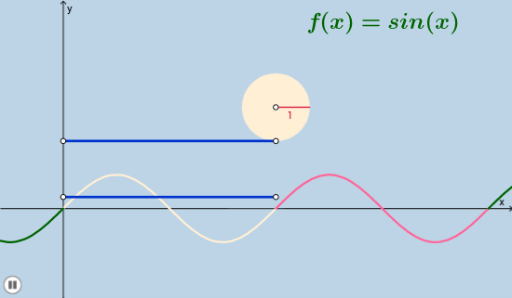
This example illustrates the relationship between trigonometric functions and geometric transformations. Key mathematical concepts include trigonometric functions, vector transformations, and geometric constructions. Using commands like Mirror, Dilate, Translate, etc., it demonstrates the symmetry and scaling transformations of trigonometric function graphs. Suitable for high school mathematics education and learning.
GeoGebra Commands & Parameters
Mirror(C, x = 0) → C'_1Circle(B, 1 / b) → dDilate(B, If[0 < a ≤ 1, 1 - a, 0], F) → B'Segment(B, B') → jDilate(D, If[1 < a ≤ 2, 2 - a, 0], E) → D'Segment(D, D') → kVector(D, D') → uTranslate(d, u) → d'Translate(B, u) → B'_1Translate(G, u) → G'Rotate(D', If[1 < a ≤ 2, (((-(a - 1)) * 2) * π), (-2 * π)], B'_1) → D''CircleArc(B'_1, D', D'') → cTranslate(B, u) → B'_2Translate(B', u) → B''Segment(B'_2, B'') → j'Dilate(D, If[3.5 < a ≤ 4.5, 4.5 - a, 0], H) → D'_1Vector(D, D'_1) → vTranslate(D, v) → D'_2Translate(D', v) → D''_1Segment(D'_2, D''_1) → k'Translate(E, v) → E'Dilate(D, If[5 < a ≤ 6, 6 - a, 0], E) → D'_3Vector(D, D'_3) → wTranslate(D'_2, w) → ITranslate(D''_1, w) → JSegment(I, J) → k''Translate(p, w) → p_1Translate(E', w) → E''Dilate(D, If[3.5 < a ≤ 4.5, 4.5 - a, 0], K) → D'_4Vector(D, D'_4) → mTranslate(D, m) → D'_5Translate(D', m) → D''_2Segment(D'_5, D''_2) → k'_1Translate(E, m) → E'_1Translate(D'_5, w) → LTranslate(D''_2, w) → MSegment(L, M) → nTranslate(f_1, w) → q_1
AI Drawing Prompt Reference
Draw a graph illustrating the relationship between trigonometric functions and geometric transformations, including symmetry and scaling transformations. Start with a circle, then create multiple auxiliary lines and shapes through mirror, dilation, and translation operations, and finally combine these elements to form a complete image showing trigonometric function transformations, highlighting key concepts in geometric construction.
The prompt above was compiled from the original drawing commands and is for reference only.