
Angle Sketching by Estimation with Rays and Angle Control
Loading the math board and drawing, please wait…
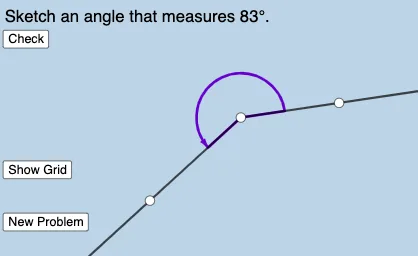
This example demonstrates how to sketch or approximate target angles using geometric estimation. It highlights the idea of constructing angles from given rays and constraints, and then checking/adjusting the result. Key concepts include angles (Angle) and rays (Ray), as well as the geometry–trigonometry connection that motivates estimating angle measures and enforcing angle relationships. Construction details: GeoGebra’s Ray is used to build the underlying rays; Angle defines and displays angles such as α, β, and γ; Sequence organizes ordered steps or generated values to support iterative estimation; RandomElement introduces variability for trying different starting configurations; and If controls the construction logic based on conditions to switch or refine outcomes. Visible objects include A, B, f, C, g, α/β/γ, interactive buttons (button1–button3), and parameters like a, b, and l1, enabling learners to observe how estimation changes the resulting angle sketches. Suitable for middle/high school geometry practice, interactive demonstrations, and trigonometry-related explorations.
GeoGebra Commands & Parameters
Ray(A, B) → fRay(A, C) → gAngle(B, A, C) → αSequence(i°, i, 1, 359, 1) → l1RandomElement(l1) → βIf(round(γ, 0) ≟ 0°, "Spot on!!! ", 0° < γ ≤ 5°, "Great estimate! ", 6° < γ ≤ 10°, "Not bad! ", "Not quite. ") → text2
AI Drawing Prompt Reference
Draw an angle estimation diagram with two rays f and g starting from point A, and the angle α formed by these two rays. Use a slider from 1° to 359° to generate a series of angles, and randomly select one of them as the target angle β. Display evaluation information such as 'Spot on!!!', 'Great estimate!', etc., based on the difference between β and the actual angle α.
The prompt above was compiled from the original drawing commands and is for reference only.