
Affine Transformation
Loading the math board and drawing, please wait…
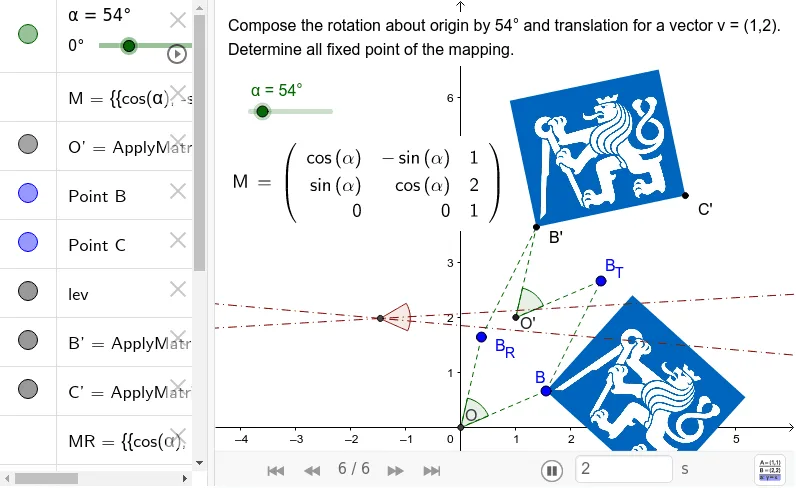
This example demonstrates the basic principles of affine transformation. It involves concepts of vectors and matrices, and uses matrix transformations to perform operations like translation and rotation. The commands used include ApplyMatrix, Angle, Segment, etc. It is suitable for high school mathematics education and learning affine transformations.
GeoGebra Commands & Parameters
LaTeX(M, false, true) → text2ApplyMatrix(M, (0, 0)) → O'ApplyMatrix(M, B) → B'ApplyMatrix(M, C) → C'ApplyMatrix(MR, B) → B_RAngle(B, O, B_R) → βSegment(B, O) → aSegment(B_R, O) → bSegment(B_R, B') → cApplyMatrix(MT, B) → B_TSegment(B, B_T) → dSegment(B_T, O') → eSegment(O', B') → fAngle(B_T, O', B') → γLineBisector(B, B') → gLineBisector(C, C') → hIntersect(g, h) → AAngle(B, A, B') → δ
AI Drawing Prompt Reference
Draw a diagram illustrating affine transformation. Start with a coordinate system and a point. Apply a matrix transformation to the origin and the point, marking their images. Also show a rotated version of the point and a translated version. Connect the original point to the origin and to its rotated image, forming an angle. Connect the translated point to the transformed origin and the transformed point, forming another angle. Construct perpendicular bisectors of the segments between the original and transformed points; their intersection is the center of rotation. Finally, draw segments from this center to the original and transformed points, and label the rotation angle. Include vectors and matrix-related visual cues for educational clarity.
The prompt above was compiled from the original drawing commands and is for reference only.