
4Q Quiz: Transforming Graphs of Quadratic Functions (1)
Loading the math board and drawing, please wait…
In collections
Quadratic Functions Anatomy and Transformations
Transforming Quadratic Function Graphs
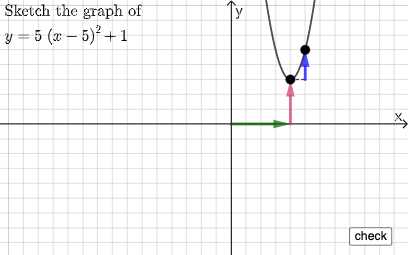
① This interactive quiz demonstrates how the graph of a quadratic function changes under transformations such as translation and scaling, with randomly generated questions for practice. ② Core mathematical concepts include the standard and vertex forms of quadratic functions, horizontal and vertical shifts, vertical and horizontal stretches/compressions, and the effects on the vertex and axis of symmetry. ③ Construction highlights: The GeoGebra commands Sequence, RandomElement, and Random are used to generate random parameters and questions; sliders control transformation parameters; Point, Line, Vector, Polygon, and Segment construct auxiliary shapes (e.g., triangles, quadrilaterals) to visualize transformations; buttons trigger new questions and provide interactive feedback. ④ Suitable for high school students learning transformations of quadratic functions, and useful for classroom demonstrations or self-paced practice to build intuitive understanding of how parameters affect the graph.
GeoGebra Commands & Parameters
Sequence(i, i, 1, 5, 1) → l2Sequence(i, i, -5, -1, 1) → l1Union(l1, l2) → l3Point(Segment[(h + 1, y(C) + 10), (h + 1, y(C) - 10)]) → DLine(A, B) → fVector(A, C) → uPolygon(A, C, B) → t1, b, a_1, cSegment(A, C) → h_{1}Vector(C, D) → vVector((h, 0), A) → wVector((0, 0), (h, 0)) → jRandomElement(l3) → nRandom(-5, 5) → oRandom(-5, 5) → p
AI Drawing Prompt Reference
Draw a quadratic function graph and demonstrate its transformations through translation and scaling. Use randomly generated parameters and sliders to control the transformation parameters. Construct auxiliary shapes like triangles and quadrilaterals to visualize the transformations. First, draw two vertical lines, then randomly select one line as the starting point for transformation, next draw the function graph, construct vectors and segments to represent the transformation, and finally generate new transformation parameters randomly.
The prompt above was compiled from the original drawing commands and is for reference only.