
3D Vectors and Coordinate Geometry Interactive Demo
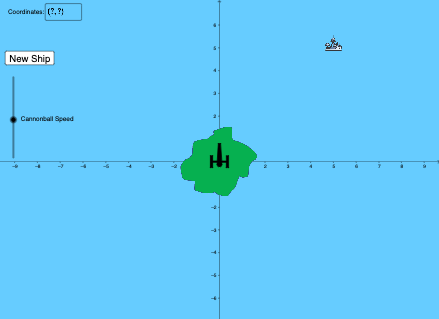
Loading the math board and drawing, please wait…
In collections
Gamified Math Exercises
This example demonstrates 3D vector operations and coordinate geometry problems interactively in space; involves core concepts like 3D vectors, coordinates, point-line-plane relationships, geometric constructions; constructed using GeoGebra commands/objects such as RandomElement, Ray, OrthogonalLine, Circle, Line, Polygon; suitable for high school and above students to understand solid geometry and vector knowledge, or for mathematical teaching demonstrations.
GeoGebra Commands & Parameters
RandomElement(l2) → b, 5RandomElement(l1) → a, 5Textfield(P) → InputBox1Intersect(xAxis, yAxis) → ARay(A, P) → fOrthogonalLine(A, f) → gCircle(A, 0.3) → cIntersect(c, g, 1) → BIntersect(c, g, 2) → CCircle(A, 0.4) → dIntersect(d, g, 1) → DIntersect(d, g, 2) → EOrthogonalLine(E, g) → hOrthogonalLine(C, g) → iOrthogonalLine(D, g) → jOrthogonalLine(B, g) → kIntersect(d, k, 2) → FIntersect(d, i, 2) → GOrthogonalLine(F, k) → mIntersect(d, k, 1) → HOrthogonalLine(H, k) → nIntersect(h, m) → IIntersect(h, n) → JIntersect(j, n) → KCircle(A, 0.1) → eIntersect(e, g, 1) → LIntersect(e, g, 2) → MLine(L, f) → pLine(M, f) → qIntersect(i, n) → OIntersect(j, m) → QCircle(D, 0.03) → rIntersect(d, r, 1) → RMirror(R, g) → R'OrthogonalLine(D, j) → sOrthogonalLine(R', j) → tOrthogonalLine(R, j) → f_1Intersect(t, h) → SIntersect(f_1, h) → UPolygon(R', R, U, S) → q1, r', r_1, u, s_1Polygon(Q, K, H, F) → q2, q_1, k_1, h_1, f_2Polygon(G, O, J, I) → q3, g_1, o, j_1, i_1Circle(A, 0.8) → c_1Intersect(m, p) → WIntersect(m, q) → ZMidpoint(W, L) → A_1Midpoint(Z, M) → B_1Midpoint(A_1, B_1) → C_1Polygon(A_1, L, M, B_1) → q5, a_1, l_2, m_3, b_1Circle(C_1, B_1) → p_1Circle(A, v) → t_1Intersect(t_1, f, 1) → H_1Polygon(R_1, K_1, D_2, V_1, U_1, M_1, N_1, O_1, P_1, F_2, E_2, Q_1, L_1, T_1, S_1, A_2, B_2, W_1, Z_1, C_2) → poly1, l, c_2, d_2, v_1, u_1, k_2, n_2, o_1, p_2, q_2, e_2, g_2, r_2, h_2, i_2, j_2, a_2, b_2, w_1, z_1Midpoint(W_1, Z_1) → G_2Circle(G_2, Z_1) → s_2Defined(P) → wIntersect(c_1, f, 1) → I_2Circle(I_2, 0.05) → t_2Intersect(c_1, t_2, 1) → J_2Intersect(c_1, t_2, 2) → K_2Intersect(p, f_1) → L_2Intersect(q, f_1) → M_2Intersect(q, t) → NIntersect(t, p) → VPolygon(N, J_2, K_2, V) → q4, n_1, l_1, m_1, v_2Polygon(M, K_2, J_2, L) → q6, m_2, d_1, e_1, l_3Distance(A, P) → o_2If(Defined[Distance[A, P]], Distance[A, P], 1) → maxslider
AI Drawing Prompt Reference
Create an interactive 3D demonstration showing vector operations and coordinate geometry. Start from a random point, draw rays intersecting coordinate axes, and construct perpendicular lines, circles, and polygons. Use these geometric objects to illustrate relationships between points, lines, and planes, and display the geometric construction process, suitable for high school and above students to understand solid geometry and vectors.
The prompt above was compiled from the original drawing commands and is for reference only.