
Spider and Fly Mathematical Model
Loading the math board and drawing, please wait…
In collections
geometriadinamica.es
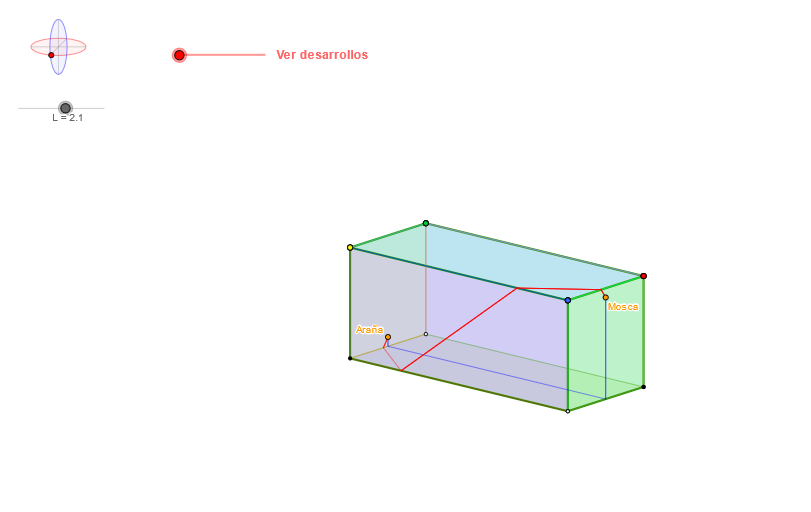
This example dynamically demonstrates the spider catching the fly, showcasing spatial geometry and vector operations. It involves core math concepts like vectors, coordinate geometry, rotation, and integration. GeoGebra commands used include Ellipse, Point, Vector, Rotate, and Integral. Suitable for high school and above to understand spatial geometry and calculus applications.
GeoGebra Commands & Parameters
Ellipse(O_r - (0.95, 0), O_r + (0.95, 0), 1) → mira1Point(mira1) → AEllipse(O_r - (0, 0.95), O_r + (0, 0.95), 1) → mira2Point(mira2) → Bpunto3d(A, B, M, O_0, O_r, -4, 0.12121212121212122, 1, U, L) → Epunto3d(A, B, M, O_0, O_r, -4, 1, 1, U, L) → V5punto3d(A, B, M, O_0, O_r, 1, -1, 1, U, L) → V3punto3d(A, B, M, O_0, O_r, 1, 1, 1, U, L) → V2Segment(V2, V5) → cubA8Segment(V2, V3) → cubA2punto3d(A, B, M, O_0, O_r, -4, 3, -1, U, L) → Ppunto3d(A, B, M, O_0, O_r, 1, 3, -1, U, L) → WLine(W, P) → l1punto3d(A, B, M, O_0, O_r, -4.166666666666667, 4, -1, U, L) → Cpunto3d(A, B, M, O_0, O_r, 1, 0.12121212121212122, -1, U, L) → DLine(D, C) → f1Intersect(f1, l1) → SLine(S, cubA2) → i1punto3d(A, B, M, O_0, O_r, 1, 1, -1, U, L) → V1Segment(V1, V2) → cubA1punto3d(A, B, M, O_0, O_r, -4, 1, -1, U, L) → V6Segment(V1, V6) → cubA5Intersect(cubA5, i1) → TLine(T, cubA1) → j1Intersect(cubA8, j1) → VIntersect(f1, cubA5) → Kpunto3d(A, B, M, O_0, O_r, ((-sqrt(4 - (t - 2)^(2)))) / 12 - 4, (2 * t), (t - 14) / 12 + sqrt(4 - t^(2)) + sqrt((8 * t) - (4 * t^(2))) / 2, U, L) → Jpunto3d(A, B, M, O_0, O_r, 1 + t / 12, 0, sqrt(4 - t^(2)) / 12 - 1, U, L) → R1a'punto3d(A, B, M, O_0, O_r, -4 - (t * 11 / 12), 0, (sqrt(4 - t^(2)) * 11 / 12) - 1, U, L) → R1c'punto3d(A, B, M, O_0, O_r, -4, 0, -1, U, L) → R1bpunto3d(A, B, M, O_0, O_r, 1, 0, -1, U, L) → R1apunto3d(A, B, M, O_0, O_r, 1, 0, -0.8333333333333334, U, L) → ArañaIntersect(mira1, mira2) → Mira1, Mira2, Mira3, Mira4Angle(M, O_r, B) → θAngle(U, O_r, A) → φVector(O_r, O_0) → uTranslate(Xr, u) → X0Translate(Zr, u) → Z0Translate(Yr, u) → Y0Vector(O_0, Z0) → vVector(O_0, Y0) → wVector(O_0, X0) → zCircle(O_0, L) → cLine(O_0, Y0) → aLine(O_0, yAxis) → bLine(O_0, X0) → gLine(Z0, O_0) → jTranslate(P1r, u) → P1Rotate(A, botonpaso, O_r) → botonARotate(B, botonpaso, O_r) → botonBSegment(Mira3, Mira2) → kSegment((-1, 0), U) → lSegment((0, -1), M) → mpunto3d(A, B, M, O_0, O_r, 1, -1, -1, U, L) → V4punto3d(A, B, M, O_0, O_r, -4, -1, 1, U, L) → V7punto3d(A, B, M, O_0, O_r, -4, -1, -1, U, L) → V8Midpoint(V1, V2) → cub1MMidpoint(V3, V2) → cub2MMidpoint(V1, V6) → cub4MMidpoint(V7, V8) → cub5MAngle(V3, cub1M, V4) → cub1AngIf(cub1Ang < 180°, V2, V3) → cubV2bIf(cub1Ang < 180°, V1, V4) → cubV1bPolygon(V3, V4, cubV1b, cubV2b) → cub1, cub1v3, cub1v4, cub1v1, cub1v2Angle(V6, cub1M, V5) → cub3AngIf(cub3Ang < 180°, V2, V5) → cubV2cIf(cub3Ang < 180°, V1, V6) → cubV1cPolygon(V6, V5, cubV2c, cubV1c) → cub3, cub3v6, cub3v5, cub3v2, cub3v1Angle(V5, cub5M, V6) → cub5AngIf(cub5Ang < 180°, V5, V7) → cubV5bIf(cub5Ang < 180°, V6, V8) → cubV6bPolygon(V8, V7, cubV5b, cubV6b) → cub5, cub5v8, cub5v7, cub5v5, cub5v6Angle(V4, cub5M, V3) → cub6AngIf(cub6Ang < 180°, V7, V3) → cubV7bIf(cub6Ang < 180°, V8, V4) → cubV8bPolygon(V4, V3, cubV7b, cubV8b) → cub6, cub6v4, cub6v3, cub6v7, cub6v8Angle(V5, cub2M, V7) → cub2AngIf(cub2Ang < 180°, V3, V7) → cubV3bIf(cub2Ang < 180°, V2, V5) → cubV2dPolygon(V7, V5, cubV2d, cubV3b) → cub2, cub2v7, cub2v5, cub2v2, cub2v3Angle(V4, cub4M, V8) → cub4AngSegment(V2, V1) → cubA1'Segment(V2, V3) → cubA2'Segment(V3, V4) → cubA3'Segment(V4, V1) → cubA4'Segment(V1, V6) → cubA5'Segment(V8, V6) → cubA6'Segment(V4, V8) → cubA7'Segment(V2, V5) → cubA8'Segment(V5, V7) → cubA9'Segment(V3, V7) → cubA10'Segment(V5, V6) → cubA11'Segment(V7, V8) → cubA12'Segment(V3, V4) → cubA3Segment(V4, V1) → cubA4Segment(V6, V8) → cubA6Segment(V8, V4) → cubA7Segment(V5, V7) → cubA9Segment(V7, V3) → cubA10Segment(V6, V5) → cubA11Segment(V7, V8) → cubA12If(cub4Ang < 180°, V1, V4) → cubV1dIf(cub4Ang < 180°, V6, V8) → cubV6cPolygon(V8, V4, cubV1d, cubV6c) → cub4, cub4v8, cub4v4, cub4v1, cub4v6punto3d(A, B, M, O_0, O_r, 1, 1 + t, sqrt(4 - t^(2)) - 1, U, L) → V2bpunto3d(A, B, M, O_0, O_r, 1, -1 - t, sqrt(4 - t^(2)) - 1, U, L) → V3cpunto3d(A, B, M, O_0, O_r, 1 + t, -1, sqrt(4 - t^(2)) - 1, U, L) → V3dpunto3d(A, B, M, O_0, O_r, 1 + t, 1, sqrt(4 - t^(2)) - 1, U, L) → V2dPolygon(V4, V3d, V2d, V1) → poly2, v4, v3d_1, v2d_1, v1Polygon(V1, V4, V8, V6) → poly6, v1_2, v4_2, v8_2, v6_2punto3d(A, B, M, O_0, O_r, 1, (3 * t) - 1, sqrt((8 * t) - (4 * t^(2))) + sqrt(4 - t^(2)) - 1, U, L) → V3fpunto3d(A, B, M, O_0, O_r, 1, (-3 * t) + 1, sqrt((8 * t) - (4 * t^(2))) + sqrt(4 - t^(2)) - 1, U, L) → V2epunto3d(A, B, M, O_0, O_r, -4, -1 - t, sqrt(4 - t^(2)) - 1, U, L) → V7cpunto3d(A, B, M, O_0, O_r, -4, (-3 * t) + 1, sqrt((8 * t) - (4 * t^(2))) + sqrt(4 - t^(2)) - 1, U, L) → V5epunto3d(A, B, M, O_0, O_r, -4, 1 + t, sqrt(4 - t^(2)) - 1, U, L) → V5bpunto3d(A, B, M, O_0, O_r, -4 - t, -1, sqrt(4 - t^(2)) - 1, U, L) → V7apunto3d(A, B, M, O_0, O_r, -4 - t, 1, sqrt(4 - t^(2)) - 1, U, L) → V5apunto3d(A, B, M, O_0, O_r, -4, (3 * t) - 1, sqrt((8 * t) - (4 * t^(2))) + sqrt(4 - t^(2)) - 1, U, L) → V7fpunto3d(A, B, M, O_0, O_r, (-sqrt(4 - (t - 2)^(2))) - 4, 1 + t, t + sqrt(4 - t^(2)) - 3, U, L) → v6gpunto3d(A, B, M, O_0, O_r, (-sqrt(4 - (t - 2)^(2))) - 4, (3 * t) - 1, t + sqrt((8 * t) - (4 * t^(2))) + sqrt(4 - t^(2)) - 3, U, L) → V8gPolygon(V4, V3c, V7c, V8) → poly1, v4_1, v3c, v7c, v8Polygon(V3c, V2e, V5e, V7c) → poly3, v3c_1, v2e, v5e, v7c_1Polygon(V8, V7a, V5a, V6) → poly4, v8_1, v7a, v5a, v6Polygon(V6, V5b, V2b, V1) → poly5, v6_1, v5b, v2b, v1_1Polygon(V5b, V7f, V3f, V2b) → poly7, v5b_1, v7f, v3f, v2b_1Polygon(V5b, v6g, V8g, V7f) → poly8, v5b_2, v6g_1, v8g, v7f_1punto3d(A, B, M, O_0, O_r, -4, 0, 0.8333333333333334, U, L) → MoscaSegment(R1b, Mosca) → r1cSegment(Araña, R1a) → r1aSegment(R1a, R1b) → r1bSegment(R1a', R1a) → r1a'Segment(R1b, R1c') → r1c'Segment(V2, V6) → dSegment(V1, V5) → eMidpoint(d) → FSegment(V2b, V6) → fSegment(V1, V5b) → hMidpoint(f) → ISegment(R1a', D) → iSegment(Araña, D) → sSegment(R1a, R1b) → e1Segment(K, V) → k1Segment(E, Mosca) → d1Line(T, v6_1) → m1Intersect(v5b, v2b_1) → ZIntersect(v5b, v2b_1) → A1Intersect(v5b, v2b_1) → B1Intersect(m1, v5b) → C1Segment(D, K) → nSegment(K, C1) → qSegment(V, E) → b1punto3d(A, B, M, O_0, O_r, -4, 1 + t + (29 * (t - 1) / 33), sqrt(4 - t^(2)) - 1 + (29 * sqrt((2 * t) - t^(2)) / 33), U, L) → GSegment(G, J) → pSegment(C1, G) → rSegment(D, K) → a1
AI Drawing Prompt Reference
In a 3D coordinate space, start by drawing two vertical ellipses with the same center O_r, using axis-offset endpoints to define two control points. Use these points together with the provided parameters to construct several 3D points and connect them with line segments, forming interconnected spatial parts that represent the spider and the fly model. Next, create a couple of guiding lines from selected points, find their intersection points, and use those intersections as endpoints to assemble additional segments that link the components. Add two angle measurements with O_r as the vertex: one between M and B, and one between U and A. Finally, compute direction vectors from translated reference points and apply corresponding translations to place other key points in the correct spatial relation, illustrating the catching/approach geometry.
The prompt above was compiled from the original drawing commands and is for reference only.