
有理函数中的空洞(可去间断点)可视化
几何画板及绘图内容加载中,请稍等……
所属专题
Rational Functions
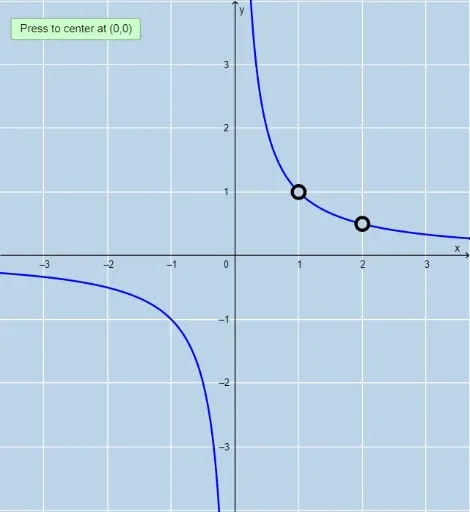
本范例通过GeoGebra动态演示有理函数图像中“空洞”(即可去间断点)的生成与定位。核心数学概念是有理函数的因式分解、公因式约分以及函数在特定点处无定义但极限存在的现象。作图要点包括:使用Root和Intersection命令计算分子分母的根,通过Sequence和Length筛选公共根,利用Limit命令验证空洞处的极限值,并用Textfield和InputBox交互输入函数参数,最终以线段和点标记空洞位置。适合高中至大学初年级学习函数连续性、极限和有理函数性质的学生,也可用于教师课堂演示,帮助直观理解“空洞”与垂直渐近线的区别。
GeoGebra 命令及参数
Root(Denominator[r]) → A, B, CIntersection(rootsd, rootsm) → commonrootsLength(commonroots) → numberofholesSequence(x = x(Element[commonroots, i]), i, 1, numberofholes, 1) → linesSequence(x(Element[commonroots, i]), i, 1, numberofholes, 1) → xvalsSequence((Element[xvals, i], r(Element[xvals, i])), i, 1, numberofholes, 1) → holesSequence(Limit[r, Element[xvals, i]], i, 1, numberofholes, 1) → list1Sequence((Element[xvals, i], Element[list1, i]), i, 1, numberofholes, 1) → list2Limit(r, Infinity) → aLimit(r, -Infinity) → bTextfield(n) → InputBox1Textfield(d) → InputBox2PartialFractions(r) → pSequence((Element[xvals, i], Element[list1, i]), i, 1, numberofholes, 1) → l1