
Yatko Conjecture E: Interactive Exploration of Quadrilaterals and Geometric Tran
Loading the math board and drawing, please wait…
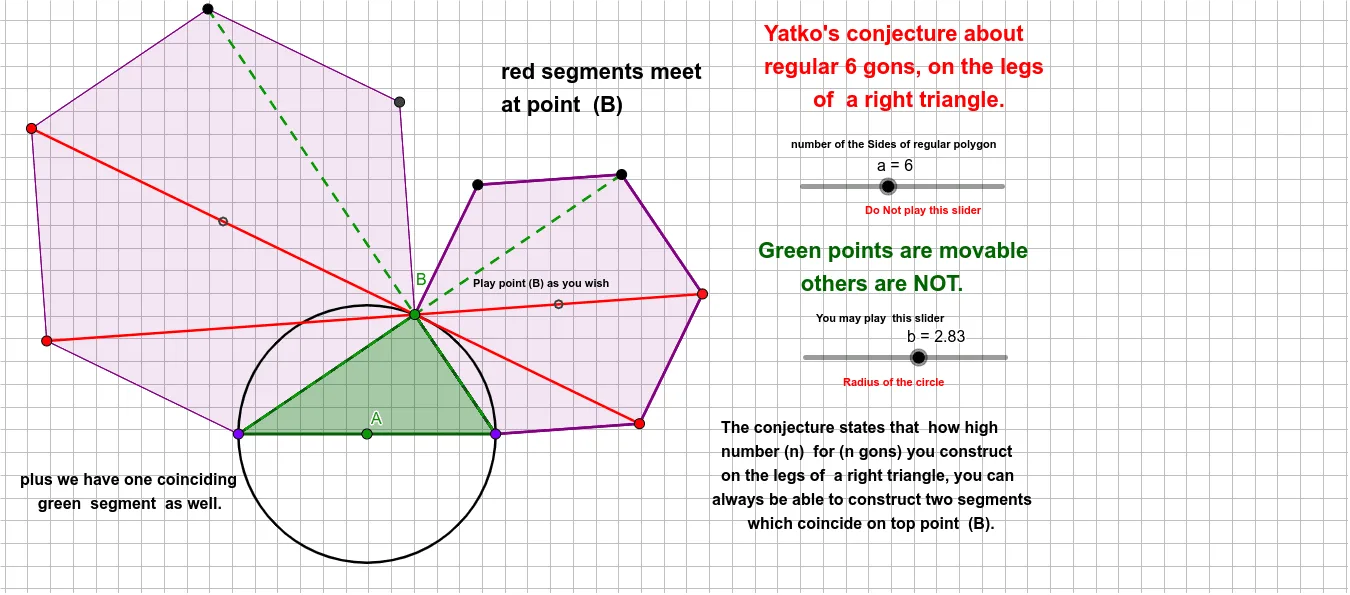
This GeoGebra example demonstrates a geometric construction named 'Yatko Conjecture E', involving a general quadrilateral with associated points, segments, polygons, and circles, allowing dynamic interaction to explore geometric properties and conjectures. Core mathematical concepts include general quadrilaterals, polygons, circles, centroid, geometric transformations such as rotation, complex numbers, power functions, and upper/lower sums (Riemann sums), integrating multiple areas of mathematics. Construction details: using GeoGebra commands Circle, Point, Segment, Polygon, PointIn, and Centroid, with objects including points A, B, C, D, E, F, G, H, I, J, Q, R; segments a, b, c, d, e, f, g, h, i, j, k, l, m, n, p, q, r, s, t; polygons poly1 and poly2; auxiliary lines l_1, m_1; and functions f_1, g_1, h_1, n_1, p_1. Suitable for high school and above students or math enthusiasts, this example is ideal for investigating geometric conjectures, verifying properties, and understanding connections between geometry, algebra, and transformations. It can also serve as a teacher demonstration or student self-exploration material.
GeoGebra Commands & Parameters
Circle(A, b) → cPoint(c) → BPoint(c) → CPoint(c) → DSegment(C, D) → fSegment(B, C) → gSegment(B, D) → hPolygon(C, B, a) → poly1, i, m_1, E, F, G, H, I, J, Q, R, j, k, l, m, n, p, q, l_1Polygon(B, D, a) → poly2, r, p_1, K, L, M, N, O, P, S, T, s, t, d, e, f_1, g_1, h_1, n_1Segment(J, M) → k_1Segment(R, N) → q_1Polygon(C, B, D) → t1, d_1, c_1, b_1PointIn(t1) → Pointt1Centroid(poly1) → F_1Centroid(poly2) → G_1PointIn(poly1) → Pointpoly1_{1}PointIn(poly2) → Pointpoly2_{1}PointIn(poly1) → Pointpoly1PointIn(poly2) → Pointpoly2Segment(L, I) → i_1Segment(H, L) → j_1Segment(G, K) → r_1Segment(F, D) → s_1Segment(M, C) → t_1
AI Drawing Prompt Reference
Draw an interactive-style geometric construction centered on a general quadrilateral: start by choosing a point A and draw the circle with center A and radius b. Mark multiple points on this circle and label them B, C, and D, so that segments CD, BC, and BD form key sides. Construct two related polygons, poly1 and poly2, by using the appropriate vertices among C, B, D and additional marked points on the circle so both shapes share the same overall framework. Inside each polygon, place corresponding test points, then mark the centroids F_1 for poly1 and G_1 for poly2. Finally, add several segments connecting selected internal/key points to compare the two polygon configurations.
The prompt above was compiled from the original drawing commands and is for reference only.