
Wurzeralm Workshop Group Activity: Tessellation
Loading the math board and drawing, please wait…
In collections
From POST-IT to 3D PRINTING: playing with squares and cubes
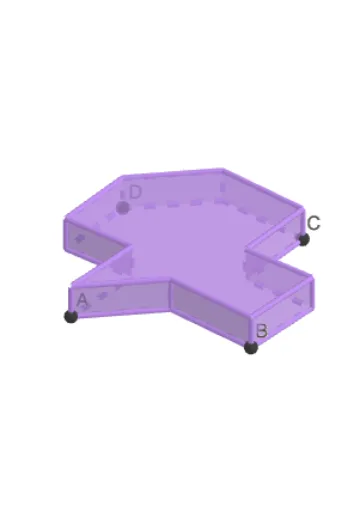
This example demonstrates how to create a tessellation piece suitable for printing. It involves core math concepts like geometric transformations, quadrilaterals, intersections, trigonometric functions, and optimization problems. GeoGebra commands used include Intersect, Point, Polygon, Vector, Translate, and Prism. Ideal for high school mathematics education or geometry clubs.
GeoGebra Commands & Parameters
Intersect(xAxis, yAxis) → APoint(xAxis) → BPolygon(A, B, 4) → poly1, f, g, h, i, C, DPoint(xAxis) → HVector(H, I) → uVector(J, K) → vTranslate(E, u) → E'Translate(F, v) → F'Translate(G, v) → G'Polygon(A, G, F, D, E', C, F', G', B, E) → poly2, a, e, g_1, f_1, d, e', c, f', g', bPrism(poly2, k) → l, V, G_1, faceAGWV, faceFGWZ, face6, face7, face4, face5, face8, face3, face2, W, face1, face9, edgeAV, edgeGW, edgeFZ, edge3, edge5, edge2, edge6, edge7, Z, edge1, edge4, edgeVW, edgeWZ, edge9, edge10, edge11, edge12, edge13, edge14, A_1, edge15, edge8, B_1, C_1, D_1, E_1, F_1
AI Drawing Prompt Reference
Create a tessellation piece by starting with a square on the coordinate axes. Mark two points on the axes as vertices, then construct the square. Translate one point horizontally and two points along another direction to get three new points. Connect these translated points with the original square's vertices in order to form an irregular polygon. Finally, extrude this polygon vertically to create a prism, showing the 3D tessellation effect.
The prompt above was compiled from the original drawing commands and is for reference only.