
Writing Square Root Functions from Graphs: GeoGebra Tutorial
Loading the math board and drawing, please wait…
In collections
Square Root Function Anatomy: Exploration
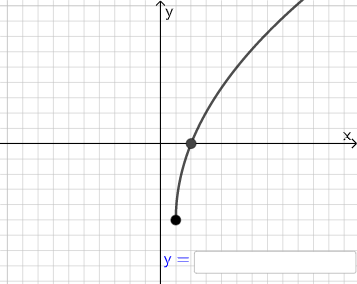
This example demonstrates how to derive the expression of a square root function from its graph. Key mathematical concepts include function graphs, radical operations, and geometric construction. The construction involves using GeoGebra commands such as Point, Line, Vector, and Polygon. Suitable for middle or high school students to understand the relationship between functions and their graphs.
GeoGebra Commands & Parameters
Point(Segment[(h + 1, y(C) + 10), (h + 1, y(C) - 10)]) → DLine(A, B) → fVector(A, C) → uPolygon(A, C, B) → t1, b, a_1, cSegment(A, C) → h_{1}Vector(C, D) → vVector((h, 0), A) → wVector((0, 0), (h, 0)) → jRandomElement({-8, -7, -6, -5, -4, -3, -2, -1, 1, 2, 3, 4, 5, 6, 7, 8}) → nRandom(-8, 8) → oRandom(-8, 8) → pIf(h ≟ o, "Horizontal shift is correct!", "Horizontal shift is not correct.") → text9If(n ≟ rise, "Vertical stretch is correct!", "Vertical stretch is not correct.") → text10If(p ≟ y(A), "Vertical shift is correct!", "Vertical shift is not correct.") → text11Textfield(s) → InputBox1
AI Drawing Prompt Reference
Draw a coordinate plane with a straight line and a vector from the origin. Place two points on the line and connect them with a third point to form a triangle, using one side as the base. Drop a perpendicular segment from a vertex to the base and label it. Extend the base line and place a point, then draw a vector from that point in another direction. Also show a horizontal shift vector along the x-axis. Include three input boxes for horizontal shift, vertical stretch, and vertical shift, each with a text label indicating whether the entered value is correct.
The prompt above was compiled from the original drawing commands and is for reference only.