
Writing Exponential Functions
Loading the math board and drawing, please wait…
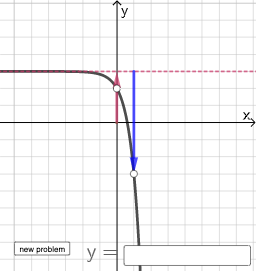
This example helps students understand and write exponential functions through interactive assessment. It covers key math concepts such as the properties and graphs of exponential functions. Using GeoGebra commands like RandomElement, Random, and If, students can dynamically adjust parameters to observe changes in the function's graph. Suitable for high school math education and learning.
GeoGebra Commands & Parameters
RandomElement(l1) → jRandomElement({-6, -5, -4, -3, -2, -1, 0, 1, 2, 3, 4, 5, 6}) → lRandomElement({-6, -5, -4, -3, -2, -1, 0, 1, 2, 3, 4, 5, 6}) → mRandom(0, 1) → isNegIf(isNeg ≟ 0, j^(x - l) + m, (-1 * j^(x - l)) + m) → fTextfield(p) → InputBox1Vector((0, 0), (l, 0)) → vVector(E, E + (0, m)) → wIf(isNeg ≟ 0, Vector[F, F + (0, j)], Vector[F, F - (0, j)]) → u
AI Drawing Prompt Reference
Draw a dynamic exponential function graph. The graph should include a random exponential function with parameters determined by random numbers. There should be an input box to display parameter values. Also include a vector from the origin to the function's starting point. The overall graph should show the dynamic effect of the exponential function as parameters change.
The prompt above was compiled from the original drawing commands and is for reference only.