
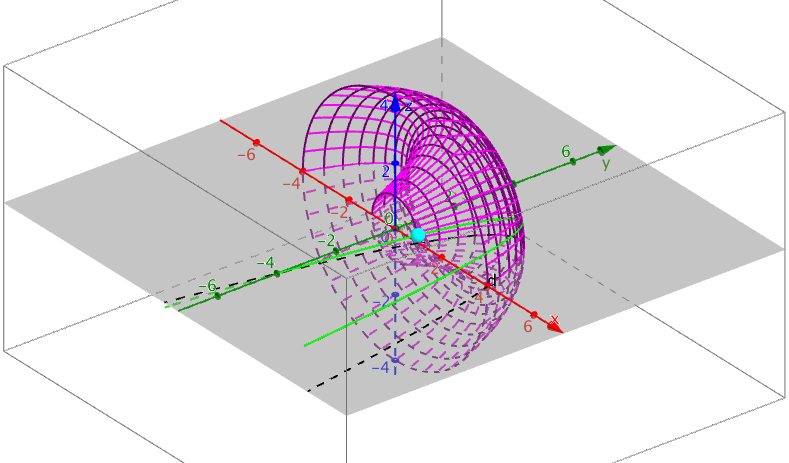
Wireframe of Parabola Rotated Around y-Axis
Loading the math board and drawing, please wait…
In collections
BC Calculus
This example demonstrates the wireframe figure formed by rotating the upper part of the parabola f(x)=-(x-1)(x-4) around the y-axis. It involves key mathematical concepts such as integral calculus, solid geometry, surface area, centroid, limits, and optimization problems. The construction uses GeoGebra commands like Surface, Circle, Point, CurveCartesian, and Sequence. Suitable for high school and above students to learn about rotational solids, integral applications, and 3D shape construction.
GeoGebra Commands & Parameters
Surface((u * cos(v)), f(u), (u * sin(v)), u, 1, 4, v, 0, 6.28319) → aCircle(yAxis, (1, 0, 0)) → cPoint(c) → ACurveCartesian((t * cos(acos(x(A)))), f(t), (t * sin(asin(z(A)))), t, -1, 6) → bCircle(yAxis, (4, 0, 0)) → dSequence(CurveCartesian[(t * cos(a)), f(t), (t * sin(a)), t, 1, 4], a, 0, 6.28319, 0.15707963267948966) → list1Sequence(Circle[yAxis, (t, f(t), 0)], t, 1, 4, 0.2) → list2
AI Drawing Prompt Reference
Draw a wireframe of a paraboloid formed by rotating the upper part of the parabola f(x)=-(x-1)(x-4) around the y-axis. Start by plotting the intersection points of the parabola with the y-axis, then create a series of circles and curves distributed around the y-axis to form a mesh structure, resulting in the wireframe of the rotational paraboloid.
The prompt above was compiled from the original drawing commands and is for reference only.