
Volumes of revolution - vase example
Loading the math board and drawing, please wait…
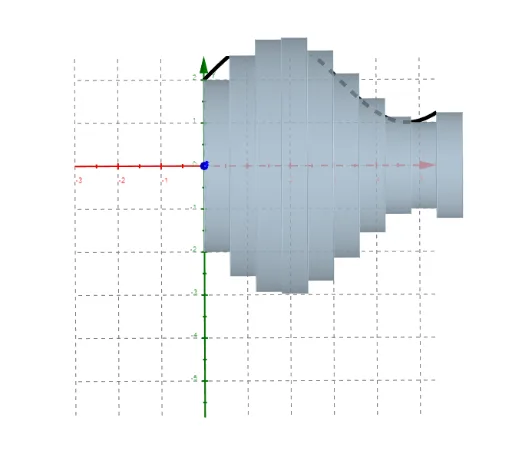
This example demonstrates the generation of a vase-like solid by revolving a curve, focusing on volume calculation of revolution, integral application, and function graphing. Key GeoGebra commands like Div and Sequence are used, along with parameters a, b, r, f for control. Suitable for high school and above students studying calculus, solid geometry, and geometric modeling for intuitive understanding of revolution volumes.
GeoGebra Commands & Parameters
Div(b - a, dx) → nstepsSequence({QuadricSide[Cylinder[(a + (dx * k), 0), (a + (dx * (k + 1)), 0), f(a + (dx * k))]], Top[Cylinder[(a + (dx * k), 0), (a + (dx * (k + 1)), 0), f(a + (dx * k))]], Bottom[Cylinder[(a + (dx * k), 0), (a + (dx * (k + 1)), 0), f(a + (dx * k))]]}, k, a, (b - a) / dx - 1) → cylinders
AI Drawing Prompt Reference
Draw a vase-like solid formed by revolving a curve around the x-axis, demonstrating the volume calculation of the revolution. Approximate the volume by summing the volumes of small cylindrical segments, each with bases and tops intersecting the curve and vertical sides. Use细分 steps to construct the shape for a smoother result, illustrating the application of integration.
The prompt above was compiled from the original drawing commands and is for reference only.