
Volumes of Cylinders
Loading the math board and drawing, please wait…
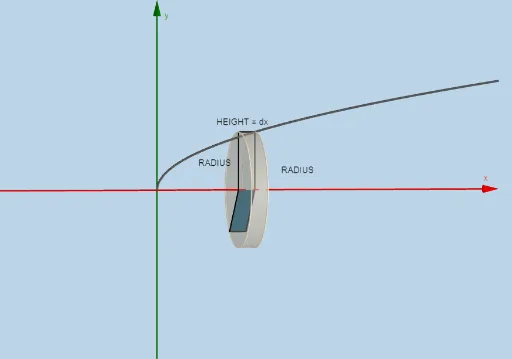
This example demonstrates how to calculate the volume of cylinders using cylinders. Key mathematical concepts include solid geometry and integration. Using GeoGebra commands such as Sequence, Rotate, Intersect, Polygon, Circle, Surface, Cylinder, etc., one can construct cylinders and calculate their volumes. Suitable for high school and above students to learn the application of solid geometry and integration.
GeoGebra Commands & Parameters
Sequence(Polygon[(a + (i * deltax), 0), (a + ((i + 1) * deltax), 0), (a + ((i + 1) * deltax), f(a + ((i + 1) * deltax))), (a + (i * deltax), f(a + ((i + 1) * deltax)))], i, 0, n - 1, 1) → list1, {5.656854249492381, 8, 9.797958971132712, 11.31370849898476, 12.649110640673516, 13.856406460551028, 14.966629547095764, 16}Rotate(list1, α, y = 0) → list1'Intersect(i, l) → BIntersect(k, l) → CIntersect(j, k) → DPolygon(C, B, A, D) → poly1, c_2, b_1, a_1, dRotate(C, α, y = 0) → C'Rotate(B, α, y = 0) → B'Rotate(A, α, y = 0) → A'Rotate(D, α, y = 0) → D'Polygon(C', B', A', D') → poly1', c', b', a', d'Sequence((a + (i * deltax), 0), i, 0, n, 1) → list2, {(0, 0), (2, 0), (4, 0), (6, 0), (8, 0), (10, 0), (12, 0), (14, 0), (16, 0)}Sequence((a + (i * deltax), f(a + (i * deltax))), i, 1, n, 1) → list3, {(2, 2.8284271247461903), (4, 4), (6, 4.898979485566356), (8, 5.656854249492381), (10, 6.324555320336759), (12, 6.928203230275509), (14, 7.483314773547883), (16, 8)}Rotate(list3, α, y = 0) → list3'Sequence((a + (i * deltax), f(a + ((i + 1) * deltax))), i, 0, n - 1, 1) → list4, {(0, 2.8284271247461903), (2, 4), (4, 4.898979485566356), (6, 5.656854249492381), (8, 6.324555320336759), (10, 6.928203230275509), (12, 7.483314773547883), (14, 8)}Sequence(x = a + (i * deltax), i, 1, n, 1) → list6, {x = 2, x = 4, x = 6, x = 8, x = 10, x = 12, x = 14, x = 16}Sequence(Segment[Element[list3, i], Element[list4, i]], i, 0, n, 1) → list5, {NaN, 2, 2, 2, 2, 2, 2, 2, 2}Sequence(CircleSector[Element[list2, i + 1], Element[list3', i], Element[list3, i], xOyPlane], i, 1, n, 1) → list7, {9.564404300928928, 19.128808601857852, 28.693212902786772, 38.25761720371571, 47.82202150464464, 57.386425805573545, 66.95083010650248, 76.51523440743141}Sequence(Cylinder[Element[list2, i], Element[list2, i + 1], f(Element[list2, i + 1])], i, 1, n, 1) → list8, {50.265482457436704, 100.53096491487338, 150.79644737231004, 201.06192982974682, 251.3274122871835, 301.5928947446201, 351.85837720205683, 402.1238596594935}Sequence(Circle[Element[list2, i], f(Element[list2, i]), x = 0], i, 2, n + 1, 1) → list10, {X = (2, 0, 0) + (0, -2.8284271247461903 cos(t), 2.8284271247461903 sin(t)), X = (4, 0, 0) + (0, -4 cos(t), 4 sin(t)), X = (6, 0, 0) + (0, -4.898979485566356 cos(t), 4.898979485566356 sin(t)), X = (8, 0, 0) + (0, -5.656854249492381 cos(t), 5.656854249492381 sin(t)), X = (10, 0, 0) + (0, -6.324555320336759 cos(t), 6.324555320336759 sin(t)), X = (12, 0, 0) + (0, -6.928203230275509 cos(t), 6.928203230275509 sin(t)), X = (14, 0, 0) + (0, -7.483314773547883 cos(t), 7.483314773547883 sin(t)), X = (16, 0, 0) + (0, -8 cos(t), 8 sin(t))}Circle((a, 0), f(a + deltax), x = 0) → pSurface(q, α, xAxis) → eCylinder((x(A), 0), (x(A) - deltax, 0), y(A)) → o, r, s, tDilate(E, If[0 < u ≤ 1, 1 - u, 0], D) → E'Dilate(F, If[0 < u ≤ 1, 1 - u, 0], A) → F'Segment(E, E') → f_1Segment(F, F') → g_1Dilate(D, If[1 < u ≤ 2, 2 - u, 0], A) → D'_1Segment(D, D'_1) → h_1Rotate(F, α, y = 0) → F'_1Rotate(F', α, y = 0) → F''Segment(F'_1, F'') → i_1Rotate(E, α, y = 0) → E'_1Rotate(E', α, y = 0) → E''Segment(E'_1, E'') → j_1Rotate(D, α, y = 0) → D'_2Rotate(D'_1, α, y = 0) → GSegment(D'_2, G) → k_1Textfield(f) → InputBox1Textfield(a) → InputBox2Textfield(b) → InputBox3Integral(f, a, b) → m_1
AI Drawing Prompt Reference
Draw a geometric model of cylinder volumes. First, draw a series of rectangles, then rotate these rectangles around the x-axis to form cylinders. Next, calculate the volume of each cylinder and connect them to form a continuous cylinder model. Finally, use input boxes to set the function f(x), interval [a, b], and rotation angle α to dynamically adjust the shape and volume of the cylinders.
The prompt above was compiled from the original drawing commands and is for reference only.