
Volume of Similar Figures Using Scale Factor
Loading the math board and drawing, please wait…
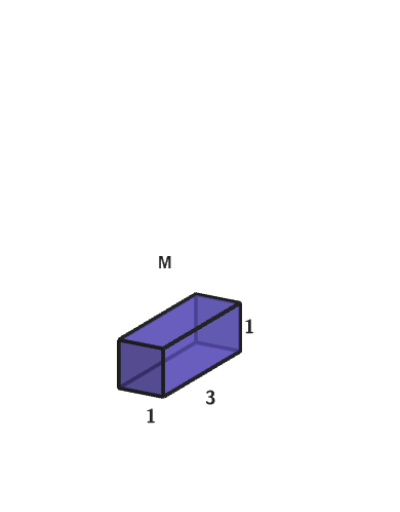
This example demonstrates how to calculate the volume of similar geometric figures using scale factors. Key math concepts include the effect of scale factors on areas and volumes, and using formulas to solve geometric problems. GeoGebra commands and objects like RandomUniform, Take, Textfield, Polygon, Corner, onboardingTextOffset, Prism, Cylinder, Sphere, Bottom, Segment, Rotate, Text, Vertex, CornerThreeD are used to create and manipulate 3D figures. Suitable for students in grades 6-8 learning solid geometry and ratio relationships.
GeoGebra Commands & Parameters
RandomUniform(0, 0.99, 200) → allRandomSeeds, {0.08116044426889117, 0.4420068009316524, 0.07404236170218927, 0.11018375733945836, 0.027525411594362358, 0.6223915632407124, 0.23445015873085462, 0.9656279114327699, 0.9342609564443031, 0.2838819954041128, 0.1046098230142216, 0.7806372037228182, 0.06255139153885808, 0.029787322727217867, 0.8479201436392559, 0.904643207678458, 0.853596651823457, 0.35438927234013173, 0.8094101084647262, 0.7637070362554512, 0.7416980445659366, 0.15692569475798704, 0.41783229427902, 0.559812505742199, 0.526069236998655, 0.548523637232787, 0.34811029417613076, 0.4240625454486669, 0.07495007130971042, 0.40632134441495144, 0.7715997852989912, 0.8631108804292896, 0.25172406259637864, 0.9669376364251394, 0.7982145491097228, 0.7152997174954949, 0.2173003995157553, 0.7953060659974629, 0.15449753984944348, 0.04105003453195066, 0.28601986233392895, 0.29468446105982965, 0.9351848136168872, 0.871065156985348, 0.23377957288431253, 0.01938449642455629, 0.8627134612915716, 0.10585920189127526, 0.5769439693587811, 0.09343446474828734, 0.48946730663886, 0.9510107558504218, 0.5589206998906905, 0.9159969203842401, 0.3413328498966873, 0.414368106104664, 0.798027892202755, 0.7179072785986375, 0.5083549992836843, 0.9541965992120316, 0.37546427880122946, 0.25318149285834257, 0.988936299005399, 0.8209590174504012, 0.8358178560802972, 0.554762064981018, 0.5381155323503689, 0.3400592631836805, 0.07460797115085126, 0.40512770676638915, 0.8979901443766773, 0.568455426357853, 0.15785490419606005, 0.6296876289766825, 0.5193144573663192, 0.06456232407625268, 0.4176057947981297, 0.5341138812975996, 0.2777096358038137, 0.0983140735758751, 0.6747193344407894, 0.0459348034963299, 0.6857630648018685, 0.5766469347892336, 0.16602160966988486, 0.385820137246817, 0.1435742514026892, 0.3389879217525846, 0.13719433905547804, 0.6350334097239426, 0.9250211437206955, 0.35759894115783364, 0.13544131567871018, 0.5525096127952319, 0.7951749769738465, 0.21882702248525157, 0.9771030251807371, 0.8379357589310147, 0.3158836783673352, 0.8234502243901984, 0.09494865805366491, 0.13606995400947447, 0.921573051980605, 0.327384531630099, 0.347874148564052, 0.662328989941375, 0.7757817005572988, 0.8880312660658899, 0.9221693177301546, 0.910407059012082, 0.4008502036987298, 0.10649509984553662, 0.628390745717954, 0.20935840744550777, 0.18852662054222538, 0.3717920833763646, 0.9111878353637181, 0.6001835305331794, 0.20802968667802507, 0.9499927215088932, 0.7011765468612081, 0.25050409331634954, 0.23032804130941276, 0.009008922010596412, 0.12814226051991298, 0.7103938674289051, 0.023048023678093547, 0.11843537962129806, 0.8334749081416608, 0.7128527717235962, 0.8995143421077757, 0.9034935371953523, 0.22680100822034496, 0.13876879824389265, 0.3179571561505939, 0.22270356246469933, 0.7772748725580779, 0.1085074141046684, 0.5328862058092991, 0.5904227084558882, 0.25392673326021026, 0.5005004702321271, 0.11003652425042357, 0.8678398494802498, 0.6518390021906454, 0.18137640989179665, 0.5391323242655115, 0.929404766974049, 0.11173185937496645, 0.8322812730933012, 0.6249949393457311, 0.6759967380210208, 0.5597878345679338, 0.49208484068590025, 0.46723728661832403, 0.7314006114598199, 0.8222305220389783, 0.18014816573655956, 0.6119418944024564, 0.5348600780979922, 0.08529540662597446, 0.5792498829307388, 0.9553111723916817, 0.7196161168065847, 0.8857915103412294, 0.09312452559305229, 0.979307858042084, 0.1554149696010671, 0.060450794976225006, 0.8528624268374496, 0.6727705814085991, 0.1619835368394089, 0.15369701835347135, 0.2821521780291901, 0.03839345581093146, 0.07042164401162734, 0.3233401823227448, 0.553017268536314, 0.3463008362662009, 0.4003485767682859, 0.11201165129047824, 0.7513053229629557, 0.4887271065878773, 0.6624683104816491, 0.30890424384778364, 0.2647340000862408, 0.47752894926791534, 0.058980773536037014, 0.611566769792547, 0.19577897935478872, 0.026910789010532274, 0.9479682006289805, 0.6511253412778848, 0.8871108584298376, 0.3978371116736673, 0.6225240440746735, 0.25636453649308794, 0.5086436277950255, 0.07813360173573461, 0.09096805008641604}Take(allRandomSeeds, randIndex, randIndex + numRandoms - 1) → currentRandomSeedsTextfield(inputB) → InputBoxBPolygon(Zip[PixelsToPoint[Corner[1], Corner[3], Corner[5], A], A, {(pixelsLeft, pixelsTop), (pixelsLeft, y(Corner[5]) - pixelsBottom), Corner[5] - (pixelsRight, pixelsBottom), (x(Corner[5]) - pixelsRight, pixelsTop)}]) → borderBoxCorner(5) → layoutAppSizeonboardingTextOffset(Corner[onboardingText, 1], Corner[onboardingText, 3], onboardingCase, Corner[1], Corner[3], Corner[5]) → OnboardingTextOffsetTextfield(inputA) → InputBoxATextfield(inputC) → InputBoxCPrism(Polygon[(((-randomNum1)) / 2, ((-randomNum2)) / 2), (randomNum1 / 2, ((-randomNum2)) / 2), (randomNum1 / 2, randomNum2 / 2), (((-randomNum1)) / 2, randomNum2 / 2)], randomNum3) → a, A, edge1, edge2, edge3, edge4, edgeAB, edgeBC, edgeCD, edgeAD, B, C, D, face1, face3, face4, face2, faceABCDCylinder(Circle[(0, 0), randomNum1], randomNum2) → b, c, dSphere((0, 0, 2), 2) → eBottom(b) → fSegment(Center[c], Translate[Center[c], Vector[(0, randomNum1, 0)]]) → radCylSegment((randomNum1, 0, 0), (randomNum1, 0, randomNum2)) → heiCylRotate((2, 0, 2), 20°, zAxis) → ESegment((0, 0, 2), E) → radSphPolygon((((-randomNum1)) / 2, ((-randomNum2)) / 2), (randomNum1 / 2, ((-randomNum2)) / 2), (randomNum1 / 2, randomNum2 / 2), (((-randomNum1)) / 2, randomNum2 / 2)) → q1, g, h, i, jText(randomNum1, Midpoint[g] - (0, 0, 0.25), true, true) → text1Text(randomNum2, Midpoint[h] - (0, 0, 0.25), true, true) → text2Text(randomNum3, Midpoint[edge3] + (0, 0, 0.25), true, true) → text3Vertex(q1) → F, G, H, ICornerThreeD(-1, 9) → JText(("r=" * randomNum1), Vertex[radCyl, 2] + (0, 0, 1), true, true) → labelRadCylText(("h=" * randomNum2), Midpoint[heiCyl] + (0, 0.75, 0), true, true) → labelHeiCylText(("r=" * randomNum1), Dilate[E, 1.2, (0, 0, 2)], true, true) → labelRadSphText("M", Element[{(((-randomNum1)) / 2, 0, randomNum3 + 1), ((-randomNum1), 0, randomNum2 + 1), (-4, 2, 3)}, figureNum]) → texto2
AI Drawing Prompt Reference
Create a 3D geometry teaching scene showing the volume of similar figures using scale factors. Place a rectangular prism, a cylinder, and a sphere side by side. Label the prism's length, width, and height; the cylinder's radius and height; and the sphere's radius. All dimensions are random numbers displayed near the objects. Include an input box area for adjusting parameters. The layout is clear, suitable for middle school students to understand how scale factors affect volume.
The prompt above was compiled from the original drawing commands and is for reference only.