
Volume of Pyramid and Cube 1
Loading the math board and drawing, please wait…
In collections
Mathematics Form 2
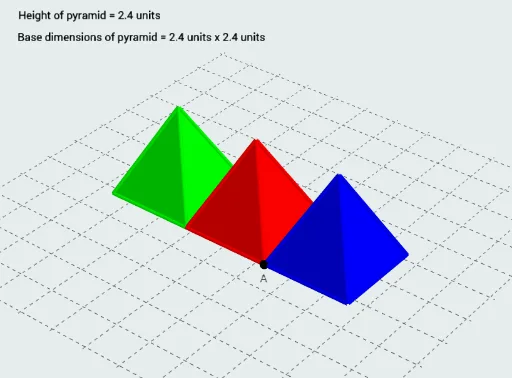
This example demonstrates the calculation and comparison of volumes for pyramids and cubes. It involves core mathematical concepts such as volume formulas, geometric properties, and integral calculus. Construction highlights include using GeoGebra commands like If, Line, Vector, Midpoint, Translate, Rotate, SelectedIndex to build the shapes and compute volumes. Suitable for high school students and math enthusiasts studying solid geometry and calculus.
GeoGebra Commands & Parameters
If(2 < e ≤ 3, e - 2, If[e ≤ 2, 0, 1]) → h_2If(1 < e < 2, e - 1, If[e ≤ 1, 0, 1]) → h_1If(e < 1, e, 1) → h_0Line(A, xAxis) → lVector(A, B) → wLine(D, yAxis) → nMidpoint(B, D) → LVector(L, D) → uTranslate((x(A) - (3 * Bs / 2), y(A) + Bs / 2, z(A) + Bs), Vector[(h_0 * u)]) → H_1Vector(L, A) → vTranslate((x(A) - Bs / 2, y(A) + Bs / 2, z(A) + Bs), Vector[(h_0 * u)]) → H_0Rotate(Translate[Rotate[Pyramid[Polygon[D, C, (x(A) - (2 * Bs), y(A) + Bs), (x(A) - (2 * Bs), y(A))], H_1], ((h_1 * 90))°, l], Vector[(h_1 * w)]], (((-h_2) * 90))°, n) → p_3Translate((x(A) + Bs / 2, y(A) + Bs / 2, z(A) + Bs), Vector[(h_0 * v)]) → H_2Rotate(Pyramid[Polygon[A, B, C, D], H_0], 0°, xAxis) → p_1If(3 < e ≤ 4, e - 3, 0) → h_3Line(A, yAxis) → mRotate(Pyramid[Polygon[A, (x(A) + Bs, y(A)), (x(A) + Bs, y(A) + Bs), B], H_2], (((-h_3) * 90))°, m) → p_2SelectedIndex(Bahasa) → nnIf(nn ≟ 1, "Animation", "Animasi") → Tex1If(nn ≟ 1, "Stop", "Berhenti") → Tex2If(nn ≟ 1, "Height of pyramid = ", "Tinggi piramid = ") → Tex3If(nn ≟ 1, If[Bs ≟ 1, " unit", " units"], " unit") → UTexIf(nn ≟ 1, "Base dimensions of pyramid = ", "Dimensi tapak piramid = ") → Tex4
AI Drawing Prompt Reference
Draw a cube and a pyramid sharing the same base, demonstrating volume calculation and comparison. The pyramid's apex is vertically above the base center. Use distinct colors for each shape and label their volume formulas. Adjust the pyramid's height with a slider while keeping the cube's height fixed. Display volume calculations and geometric properties beside the shapes for educational purposes.
The prompt above was compiled from the original drawing commands and is for reference only.