
Visualizing the Area of a Circle
Loading the math board and drawing, please wait…
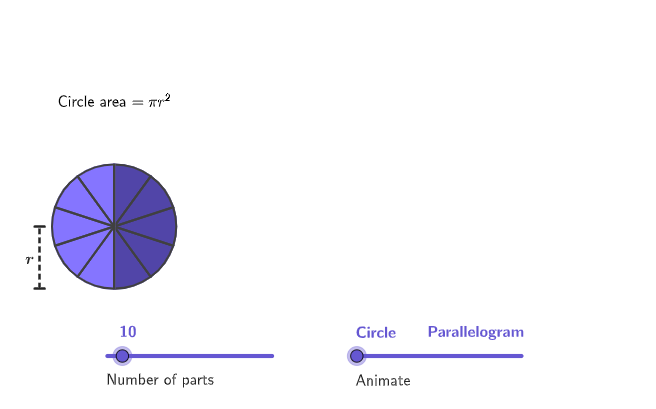
This example visually demonstrates the derivation of the circle area formula by breaking a circle into pieces and rearranging them. It covers core math concepts like circle area, geometric transformations, and limit ideas. Constructed using GeoGebra commands such as Min, Max, Sequence, Rotate, If, Join, Angle, Polygon, Segment, CircleArc, Take, etc., it simulates the transformation of a circle into a shape resembling a parallelogram through controlled sliders for section count and rotation angles. Suitable for 6-8th grade students to understand the geometric origin and meaning of the circle area formula.
GeoGebra Commands & Parameters
Min(moveSlider, 1) → stage1Max(0, (((moveSlider - 1) * 3) * pi / 2)) → stage2Sequence(If[stage1 < 1, Rotate[PStart, (sectorCenterAngle * i), PCenter], (x(PStart) + (baseLength * i), y(PStart))], i, 0, numSections) → movePosStage1Rotate(BreakPoint - (0.5, 0), ((-(pi - theta))) / 2, BreakPoint) → PRotateCenterRotate(BreakPoint, Min[stage2, pi], PRotateCenter) → RotateEnd1If(stage2 ≤ pi, Vector[UnitVector[Vector[BreakPoint - (0.5, 0), RotateEnd1]]], Vector[Rotate[(0, -1), stage2, (0, 0)]]) → rotate2DirectionJoin({Sequence[((A * baseLength), 0), A, 0, numSemiSections], Sequence[RotateEnd1 + ((baseLength * A) * rotate2Direction), A, 0, numSemiSections]}) → movePosStage2If(stage2 ≟ 0, movePosStage1, movePosStage2) → movePosAngle(PStart, PCenter, PEnd) → currentAnglePolygon(Zip[PixelsToPoint[Corner[1], Corner[3], Corner[5], A], A, {(pixelsLeft, pixelsTop), (pixelsLeft, y(Corner[5]) - pixelsBottom), Corner[5] - (pixelsRight, pixelsBottom), (x(Corner[5]) - pixelsRight, pixelsTop)}]) → borderBoxSegment(PStart, PStart + ((2 * pi), 0)) → unrolledCircumferenceSequence(CircleSector[Midpoint[movePos(i), movePos(i + 1)] + (triHeight * UnitOrthogonalVector[Segment[movePos(i), movePos(i + 1)]]), movePos(i), movePos(i + 1)], i, 1, Length[movePos] - 1) → moveSectorsAllCircleArc(PCenter, PStart, PEnd) → circUnravelTake(moveSectorsAll, 1, numSemiSections) → moveSectorsColor1Take(moveSectorsAll, Length[moveSectorsAll] - numSemiSections + 1) → moveSectorsColor2Polygon({movePos(1), movePos(numSemiSections + 1), movePos(numSemiSections + 2), movePos(-1)}) → parallelogramShapeIf(moveSlider < 2, PStart - (1.2, 0), (x(Vertex[parallelogramShape, 4]) - 0.2, 0)) → StartRadiusSegment(StartRadius, StartRadius + (0, 1)) → segRadiusSegment((0, 0), (pi, 0)) → segToPi
AI Drawing Prompt Reference
Please draw a graphic that illustrates the derivation of the circle area formula. The graphic should include a circle, and the process of dividing the circle into multiple sectors and rearranging them into a parallelogram, controlled by a slider. The slider adjusts the number of divisions and rotation angles. The graphic should clearly show how the circle is transformed into a parallelogram, helping to understand the geometric meaning of the circle area formula. Suitable for students in grades 6-8, the graphic should be intuitive and easy to understand.
The prompt above was compiled from the original drawing commands and is for reference only.