
Area-Changing Illusion with Insight: Circles and Triangle Geometry
Loading the math board and drawing, please wait…
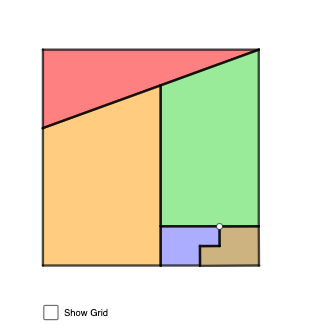
This GeoGebra example demonstrates an “area-changing illusion” by showing how the apparent area behavior of a composed geometric figure shifts as a parameter varies, while still allowing a precise mathematical explanation. It centers on circle-line intersection, perpendicular (orthogonal) constructions, and the way triangle side relationships (via the Pythagorean theorem and trigonometric viewpoints) determine measurable quantities like area. Construction-wise, Polygon is used to build the key faces (triangular/pyramidal components), Line and Segment define structural edges, OrthogonalLine creates right-angle constraints to guide the geometry, Circle provides the curved constraint that generates moving intersection points, and Intersect computes those intersection points automatically as the configuration changes. The model includes many labeled points (e.g., A, B, C, D, E, F, G, H, I, J, K, etc.) and parameter-driven variables (such as t and other scalar parameters) so the figure updates dynamically. Suitable for advanced middle school through early university, it supports lessons on parametric geometry, geometric construction, and using computation to validate visual intuition about area.
GeoGebra Commands & Parameters
Polygon(A, B, D) → t1, d, a, bLine(A, D) → fPolygon(C, E, F, G) → q1, c, e, f_1, gPolygon(H, J, K, I) → q2, h, j, k, iPoint(Circle[L, 2]) → MSegment(L, M) → lOrthogonalLine(L, l) → mCircle(L, 2) → pIntersect(p, m, 2) → NOrthogonalLine(N, m) → nCircle(N, 3) → qIntersect(q, n, 1) → OOrthogonalLine(O, n) → rCircle(O, 1) → sIntersect(s, r) → P, QOrthogonalLine(Q, r) → tOrthogonalLine(M, l) → g_1Intersect(t, g_1) → RPolygon(L, N, O, Q, R, M) → poly1, l_1, n_1, o, q_1, r_1, m_1Point(Circle[S, Segment[L, N]]) → TPolygon(S, T, U, V, W, Z) → poly2, s_1, t_1, u, v, w, z_1Segment(A, D) → h_1Segment(D, B) → i_1Segment(B, A) → j_1Segment(I, K) → k_1Segment(K, J) → p_1Segment(J, H) → a_1Segment(H, I) → b_1Segment(C, G) → c_1Segment(G, F) → d_1Segment(F, E) → e_1Segment(E, C) → f_2Segment(T, U) → g_2Segment(U, V) → h_2Segment(V, W) → i_2Segment(W, Z) → j_2Segment(Z, S) → k_2Segment(S, T) → l_2Segment(O, N) → m_2Segment(N, L) → n_2Segment(L, M) → p_2Segment(M, R) → q_2Segment(R, Q) → r_2Segment(Q, O) → s_2
AI Drawing Prompt Reference
Draw a dynamic geometric figure composed of multiple polygons and circles. Start with a triangle, then add two quadrilaterals at different positions. Create a circle with radius 2 centered at a point, draw a segment from the center, and construct a perpendicular line intersecting the circle at a point. Using that intersection as a new center, draw another circle with radius 3, construct a perpendicular, and find another intersection. Repeat this process to create a chain of perpendicular circles and segments. Finally, connect all key intersection points to form a large irregular polygon, and label all vertices. The overall shape illustrates an area-changing illusion as parameters vary.
The prompt above was compiled from the original drawing commands and is for reference only.