
Visualizing Positive and Negative Regions of a Function
Loading the math board and drawing, please wait…
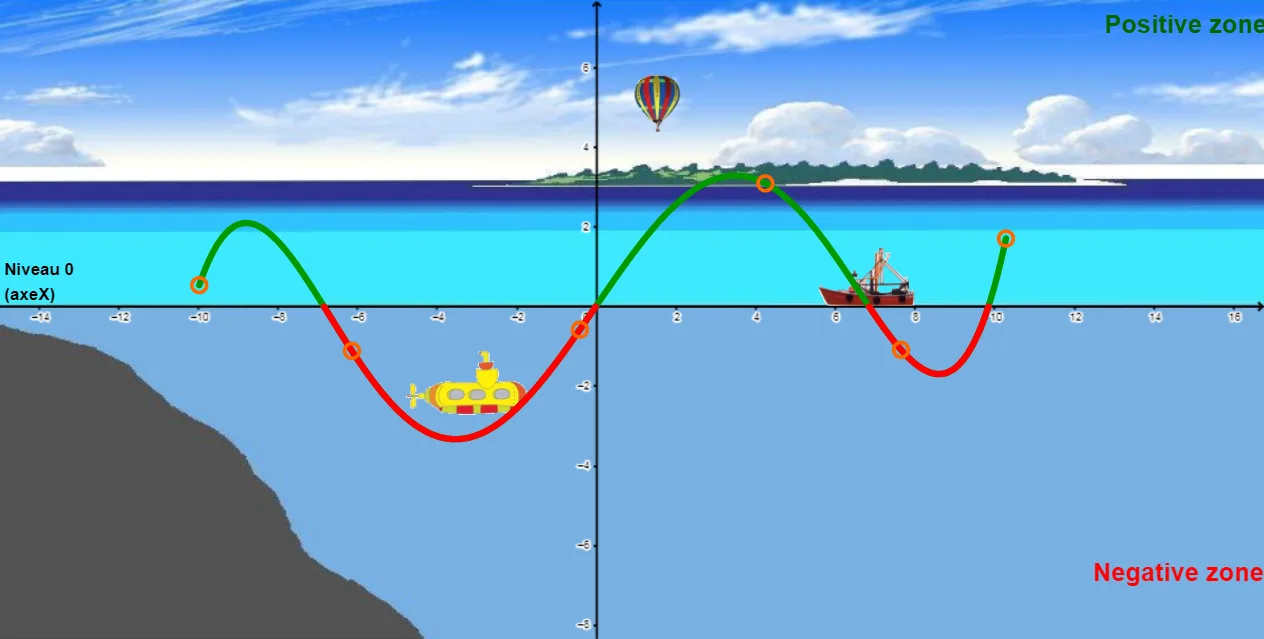
This example visually demonstrates the regions where a function takes positive and negative values across its domain. The core mathematical concepts include sign analysis of functions, zeros and intersection points, combinations of polynomial and trigonometric expressions, and the areas bounded by the function graph and the coordinate axes. The construction uses GeoGebra commands such as Polynomial to generate random polynomials, Random and Intersect to compute x-intercepts, and If conditions combined with Line and Textfield objects to color-code or annotate the positive and negative regions. Sliders or text fields allow dynamic parameter adjustment, updating the graph in real time. This resource is suitable for upper secondary or pre-university students to understand function sign changes, solution sets of inequalities, and the connection between graphical and algebraic representations, and can be used for classroom demonstrations or independent exploration.
GeoGebra Commands & Parameters
Polynomial(l1) → rRandom(-9, -1) → aaIntersect(xAxis, yAxis) → ALine(A, xAxis) → aRandom(2, 6) → bbTextfield(f) → ChampTexte1If(t < 12, ((-t), 0), (-24 + t, 0)) → IIf(t < 12, (((-t)) / 6, 4.5 + t / 40), (-5 + t / 6, 4.5 + t / 40)) → BIf(t < 12, (-2 + t / 2, -3 - t / 20), (4 + (12 - t) / 2, -3 - t / 20)) → C
AI Drawing Prompt Reference
Create a graph that visualizes where a function is positive or negative over its domain. Start by drawing the coordinate axes and plotting a function curve built from a polynomial combined with trigonometric expressions. Determine and mark the x-intercepts of the curve so the plane is split into sign-changing intervals. Then add a pair of horizontal guide lines and boundary segments determined by piecewise parameter conditions, using those conditions to generate several key points and connect them as interval boundaries. Display the function expression with a text field, and color-code or annotate the parts of the graph where the function lies above versus below the x-axis. Include a parameter slider so the curve, intercepts, and labeled regions update in real time.
The prompt above was compiled from the original drawing commands and is for reference only.