
Interactive Mixed Tasks: Exponentials, Trigonometry & Equations
Loading the math board and drawing, please wait…
In collections
Wiederholung: Längen- und Flächenmaße
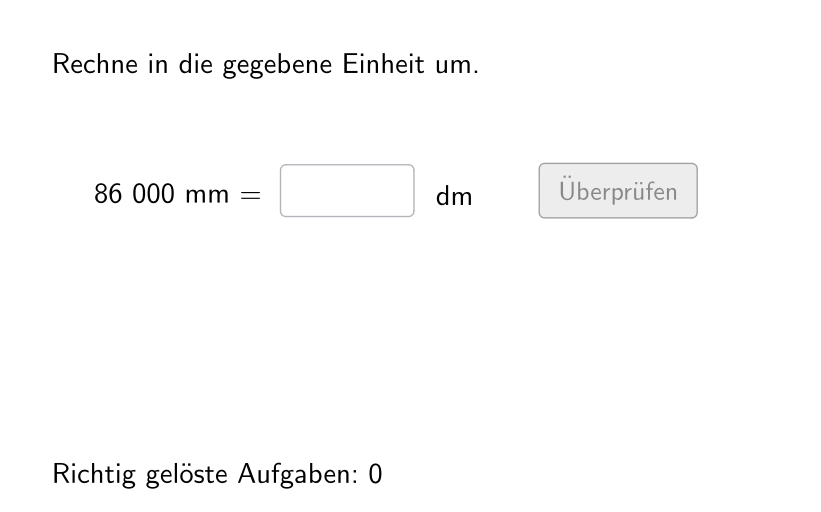
This GeoGebra example demonstrates how to generate a set of “mixed tasks” interactively: the program randomly selects task components, accepts a student’s numeric input, and validates it with feedback. The math focus combines exponential-function curve interpretation (curve discussion), trigonometry-related expressions (to support solving for quantities linked to trig formulas), and algebraic equation solving/verification. Key construction ideas include using Shuffle, Sequence, and Element to randomly draw from predefined task elements; using If and Defined to choose the correct evaluation/answer path under different conditions; using Textfield for student input; and controlling validity such as whether decimal numbers are allowed via allowDecimalNumbers. For interaction, it employs buttons and UI objects like btnValidate, txtHint, attemptCount, correctCount, correct, plus btnNew and btnTryAgain for restarting and retrying. The workflow relies on objects such as inputNumber, randomNumbers/randomNumber, valueRight, and actualAllowedUnits/actualUnitRightFactorInvers to organize parameters and the reference answers. Suitable for upper secondary students and classroom practice for randomized assessments and review.
GeoGebra Commands & Parameters
Shuffle(Sequence[Random[1, 2], i, 1, 100]) → randomLay, {1, 1, 1, 1, 1, 1, 1, 1, 1, 2, 2, 2, 1, 1, 1, 2, 1, 1, 2, 2, 2, 1, 2, 2, 2, 1, 2, 1, 1, 1, 2, 1, 2, 1, 1, 1, 1, 2, 2, 1, 2, 1, 1, 2, 2, 2, 2, 2, 2, 1, 2, 2, 1, 1, 2, 1, 2, 1, 1, 1, 1, 2, 1, 2, 1, 2, 2, 1, 2, 1, 1, 2, 2, 1, 1, 2, 1, 1, 1, 1, 1, 1, 2, 1, 2, 2, 1, 2, 2, 2, 1, 2, 1, 1, 1, 1, 1, 1, 1, 1}Sequence(Random[1, Length[numberMatchingUnits1]], i, 1, 100) → randomUnitsLeft1, {1, 1, 6, 5, 2, 6, 2, 2, 1, 4, 1, 7, 7, 2, 2, 6, 4, 1, 7, 7, 4, 4, 1, 6, 1, 4, 5, 1, 3, 2, 1, 6, 4, 5, 2, 1, 6, 7, 7, 3, 6, 2, 3, 1, 1, 6, 4, 3, 2, 6, 3, 5, 2, 7, 2, 3, 7, 6, 5, 5, 2, 3, 1, 1, 1, 4, 3, 4, 7, 6, 2, 4, 4, 3, 6, 5, 4, 2, 5, 4, 7, 7, 5, 5, 4, 5, 6, 1, 5, 4, 3, 1, 1, 2, 7, 7, 5, 5, 2, 2}Sequence(Random[1, Length[numberMatchingUnits]], i, 1, 100) → randomUnitsLeft, {1, 5, 4, 5, 1, 3, 3, 1, 3, 2, 4, 2, 2, 5, 4, 1, 4, 2, 4, 3, 4, 3, 5, 4, 3, 4, 1, 3, 3, 3, 1, 2, 5, 2, 1, 4, 3, 1, 4, 2, 4, 1, 3, 3, 1, 4, 4, 2, 5, 1, 1, 4, 5, 1, 4, 5, 3, 3, 2, 3, 2, 1, 4, 1, 3, 4, 1, 1, 3, 1, 5, 2, 2, 2, 2, 1, 2, 2, 3, 2, 3, 5, 4, 3, 1, 2, 3, 4, 2, 2, 5, 5, 5, 5, 1, 2, 1, 4, 1, 5}Element(randomLay, Mod[questionCount, 100] + 1) → layElement(randomUnitsLeft1, Mod[questionCount, Length[randomUnitsLeft1]] + 1) → actualUnitLeft1Element(allowedUnits1, actualUnitLeft1) → actualAllowedUnits1Element(actualAllowedUnits1, Random[2, Length[actualAllowedUnits1]]) → actualUnitRightInfo1Element(actualUnitRightInfo1, 2) → actualUnitRightFactor1Element(actualUnitRightInfo1, 1) → actualUnitRight1Element(randomUnitsLeft, Mod[questionCount, Length[randomUnitsLeft]] + 1) → actualUnitLeftElement(allowedUnits, actualUnitLeft) → actualAllowedUnitsElement(actualAllowedUnits, Random[2, Length[actualAllowedUnits]]) → actualUnitRightInfoElement(actualUnitRightInfo, 2) → actualUnitRightFactorElement(actualUnitRightInfo, 1) → actualUnitRightSequence(If[¬allowDecimalNumbers, Random[1, 1000], Random[1, 10000] / Element[{10, 100, 1000}, Random[1, 3]]], i, 1, 100) → randomNumbers1Element(randomNumbers1, Mod[questionCount, Length[randomNumbers1]] + 1) → randomNumber1If(unitLeftSmaller1, round(((randomNumber1 * actualUnitRightFactor1) * 1000)) / 1000, randomNumber1) → valueRight1Sequence(If[¬allowDecimalNumbers, Random[1, 1000], Random[1, 10000] / Element[{10, 100, 1000}, Random[1, 3]]], i, 1, 100) → randomNumbersElement(randomNumbers, Mod[questionCount, Length[randomNumbers]] + 1) → randomNumberIf(unitLeftSmaller, round(((randomNumber * actualUnitRightFactor) * 1000)) / 1000, randomNumber) → valueRightIf(lay ≟ 1, inputNumber ≟ valueRight, inputNumber ≟ valueRight1) → correctTextfield(inputNumber) → inputBox1Defined(inputNumber) → clickableBtnValidateIf(unitLeftSmaller, randomNumber, round(((randomNumber * actualUnitRightFactorInvers) * 1000)) / 1000) → valueLeftIf(unitLeftSmaller1, randomNumber1, round(((randomNumber1 * actualUnitRightFactorInvers1) * 1000)) / 1000) → valueLeft1
AI Drawing Prompt Reference
Describe an interactive math practice interface. It includes an input box for student entry, a validation button that provides feedback, and a right-side panel displaying a randomly generated math task combining exponential function curves, trigonometric expressions, and algebraic equations. The task is randomly selected from predefined elements. A counter for attempts and correct answers is at the bottom. The layout is clean with color-coded sections.
The prompt above was compiled from the original drawing commands and is for reference only.