
Converting Percentages to Decimals: Interactive GeoGebra Practice
Loading the math board and drawing, please wait…
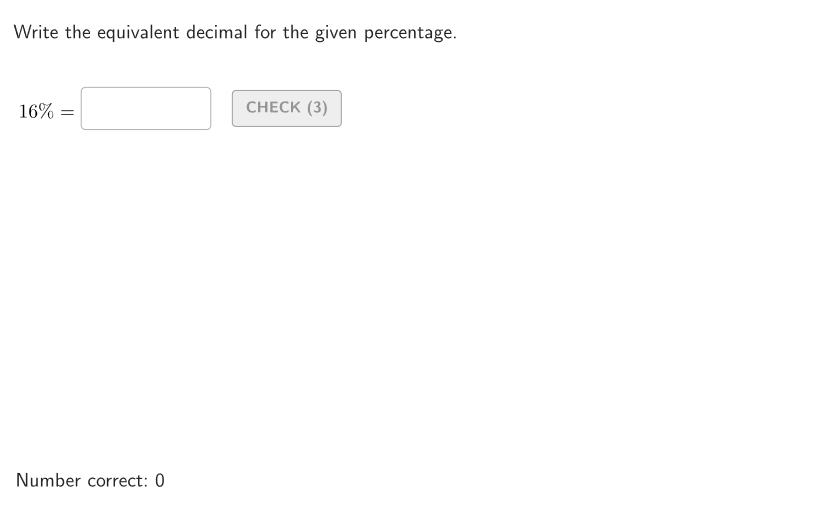
This GeoGebra example demonstrates how to convert a given percentage into its equivalent decimal form, with an interactive answer-checking workflow. The key math concept is the equivalence between percent and decimals (and fractions): p% equals p/100, which directly determines the decimal representation. Construction and interaction use randomly generated percentage values (allPerc, givenPerc) to form questions, a Textfield for the student’s input, and AreEqual to validate whether the entered value matches the expected decimal. The logic is built with tools such as Sequence/Element/Take for generating and selecting values, If for branching between prompts and feedback, and onboardingTextOffset for guided text layout. The app also displays the prompt (givenText) and the solution (textSolution), and uses controls like btnValidate, tries, countCorrect, showanswer, and showsolution to provide immediate feedback. Suitable for Grades 6–8 and for classroom practice focused on relating percents to their decimal (and fraction) equivalents.
GeoGebra Commands & Parameters
Shuffle(Sequence[t, t, 1, 99]) → allPerc, {16, 53, 51, 38, 74, 96, 75, 3, 90, 32, 79, 43, 46, 30, 40, 6, 55, 7, 14, 42, 1, 28, 77, 57, 70, 9, 80, 71, 19, 98, 83, 21, 86, 33, 13, 78, 85, 27, 26, 48, 41, 50, 65, 68, 45, 18, 91, 17, 52, 22, 62, 35, 60, 54, 15, 61, 63, 87, 95, 58, 76, 44, 8, 11, 4, 47, 36, 97, 20, 69, 39, 64, 66, 31, 93, 37, 29, 84, 82, 89, 67, 88, 72, 2, 81, 34, 73, 5, 99, 25, 56, 94, 24, 92, 23, 49, 59, 10, 12}Element(allPerc, Mod[countQuestion, Length[allPerc]] + 1) → givenPercSequence(Random[0, 99] / 100, A, 1, 200) → allRandomSeeds, {0.14, 0.44, 0.34, 0.49, 0.11, 0.13, 0.31, 0.6, 0.91, 0.14, 0.25, 0.21, 0.83, 0, 0.32, 0.58, 0.68, 0.24, 0.46, 0.74, 0.19, 0.17, 0.34, 0.46, 0.69, 0.06, 0.06, 0.63, 0.63, 0.55, 0.39, 0.05, 0.44, 0.52, 0.95, 0.07, 0.6, 0.63, 0.57, 0.51, 0.06, 0.06, 0.45, 0.87, 0.18, 0.66, 0.67, 0.62, 0.47, 0.2, 0.75, 0.18, 0.52, 0.29, 0.24, 0.79, 0.82, 0.09, 0.14, 0.51, 0.74, 0.84, 0.5, 0.8, 0.1, 0.5, 0.96, 0.58, 0.09, 0.01, 0.08, 0.79, 0.05, 0.34, 0.62, 0.96, 0.42, 0.16, 0.41, 0.51, 0.6, 0.84, 0.43, 0.3, 0.38, 0.38, 0.01, 0.87, 0.92, 0.46, 0.65, 0.11, 0.8, 0.4, 0.98, 0.91, 0.55, 0.46, 0.35, 0.08, 0.78, 0.83, 0.76, 0.75, 0.96, 0.96, 0.49, 0.97, 0.34, 0.99, 0.72, 0.53, 0.3, 0.28, 0.05, 0.34, 0.03, 0.5, 0.22, 0.37, 0.81, 0.7, 0.81, 0, 0.45, 0.32, 0.38, 0.02, 0.59, 0.07, 0.89, 0.43, 0.75, 0.46, 0.38, 0.55, 0.68, 0.68, 0.53, 0.2, 0.2, 0.24, 0.81, 0.89, 0.78, 0.52, 0.17, 0.86, 0.21, 0, 0.29, 0.53, 0.96, 0.84, 0.83, 0.86, 0.12, 0.51, 0.93, 0.28, 0.58, 0.86, 0.45, 0.29, 0.44, 0.88, 0.04, 0.4, 0.68, 0.92, 0.07, 0.33, 0.54, 0.22, 0.92, 0.78, 0.62, 0.11, 0.68, 0.1, 0.33, 0.85, 0.19, 0.16, 0.62, 0.22, 0.74, 0.85, 0.86, 0.32, 0.21, 0.13, 0.17, 0.3, 0.96, 0.24, 0.96, 0.59, 0.79, 0.06}Take(allRandomSeeds, randIndex, randIndex + numRandoms - 1) → currentRandomSeedsTextfield(inputB) → InputBoxBTextfield(inputA) → InputBoxAAreEqual(InputBoxA, givenVal) → correctValuePolygon(Zip[PixelsToPoint[Corner[1], Corner[3], Corner[5], A], A, {(pixelsLeft, pixelsTop), (pixelsLeft, y(Corner[5]) - pixelsBottom), Corner[5] - (pixelsRight, pixelsBottom), (x(Corner[5]) - pixelsRight, pixelsTop)}]) → borderBoxCorner(5) → layoutAppSizeonboardingTextOffset(Corner[onboardingText, 1], Corner[onboardingText, 3], onboardingCase, Corner[1], Corner[3], Corner[5]) → OnboardingTextOffsetTextfield(inputC) → InputBoxCIf(givenPerc < 10, 70, 75 + 2) → inputPosXSegment(E, F) → segmEFSequence(Segment[(t, y(E) - 0.8), (t, y(E) + 0.8)], t, x(E), x(F), Distance[E, F] / 10) → longTicksSequence(Segment[(t, y(E) - 0.5), (t, y(E) + 0.5)], t, x(E), x(F), Distance[E, F] / 20) → mediumTicksSequence(Segment[(t, y(E) - 0.2), (t, y(E) + 0.2)], t, x(E), x(F), Distance[E, F] / 100) → shortTicksSequence(E + (k / 100 * (F - E)), k, 0, 100) → lineGridPoint(lineGrid) → SPSegment(E, E - (1, 0)) → arrowSxSegment(F, F + (1, 0)) → arrowDxElement(lineGrid, givenPerc + 1) → SOLPSegment(SOLP + (0, 0.25), SOLP + (0, 2)) → solArrow
AI Drawing Prompt Reference
Create an interactive practice screen for converting a given percentage into its decimal form. Include a boxed rectangular background, areas for text prompts and a solution display, and several input fields for the learner’s answer. The main visual is a horizontal number-line style scale: on a single segment, draw evenly spaced tick marks in three sizes (long, medium, short) to represent values from 0 to 100 percent. Place a pointer marker at the position corresponding to the current given percent, and add a vertical indicator arrow at that marker; also add small left/right direction arrows near the scale ends. Build in order: frame and layout texts, then the scale with tick-grid marks, then the percent pointer and its arrow.
The prompt above was compiled from the original drawing commands and is for reference only.