
Quiz on Sine Function Range and Period (Degrees)
Loading the math board and drawing, please wait…
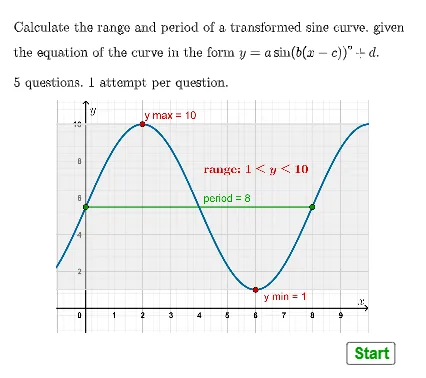
① This interactive GeoGebra quiz demonstrates the range and period of the sine function in degree mode, generating random questions with immediate feedback to test students' grasp of fundamental trigonometric concepts. ② Core mathematical concepts include the domain and range of sine ([-1,1]), its periodicity (360°), and how vertical/horizontal shifts and dilations affect the range and period. ③ Construction highlights: uses Textfield and InputBox for user input, Random and RandomElement to generate random parameters, If and AreEqual for answer validation, and Simplify for expression handling; key objects include stmin, stmax, stperiod storing correct answers, and checkmin, checkmax, checkperiod buttons that trigger conditional feedback, along with score and attempt tracking. ④ Suitable for high school or introductory college trigonometry, this tool serves as a classroom exercise or self-assessment resource to reinforce understanding of sine function properties and improve computational accuracy.
GeoGebra Commands & Parameters
Textfield(stmin) → InputBox1Random(-20, 20) → dDRandomElement(alist) → aARandomElement(bdeglist) → bBRandomElement(c1list) → c1RandomElement(c2list) → c2If(bB ≥ 12, c1, c2) → cCSimplify((bB * (x - cC))) → gIf(aA ≟ 1, sin((g(x))°) + dD, If[aA ≟ -1, (-sin((g(x))°)) + dD, (aA * sin((g(x))°)) + dD]) → fAreEqual(InputBox1, ansmin) → corrminTextfield(stmax) → InputBox2Textfield(stperiod) → InputBox3AreEqual(InputBox2, ansmax) → corrmaxAreEqual(InputBox3, ansperiod) → corrperiod
AI Drawing Prompt Reference
Create an interactive graphing quiz scene for a sine function in degree mode. Generate a sine curve with a controllable vertical shift and amplitude sign/scale, where the amplitude comes from a chosen coefficient (including the possibilities of ±1 or another multiplier) and the vertical offset comes from a random shift value. Use a horizontal shift inside the angle expression so the graph’s period changes, with the period set by the constructed angle factor. Include three input fields where the user can enter the minimum range value, maximum range value, and the period, along with corresponding feedback buttons and score/attempt tracking elements to guide the quiz workflow.
The prompt above was compiled from the original drawing commands and is for reference only.