
Visualizing Parametric Equations
Loading the math board and drawing, please wait…
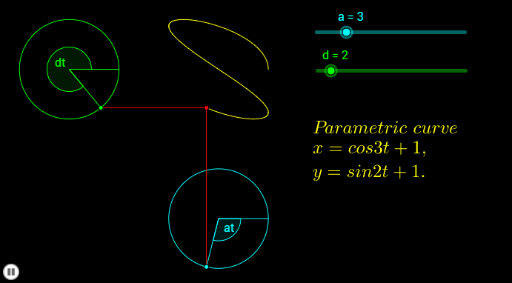
This example dynamically demonstrates how parametric equations generate plane curves. It involves core math concepts like parametric equations, coordinate geometry, trigonometry, and geometric transformations. Key GeoGebra commands and objects used include Circle, Rotate, OrthogonalLine, Intersect, Segment, CurveCartesian, and Angle. Suitable for high school students and math enthusiasts learning the application and visualization of parametric equations.
GeoGebra Commands & Parameters
Circle(A, C) → eCircle(B, D) → fRotate(C, (d * b), A) → C'Rotate(D, ((-a) * b), B) → D'OrthogonalLine(C', yAxis) → gOrthogonalLine(D', xAxis) → hIntersect(h, g) → ESegment(C', E) → iSegment(D', E) → jCurveCartesian(cos((a * t)) + 1, sin((d * t)) + 1, t, 0, b) → cSegment(A, C) → kSegment(B, D) → lSegment(A, C') → mSegment(B, D') → nAngle(C, A, C') → αAngle(D', B, D) → β