
Visualizing Parabola Arc Length with Dynamic Segments
Loading the math board and drawing, please wait…
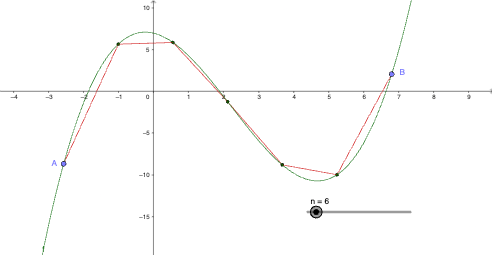
This example demonstrates how to measure and visualize the arc length along a parabola by using a segmented approximation along the curve. It focuses on key ideas of arc-length measurement, curve approximation with a polyline, and working with function graphs—especially quadratic functions—over an interval [a, b]. The construction uses GeoGebra commands Point, Min, Max, Sequence, and PolyLine: f defines the parabola; A and B set the interval endpoints; n controls how many segments are used; a and b are the chosen bounds. Min/Max help determine the correct ordering via minab and maxab. The objects s and l1 represent arc-length-related quantities (such as accumulated segment length or a comparison value), while g is used to display or manage the resulting visualization. Suitable for secondary enrichment and introductory university prep, particularly for building intuition that leads to the calculus arc-length integral.
GeoGebra Commands & Parameters
Point(f) → APoint(f) → BMin(a, b) → minabMax(a, b) → maxabSequence((Min[a, b] + (s * i), f(Min[a, b] + (s * i))), i, 0, n, 1) → l1PolyLine(l1) → g
AI Drawing Prompt Reference
Draw a parabola opening upward in the coordinate system, then select two points on the curve as the left and right endpoints of an interval. Divide this interval into several equal segments, calculate the corresponding coordinates on the parabola at each division point to obtain a sequence of discrete points. Finally, connect these discrete points with a polyline to form an approximation that wraps around the parabola, visualizing and measuring the approximate arc length of the curve within the specified interval.
The prompt above was compiled from the original drawing commands and is for reference only.