
Visualizing the Derivative of f(x)=ln(x) via Tangent Slope
Loading the math board and drawing, please wait…
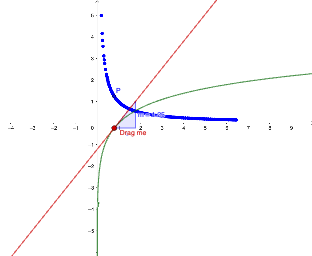
This example demonstrates how to visualize the derivative of f(x)=ln(x) by constructing the tangent line at a chosen point and using its slope as the geometric meaning of the derivative. Key concepts include logarithmic functions, the derivative as the instantaneous rate of change, and the “derivative equals tangent slope” interpretation. In GeoGebra, you define the function f(x) (the graph of ln(x)), pick a point A on the curve, construct the tangent g at A, and then compute the tangent slope m using the Slope command. A related point P is used to mark or display the slope/tangent information clearly, making the relationship between the curve’s local behavior and the derivative visually explicit. Suitable for calculus introduction, learning derivative intuition, and classroom demonstrations for students building graph-based understanding of derivatives.
GeoGebra Commands & Parameters
Point(f) → ATangent(A, f) → gSlope(g) → m
AI Drawing Prompt Reference
Draw the graph of a natural logarithm function, select a point on the curve, construct a tangent line from this point, display the slope of the tangent line to visualize the concept of the derivative, using the geometric meaning of the slope as the derivative, and mark a related point to clearly show the relationship between the derivative and the tangent slope, intuitively demonstrating the connection between the local behavior of the function and its derivative.
The prompt above was compiled from the original drawing commands and is for reference only.