
Visualizing Fraction Addition via LCM/GCD
Loading the math board and drawing, please wait…
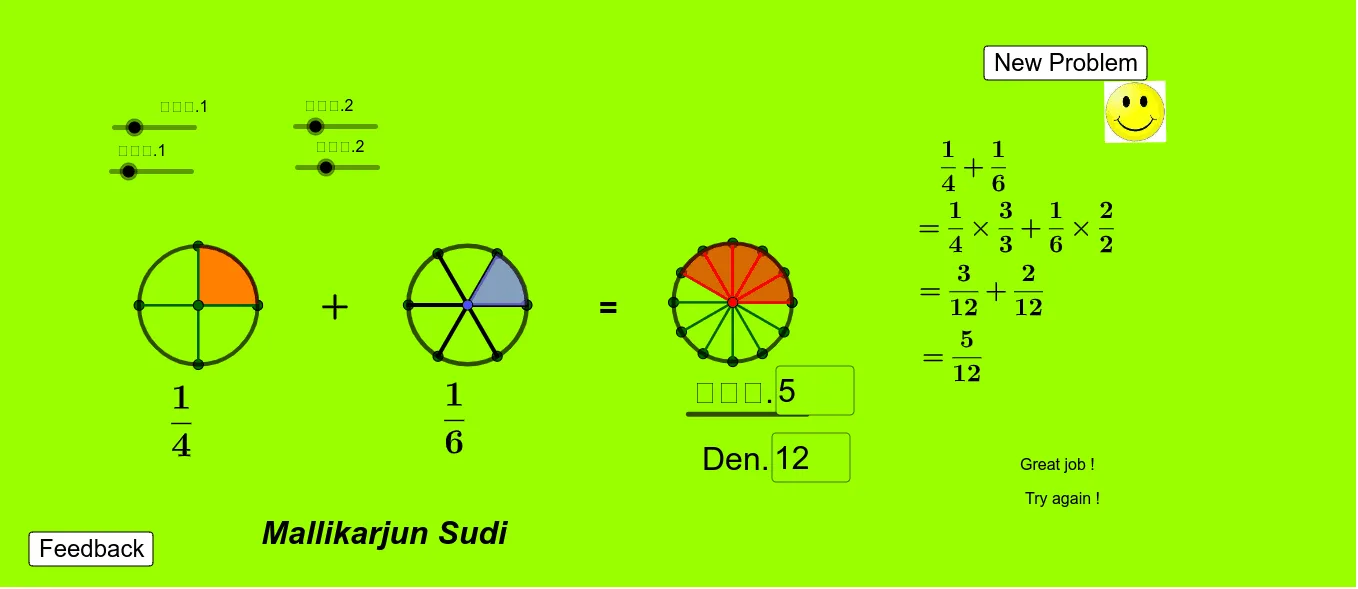
This example demonstrates fraction addition and subtraction by converting terms to a common denominator, making the resulting combined fraction visually clear. It highlights the idea that the same rational value can be represented by different numerator/denominator pairs once you use a shared denominator. Key concepts include fraction arithmetic, finding a common denominator using LCM (least common multiple) and simplifying with GCD (greatest common divisor), and the correspondence between numerical fraction parts and their graphical “parts” (bar/segment-like representations). Construction-wise, the GeoGebra workflow uses commands such as Circle, Sequence, LCM, GCD, Textfield, and Segment; objects like parameters (e.g., n, m, a, b, c, d, e, f, g) and computed values (e.g., L, L1–L6, L8) support the calculation pipeline. Textfield is used to display computed LCM/GCD and outcomes, while Segment and labeled points/annotations depict how each fraction contributes to the final combined amount. Suitable for middle and high school math classes on fractions, common denominators, and ratio interpretation, and also effective for interactive classroom demonstrations and student exploration.
GeoGebra Commands & Parameters
Circle(A, 1) → cSequence(A + ℯ^((((2 * π) * ί) * t)), t, 0, 1, 1 / n) → LSequence(CircleSector[A, Element[L, t], Element[L, t + 1]], t, 1, m) → L1Circle(B, 1) → dSequence(B + ℯ^((((2 * π) * ί) * t)), t, 0, 1, 1 / a) → L3Sequence(Segment[A, A + ℯ^((((2 * π) * ί) * t))], t, 0, 1, 1 / n) → L2Sequence(Segment[B, B + ℯ^((((2 * π) * ί) * t))], t, 0, 1, 1 / a) → L5Sequence(CircleSector[B, Element[L3, t], Element[L3, t + 1]], t, 1, b) → L4LCM(n, a) → eSequence(C + ℯ^((((2 * π) * ί) * t)), t, 0, 1, 1 / f) → L6Sequence(Segment[C, C + ℯ^((((2 * π) * ί) * t))], t, 0, 1, 1 / f) → L8Circle(C, 1) → hSequence(CircleSector[C, Element[L6, t], Element[L6, t + 1]], t, 1, g) → L7GCD(n, a) → kTextfield(g) → InputBox1Textfield(f) → InputBox2Segment(D, E) → f_1
AI Drawing Prompt Reference
This graphic visualizes fraction addition. Circles and line segments represent numerators and denominators of different fractions, combined using a common denominator (LCM) and simplified with GCD. Text boxes display LCM and GCD values. Key objects include circles, line segments, sectors, and text boxes. Their relationship is that fractions are combined via a common denominator and simplified to a simplest form. Construction order: first draw circles and line segments representing fractions, then compute LCM and GCD, and finally display the combined graphic.
The prompt above was compiled from the original drawing commands and is for reference only.