
Comparing Integers on a Number Line (Level 1)
Loading the math board and drawing, please wait…
In collections
Ordnen und Vergleichen von ganzen Zahlen
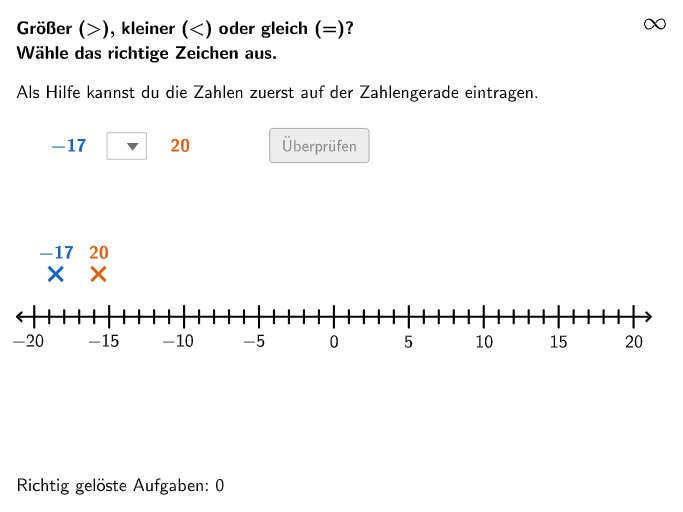
This GeoGebra example lets students compare two integers by locating them on a number line, then choosing/entering an answer and receiving immediate validation feedback. The key mathematical ideas are representing integers, using the number line to compare magnitudes (left is smaller, right is larger), and ordering integers based on their positions; it also supports interpreting integers in real-world contexts. Construction and interaction highlights from the “construct summary”: Sequence is used to generate randomized integer sets (randomNumbers1/2 and randomNum1/2), while If and Element drive the correct answer logic. Point, Segment, and Textfield create the number line elements and instructional/feedback text. RemoveUndefined cleans up objects that should not appear, and Join combines related graphic elements. The interface uses dropDown plus input/inputBox for responses, and validate together with isTypicalError to provide feedback. Objects like zahlenstrahlPunkteAlle, PNum1Start/PNum1, and zahlenstrahlXWert/zahlenstrahlYWert organize the visual placement of the number-line points. Suitable for grades 5–6 as a number-sense exercise on integer comparison and ordering.
GeoGebra Commands & Parameters
Sequence(Random[numMinimum, RandomElement[{0, numMaximum}]], i, 1, 100) → randomNumbers1, {-17, -14, -7, -5, -6, 16, 5, -12, -5, -11, -13, -7, -6, -9, 0, -7, -19, -9, -8, -20, -7, -18, -8, -20, -8, -5, 0, -14, 8, -3, 0, -6, -10, 1, 8, -9, -2, -8, -3, 7, -7, -5, -12, -12, -6, -3, -15, -4, -14, -15, -4, -2, -9, 14, 12, -12, -2, -19, -10, 10, -11, -18, -17, -20, -7, 7, -13, -9, -8, -11, 0, 14, -5, -2, -15, -17, -15, 12, -20, 9, 4, 8, -2, -11, -3, -13, -20, -17, -18, 12, -7, -14, -7, -19, -13, -2, -16, -11, -1, -1}Element(randomNumbers1, Mod[questionCount, Length[randomNumbers1]] + 1) → randomNum1Sequence(Random[numMinimum, RandomElement[{0, numMaximum}]], i, 1, 100) → randomNumbers2, {20, -3, -15, 16, -12, 19, 14, -3, 6, -3, -14, -3, -10, -20, -6, -10, -20, -5, -20, -20, -8, -12, 20, -13, -13, 0, -17, -10, -6, -2, -13, 0, -7, -20, -12, -17, 5, -14, 6, -6, -3, -19, -11, 0, -1, -7, 3, -15, -5, -9, 0, 17, 0, -11, 1, -5, -10, -4, -18, 19, 1, -18, -8, -9, 8, -17, -15, 20, -13, -3, -7, -20, 15, -2, -20, 7, -9, -4, -12, -6, -9, 6, 12, -16, -9, 15, -9, -10, -17, 14, -7, -5, 12, -18, -6, -13, -5, -3, -13, -5}Element(randomNumbers2, Mod[questionCount, Length[randomNumbers2]] + 1) → randomNum2If(randomNum1 > randomNum2, 2, If[randomNum1 < randomNum2, 3, If[randomNum1 ≟ randomNum2, 4, 1]]) → solutionSequence((zahlenstrahlXWert + (zahlenstrahlEinheit * i), zahlenstrahlYWert), i, 0, numDif, 1) → zahlenstrahlPunkteAllePoint(Join[{{PNum1Start}, zahlenstrahlPunkteAlle}]) → PNum1Textfield(input) → inputBoxSegment(zahlenstrahlStart - (zahlenstrahlUeberstand, 0), zahlenstrahlEnde + (zahlenstrahlUeberstand, 0)) → zahlenstrahlSequence(numMinimum + i, i, 0, numDif, 1) → zahlenstrahlWerte, {-20, -19, -18, -17, -16, -15, -14, -13, -12, -11, -10, -9, -8, -7, -6, -5, -4, -3, -2, -1, 0, 1, 2, 3, 4, 5, 6, 7, 8, 9, 10, 11, 12, 13, 14, 15, 16, 17, 18, 19, 20}RemoveUndefined(Sequence[If[Mod[zahlenstrahlWerte(i + 1), 10] ≟ 0 ∨ Mod[zahlenstrahlWerte(i + 1), 5] ≟ 0, (zahlenstrahlXWert + (zahlenstrahlEinheit * i), zahlenstrahlYWert)], i, 0, numDif]) → zahlenstrahlPunkte10erJoin({Sequence[Segment[zahlenstrahlPunkte10er(i) + (0, zahlenstrahlLinienLaenge + 0.1), zahlenstrahlPunkte10er(i) - (0, zahlenstrahlLinienLaenge + 0.1)], i, 1, Length[zahlenstrahlPunkte10er], 1], Sequence[Segment[zahlenstrahlPunkteNicht10er(i) + (0, zahlenstrahlLinienLaenge), zahlenstrahlPunkteNicht10er(i) - (0, zahlenstrahlLinienLaenge)], i, 1, Length[zahlenstrahlPunkteNicht10er], 1]}) → zahlenstrahlLinienPoint(Join[{{PNum2Start}, zahlenstrahlPunkteAlle}]) → PNum2RemoveUndefined(Sequence[If[Mod[zahlenstrahlWerte(i + 1), 10] ≟ 0 ∨ Mod[zahlenstrahlWerte(i + 1), 5] ≟ 0, zahlenstrahlWerte(i + 1)], i, 0, numDif]) → zahlenstrahlWerte10erSequence(Text["\textsf{\(" + (zahlenstrahlWerte10er(i)) + "\)}", zahlenstrahlPunkte10er(i) - (If[zahlenstrahlWerte10er(i) < 0, 0.13, 0], 0.2), true, true, 0, -1], i, 1, Length[zahlenstrahlPunkte10er], 1) → zahlenstrahlBeschriftungSegment(zahlenstrahlStartSolution - (zahlenstrahlUeberstand, 0), zahlenstrahlEndeSolution + (zahlenstrahlUeberstand, 0)) → zahlenstrahlSolutionSequence(Text["\textsf{\(" + (zahlenstrahlWerte10er(i)) + "\)}", zahlenstrahlPunkte10er(i) - (If[zahlenstrahlWerte10er(i) < 0, 0.13, 0], 0.2 - verschubZahlenstrahlSolution), true, true, 0, -1], i, 1, Length[zahlenstrahlPunkte10er], 1) → zahlenstrahlBeschriftungSolutionJoin({Sequence[Segment[zahlenstrahlPunkte10er(i) + (0, zahlenstrahlLinienLaenge + 0.1) + (0, verschubZahlenstrahlSolution), zahlenstrahlPunkte10er(i) - (0, zahlenstrahlLinienLaenge + 0.1) + (0, verschubZahlenstrahlSolution)], i, 1, Length[zahlenstrahlPunkte10er], 1], Sequence[Segment[zahlenstrahlPunkteNicht10er(i) + (0, zahlenstrahlLinienLaenge) + (0, verschubZahlenstrahlSolution), zahlenstrahlPunkteNicht10er(i) - (0, zahlenstrahlLinienLaenge) + (0, verschubZahlenstrahlSolution)], i, 1, Length[zahlenstrahlPunkteNicht10er], 1]}) → zahlenstrahlLinienSolutionSegment((10, zahlenstrahlYWert - 1.4), (14, zahlenstrahlYWert - 1.4)) → groeßerPfeilSegment((5, zahlenstrahlYWert - 1.4), (1, zahlenstrahlYWert - 1.4)) → kleinerPfeil
AI Drawing Prompt Reference
Draw a number line from -20 to 20 with two integer points marked on it, connected by line segments. Above the number line, display text labels showing the values of these two integers. Use arrows to indicate direction: one arrow points to the larger integer with the label "larger", and another to the smaller integer with "smaller". Include an input box for student responses. The overall layout should clearly illustrate integer comparison and ordering.
The prompt above was compiled from the original drawing commands and is for reference only.