
Number Sense Level 2: Compare Integers on a Number Line
Loading the math board and drawing, please wait…
In collections
Ganze Zahlen & Arbeiten mit der Zahlengerade
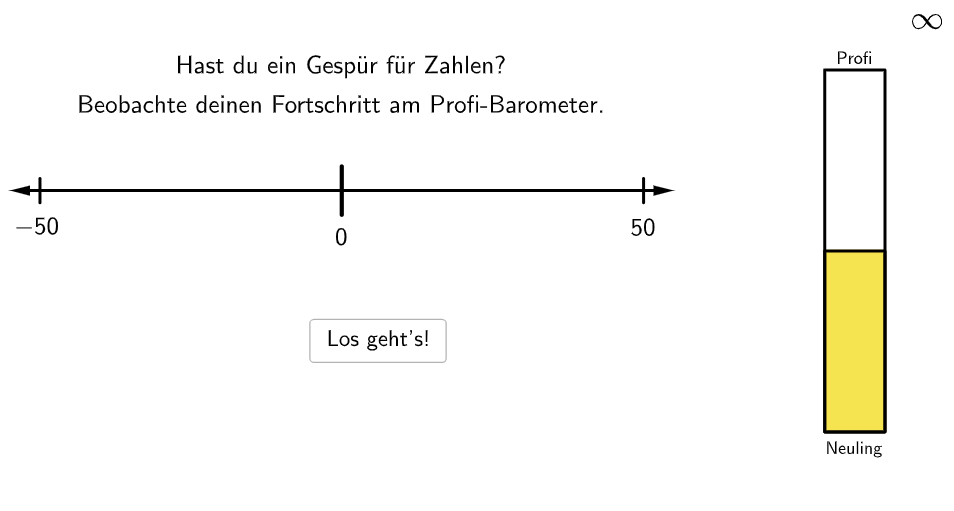
This GeoGebra example trains number sense by randomly generating integers and prompting learners to compare their sizes and locate them on a number line. It focuses on core concepts of comparing and ordering whole numbers (integers) using a number line, and interpreting integers in real contexts represented by their sign and position (negative, zero, positive). The construction uses RandomElement to pick values and manages sets such as numbers/minNums/maxNums and candidates like randomNos. Geometric elements are built with Vector, Segment, Join, and Polygon to display the number line and positions, while If is used to branch behavior for positive/negative cases. Text adds labels and feedback, and objects such as numDif, numZero, numPos, showrect/showsolution, countCorrect/correct organize the problem presentation and answer checking. Suitable for grades 5–6 and classroom or practice sessions emphasizing integer understanding.
GeoGebra Commands & Parameters
RandomElement(maxNums) → maxNumVector(A + (0.5, 0), B) → uSegment((10, b), (10, (-b))) → gJoin({{100}, Shuffle[Sequence[Random[5, 95], i, 1, 100]]}) → randomNosRandomElement(minNums) → minNumRandomElement(numbers) → numPolygon((Max[0, If[numPos ≥ numZero > numPos - 0.5, numZero, numPos - 0.5]], -0.3), (Min[10, If[numPos < numZero ≤ numPos + 0.5, numZero, numPos + 0.5]], -0.3), (Min[10, If[numPos < numZero ≤ numPos + 0.5, numZero, numPos + 0.5]], 0.3), (Max[0, If[numPos ≥ numZero > numPos - 0.5, numZero, numPos - 0.5]], 0.3)) → q1, h, i, j, kSegment((0, 0), (0.1, 0)) → P0Segment((0.1, 0), (0.2, 0)) → P1Segment((0.2, 0), (0.3, 0)) → P2Segment((0.3, 0), (0.4, 0)) → P3Segment((0.4, 0), (0.5, 0)) → P4Segment((0.5, 0), (0.6, 0)) → P5Segment((0.6, 0), (0.7, 0)) → P6Segment((0.7, 0), (0.8, 0)) → P7Segment((0.8, 0), (0.9, 0)) → P8Segment((0.9, 0), (1, 0)) → P9Segment((1, 0), (1.1, 0)) → P10Segment((1.1, 0), (1.2, 0)) → P11Segment((1.2, 0), (1.3, 0)) → P12Segment((1.3, 0), (1.4, 0)) → P13Segment((1.4, 0), (1.5, 0)) → P14Segment((1.5, 0), (1.6, 0)) → P15Segment((1.6, 0), (1.7, 0)) → P16Segment((1.7, 0), (1.8, 0)) → P17Segment((1.8, 0), (1.9, 0)) → P18Segment((1.9, 0), (2, 0)) → P19Segment((2, 0), (2.1, 0)) → P20Segment((2.1, 0), (2.2, 0)) → P21Segment((2.2, 0), (2.3, 0)) → P22Segment((2.3, 0), (2.4, 0)) → P23Segment((2.4, 0), (2.5, 0)) → P24Segment((2.5, 0), (2.6, 0)) → P25Segment((2.6, 0), (2.7, 0)) → P26Segment((2.7, 0), (2.8, 0)) → P27Segment((2.8, 0), (2.9, 0)) → P28Segment((2.9, 0), (3, 0)) → P29Segment((3, 0), (3.1, 0)) → P30Segment((3.1, 0), (3.2, 0)) → P31Segment((3.2, 0), (3.3, 0)) → P32Segment((3.3, 0), (3.4, 0)) → P33Segment((3.4, 0), (3.5, 0)) → P34Segment((3.5, 0), (3.6, 0)) → P35Segment((3.6, 0), (3.7, 0)) → P36Segment((3.7, 0), (3.8, 0)) → P37Segment((3.8, 0), (3.9, 0)) → P38Segment((3.9, 0), (4, 0)) → P39Segment((4, 0), (4.1, 0)) → P40Segment((4.1, 0), (4.2, 0)) → P41Segment((4.2, 0), (4.3, 0)) → P42Segment((4.3, 0), (4.4, 0)) → P43Segment((4.4, 0), (4.5, 0)) → P44Segment((4.5, 0), (4.6, 0)) → P45Segment((4.6, 0), (4.7, 0)) → P46Segment((4.7, 0), (4.8, 0)) → P47Segment((4.9, 0), (5, 0)) → P49Segment((5, 0), (5.1, 0)) → P50Segment((5.1, 0), (5.2, 0)) → P51Segment((5.2, 0), (5.3, 0)) → P52Segment((5.3, 0), (5.4, 0)) → P53Segment((5.4, 0), (5.5, 0)) → P54Segment((5.5, 0), (5.6, 0)) → P55Segment((5.6, 0), (5.7, 0)) → P56Segment((5.7, 0), (5.8, 0)) → P57Segment((5.8, 0), (5.9, 0)) → P58Segment((5.9, 0), (6, 0)) → P59Segment((6, 0), (6.1, 0)) → P60Segment((6.1, 0), (6.2, 0)) → P61Segment((6.2, 0), (6.3, 0)) → P62Segment((6.3, 0), (6.4, 0)) → P63Segment((6.4, 0), (6.5, 0)) → P64Segment((6.5, 0), (6.6, 0)) → P65Segment((6.6, 0), (6.7, 0)) → P66Segment((6.7, 0), (6.8, 0)) → P67Segment((6.8, 0), (6.9, 0)) → P68Segment((6.9, 0), (7, 0)) → P69Segment((7, 0), (7.1, 0)) → P70Segment((7.1, 0), (7.2, 0)) → P71Segment((7.2, 0), (7.3, 0)) → P72Segment((7.3, 0), (7.4, 0)) → P73Segment((7.4, 0), (7.5, 0)) → P74Segment((7.5, 0), (7.6, 0)) → P75Segment((7.6, 0), (7.7, 0)) → P76Segment((7.7, 0), (7.8, 0)) → P77Segment((7.8, 0), (7.9, 0)) → P78Segment((7.9, 0), (8, 0)) → P79Segment((8, 0), (8.1, 0)) → P80Segment((8.1, 0), (8.2, 0)) → P81Segment((8.2, 0), (8.3, 0)) → P82Segment((8.3, 0), (8.4, 0)) → P83Segment((8.4, 0), (8.5, 0)) → P84Segment((8.5, 0), (8.6, 0)) → P85Segment((8.6, 0), (8.7, 0)) → P86Segment((8.7, 0), (8.8, 0)) → P87Segment((8.8, 0), (8.9, 0)) → P88Segment((8.9, 0), (9, 0)) → P89Segment((9, 0), (9.1, 0)) → P90Segment((9.1, 0), (9.2, 0)) → P91Segment((9.2, 0), (9.3, 0)) → P92Segment((9.3, 0), (9.4, 0)) → P93Segment((9.4, 0), (9.5, 0)) → P94Segment((9.5, 0), (9.6, 0)) → P95Segment((9.6, 0), (9.7, 0)) → P96Segment((9.7, 0), (9.8, 0)) → P97Segment((9.8, 0), (9.9, 0)) → P98Segment((9.9, 0), (10, 0)) → P99Segment((10, 0), (10.1, 0)) → P100Segment((4.8, 0), (4.9, 0)) → P48If(floor(barometer / 2) + 1 ≥ 10, 10, floor(barometer / 2) + 1) → colorIndexPolygon((-1, -7), (17, -7), (17, 4), (-1, 4)) → canvas, l, m, n, pVector(B - (0.5, 0), A) → u1Segment((0, b), (0, (-b))) → g1Segment((numZero, a), (numZero, (-a))) → fVector((numPos, -0.4), (numPos, 0)) → vText("\textsf{\(" + num + "\)}", (numPos + 0.05, -0.75), true, true, 0, 0) → text6
AI Drawing Prompt Reference
Draw a number line from -10 to 10 with a short line every unit. Randomly generate an integer and mark it on the number line with its label. Generate another integer, compare its size with the first one, and mark it on the number line. Use differently colored rectangles to represent positive, zero, and negative numbers based on their signs. Draw a horizontal line below the number line to show the comparison result.
The prompt above was compiled from the original drawing commands and is for reference only.