
Comparing Integers with Inequality Notation on an Interactive Number Line
Loading the math board and drawing, please wait…
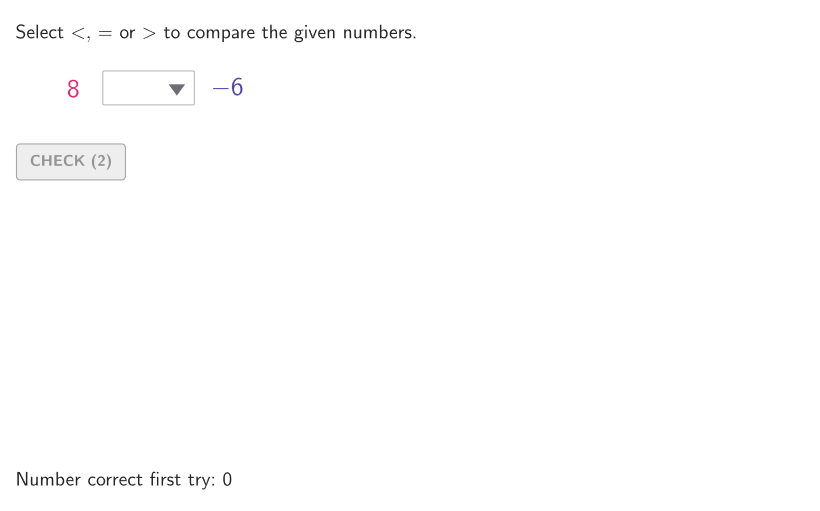
This GeoGebra lesson uses an interactive number line to help students determine how positive and negative integers compare and then complete statements using inequality symbols (<, >, ≤, ≥). It emphasizes number sense: understanding integer ordering, the sign meaning, and how location on the number line directly reflects magnitude. The construction supports randomized practice by generating and shuffling integer pairs (Sequence, Shuffle, and seed/index objects such as allRandomSeeds, numA/numB, randIndex). It selects the active values using SelectedIndex/Element, evaluates correctness with conditional logic (If with objects like randomCorrect/correct, plus counters such as tries and countCorrect), and builds the visual interface with geometric primitives (Point, Segment, Polygon, Circle and related layout pixel objects). The onboarding text, hints, and answer display are managed with onboardingTextOffset, onboarding/helpTextHint, textAnswer, showhint, and showbuttons. Designed for middle grades (about 6–8) and suitable for both guided classroom use and independent practice.
GeoGebra Commands & Parameters
Sequence((k, 0), k, -20, 20, 1) → xGridSequence(Random[0, 99] / 100, A, 1, 200) → allRandomSeeds, {0.09, 0.18, 0.14, 0.52, 0.07, 0.12, 0.08, 0.12, 0.96, 0.68, 0.44, 0.38, 0.13, 0.25, 0.99, 0.53, 0.36, 0.29, 0.34, 0.08, 0.36, 0.95, 0.44, 0.15, 0.03, 0.41, 0.4, 0.63, 0.92, 0.86, 0.45, 0, 0.7, 0.55, 0.25, 0.02, 0.75, 0.73, 0.84, 0.89, 0.48, 0.19, 0.8, 0.35, 0.3, 0.13, 0.31, 0.23, 0.06, 0.76, 0.91, 0.55, 0.28, 0.18, 0.69, 0.87, 0.69, 0.34, 0.2, 0.81, 0.8, 0.69, 0.81, 0.9, 0.05, 0.32, 0.42, 0.11, 0.7, 0.98, 0.44, 0.53, 0.22, 0.78, 0.86, 0.63, 0.7, 0.51, 0.31, 0.42, 0.22, 0.6, 0.68, 0.43, 0.54, 0.18, 0.67, 0.96, 0.59, 0.13, 0.76, 0.69, 0.26, 0.66, 0.03, 0.3, 0.88, 0.6, 0.99, 0.83, 0.28, 0.63, 0.1, 0.21, 0.97, 0.86, 0.77, 0.55, 0.91, 0.29, 0.64, 0.88, 0.89, 0.3, 0.31, 0.55, 0.05, 0.45, 0.95, 0.63, 0.33, 0.23, 0.88, 0.46, 0.39, 0.15, 0.72, 0.41, 0.36, 0.52, 0.37, 0.89, 0.57, 0.8, 0.41, 0.68, 0.66, 0.71, 0.19, 0.79, 0.04, 0.21, 0.65, 0.04, 0.03, 0.21, 0.05, 0.09, 0.77, 0.45, 0.21, 0.31, 0.34, 0.03, 0.6, 0.06, 0.29, 0.39, 0.63, 0.81, 0.04, 0.8, 0.12, 0.27, 0.89, 0.09, 0.5, 0.09, 0.53, 0.76, 0.58, 0.83, 0.29, 0.93, 0.19, 0.63, 0.47, 0.3, 0.22, 0.59, 0.54, 0.48, 0.72, 0.24, 0.31, 0.66, 0, 0.15, 0.58, 0.89, 0.84, 0.85, 0.77, 0.95, 0.24, 0.91, 0.84, 0.58, 0.83, 0.95}Shuffle(Sequence[t, t, -20, 20, 1]) → allB, {-6, -17, -15, 18, -9, -7, 6, 5, 17, 10, 14, -19, 12, 15, -16, -3, 8, 0, -10, 2, 3, -20, -8, 20, -4, -14, 13, 9, 11, 4, -12, -2, -1, -13, 1, -11, 7, 19, -18, 16, -5}Shuffle(Sequence[t, t, -20, 20, 1]) → allA, {8, -17, 20, -4, -19, 13, 14, -3, 17, -9, 19, 12, -1, 10, 6, -2, -6, 3, -12, 2, -14, 7, -10, 1, 11, 18, -11, 5, 0, 4, -15, -20, 15, 9, -16, -7, -18, -5, -13, 16, -8}Point(xGrid) → QPoint(xGrid) → PSelectedIndex(ddMenu) → isElement(allB, Mod[countQuestion, Length[allA]] + 1) → numBElement(allA, Mod[countQuestion, Length[allA]] + 1) → numATake(allRandomSeeds, randIndex, randIndex + numRandoms - 1) → currentRandomSeedsPolygon(Zip[PixelsToPoint[Corner[1], Corner[3], Corner[5], A], A, {(pixelsLeft, pixelsTop), (pixelsLeft, y(Corner[5]) - pixelsBottom), Corner[5] - (pixelsRight, pixelsBottom), (x(Corner[5]) - pixelsRight, pixelsTop)}]) → borderBoxCorner(5) → layoutAppSizeonboardingTextOffset(Corner[onboardingText, 1], Corner[onboardingText, 3], onboardingCase, Corner[1], Corner[3], Corner[5]) → OnboardingTextOffsetIf(numA ≤ -10, 30, -10 < numA ≤ -1, 40, -1 < numA ≤ 9, 60, 49) → textAPosXIf(numB < 0, 200, 210) → textBPosXSegment((-20.5, 0), (20.5, 0)) → numberLineSequence(Segment[(t, -0.2), (t, 0.2)], t, -20, 20, 1) → shortTicksSequence(t, t, -20, 20, 2) → allAxesLabelsSequence((k, 0), k, -20, 20, 2) → labelsGridZip(Text[("" * A), B, false, true, 0, 0], A, allAxesLabels, B, labelsGrid + (0, -0.7)) → labelsInPlacecirclePixels(Q, 7 + (7 * pulsing), Corner[1], Corner[3], Corner[5]) → pulsingObjectcirclePixels(P, 7 + (7 * pulsing), Corner[1], Corner[3], Corner[5]) → pulsingObjectB
AI Drawing Prompt Reference
Draw a number line from -20 to 20 with major labels and minor ticks every two units. Randomly select two integers, one between -10 and -1, and the other between -1 and 9, and mark their positions with circles. Draw minor ticks between each major tick. At the ends of the number line, draw major ticks to indicate the range. Adjust the size of the circles based on the integer values, using larger circles for larger numbers.
The prompt above was compiled from the original drawing commands and is for reference only.