
Venn Diagram Word Problems
Loading the math board and drawing, please wait…
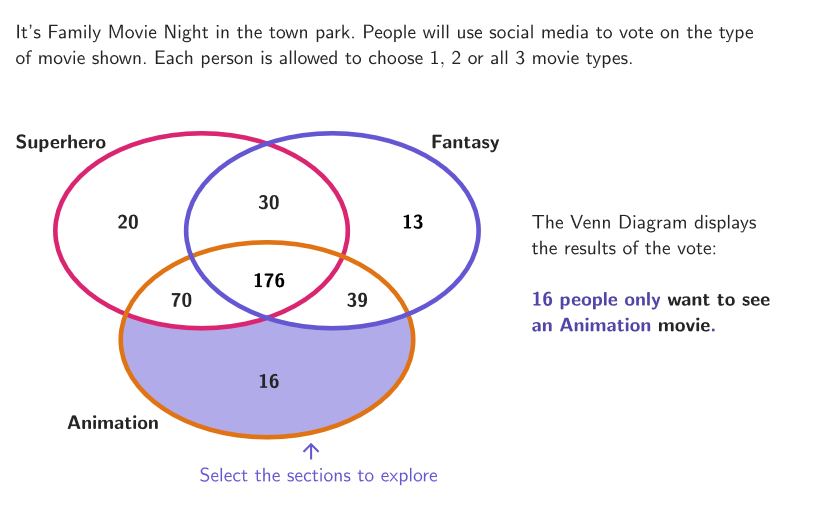
This example demonstrates how to use Venn diagrams to model and solve real-world problems. The key mathematical concepts involve sets and probability, focusing on calculating total participants, votes for specific items, and multiple selections. Construction uses GeoGebra commands like Shuffle, Element, Ellipse, etc. Suitable for grades 6-8 to enhance statistical and probabilistic thinking.
GeoGebra Commands & Parameters
Shuffle(Sequence[t, t, 350, 400, 1]) → allPeople, {352, 365, 392, 355, 354, 390, 374, 381, 364, 398, 382, 351, 389, 375, 363, 400, 369, 358, 394, 361, 362, 360, 399, 356, 391, 353, 393, 379, 378, 396, 380, 386, 395, 350, 357, 377, 366, 376, 385, 388, 371, 368, 359, 387, 372, 367, 370, 373, 384, 397, 383}Shuffle(Sequence[t, t, 2, 26, 1]) → allH, {23, 6, 22, 4, 15, 18, 11, 9, 16, 5, 20, 25, 13, 26, 7, 24, 8, 21, 14, 19, 12, 2, 17, 10, 3}Shuffle(Sequence[t, t, 2, 90, 1]) → allG, {50, 79, 33, 75, 85, 26, 55, 73, 39, 60, 30, 25, 81, 52, 82, 76, 88, 83, 6, 23, 45, 11, 5, 28, 49, 61, 64, 84, 59, 43, 7, 46, 69, 51, 34, 58, 32, 9, 10, 15, 22, 13, 42, 27, 20, 62, 31, 65, 68, 48, 78, 2, 47, 90, 38, 29, 3, 12, 74, 24, 57, 18, 63, 4, 19, 37, 70, 14, 54, 41, 67, 66, 53, 89, 87, 35, 40, 56, 36, 72, 17, 8, 86, 80, 16, 44, 77, 21, 71}Shuffle(Sequence[t, t, 2, 90, 1]) → allD, {10, 72, 76, 26, 27, 50, 43, 89, 70, 36, 4, 61, 33, 71, 58, 40, 82, 69, 78, 30, 12, 53, 44, 55, 21, 31, 15, 84, 16, 18, 46, 67, 24, 41, 83, 13, 7, 74, 19, 48, 23, 20, 77, 59, 22, 37, 63, 49, 45, 80, 73, 42, 8, 39, 17, 11, 65, 38, 68, 52, 3, 57, 2, 56, 90, 81, 79, 54, 32, 62, 25, 66, 9, 75, 60, 28, 88, 29, 47, 85, 14, 34, 86, 6, 51, 64, 5, 35, 87}Shuffle(Sequence[t, t, 2, 90, 1]) → allB, {22, 18, 43, 9, 38, 33, 44, 14, 30, 47, 85, 27, 89, 68, 36, 40, 65, 67, 57, 5, 7, 20, 11, 35, 63, 28, 41, 29, 32, 3, 82, 6, 77, 78, 71, 70, 39, 42, 86, 52, 2, 61, 34, 60, 56, 64, 72, 62, 90, 81, 23, 48, 50, 84, 12, 15, 31, 76, 17, 83, 16, 4, 66, 24, 58, 51, 69, 87, 25, 13, 8, 73, 49, 10, 21, 53, 74, 75, 59, 19, 37, 80, 79, 88, 45, 46, 55, 26, 54}Shuffle(Sequence[t, t, 2, 25, 1]) → allA, {8, 17, 24, 10, 15, 7, 12, 21, 20, 25, 14, 16, 18, 9, 3, 11, 22, 23, 4, 13, 6, 2, 19, 5}Element(allA, Mod[count, Length[allA]] + 1) → aElement(allB, Mod[count, Length[allB]] + 1) → bElement(allH, Mod[count, Length[allH]] + 1) → hElement(allG, Mod[count, Length[allG]] + 1) → gElement(allD, Mod[count, Length[allD]] + 1) → dElement(allPeople, Mod[count, Length[allPeople]] + 1) → totPeopleEllipse(A, B, C) → coVector(A, T) → vTranslate(co, v) → luVector(A, J) → uTranslate(co, u) → moPolygon(D, E, F, G) → q1, d_1, e, f_1, g_1Ellipse(A, B, C) → coWhiteTranslate(co, v) → luWhiteTranslate(co, u) → moWhiteShuffle(Sequence[t, t, 2, 28, 1]) → allC, {5, 20, 19, 22, 2, 4, 7, 21, 13, 24, 28, 14, 9, 18, 10, 15, 17, 12, 6, 23, 11, 8, 26, 16, 27, 3, 25}Element(allC, Mod[count, Length[allC]] + 1) → c
AI Drawing Prompt Reference
Create a Venn-diagram style layout for probability and set problems. Start by choosing a central reference point and draw one outer oval to represent the main universal region. Construct two more ovals of the same type by using translations from the central oval so that all three ovals overlap, forming distinct intersection regions. Add vector-based directional shifts to move the oval shape into corresponding lighter/white placement areas for visual contrast. Finally, include a closed quadrilateral region defined by four corner points near the lower or side part of the figure, so the overall composition is clear for counting and selection tasks.
The prompt above was compiled from the original drawing commands and is for reference only.