
Vectors Parallel to a Plane: 3D Construction
Loading the math board and drawing, please wait…
In collections
MATH1052-edX
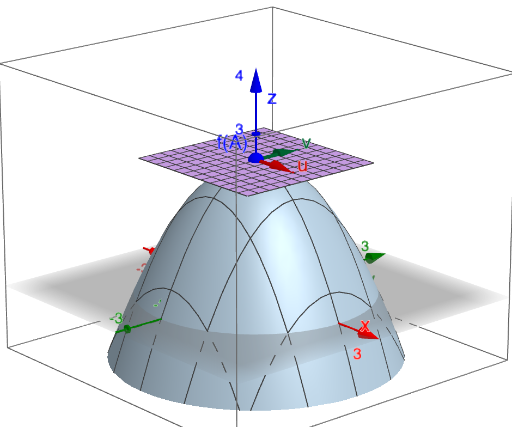
This example demonstrates how to visualize and verify that a given vector is parallel to a specified plane using a 3D GeoGebra model. It builds geometric intuition for the condition that the vector direction lies within the plane (i.e., aligns with an in-plane direction). Key concepts include space vectors, the relative position of vectors and planes, direction vectors contained in a plane, and the parameterized description of a plane via coordinates. Construction-wise, it uses GeoGebra commands such as Surface to create the plane, Translate to position/shift the vector direction, Segment to draw the corresponding direction segment, CurveCartesian to plot spatial curves or directional loci, and Fill to highlight the plane region (with objects like Af, Zu, Zv). Parameters and supporting objects (u, v, tu, tv, plane, region, and points/axes such as ax, ay, A, Z) drive the model, showing how changing parameters affects the plane orientation and the parallelism relationship. Suitable for high school to early university topics in analytic geometry, solid geometry, and vector visualization.
GeoGebra Commands & Parameters
Derivative(f, x) → fxDerivative(f, y) → fyTranslate(Vector[(0, 0, 0), (1, 0, fx(ax, ay))], Z) → uTranslate(Vector[(0, 0, 0), (0, 1, fy(ax, ay))], Z) → vCurveCartesian(ax + (t * x(v)), ay + (t * y(v)), z(Z) + (t * z(v)), t, -10, 10) → tvCurveCartesian(ax + (t * x(u)), ay + (t * y(u)), z(Z) + (t * z(u)), t, -10, 10) → tuSegment(A, Z) → sSurface(ax + (s * x(u)) + (t * x(v)), ay + (s * y(u)) + (t * y(v)), z(Z) + (s * z(u)) + (t * z(v)), s, (-region), region, t, (-region), region) → planeTranslate(Z, u) → ZuTranslate(Z, v) → Zv
AI Drawing Prompt Reference
Visualize a vector parallel to a plane in 3D space. Create two direction vectors and use them to generate a plane. Represent the vector as a line segment and fill the plane area with a surface. Show how the vectors define the plane's in-plane directions and how the vector is parallel to the plane. Adjust parameters to see changes in the plane's orientation and the parallelism relationship.
The prompt above was compiled from the original drawing commands and is for reference only.