
Vector Cross Product Interpretation
Loading the math board and drawing, please wait…
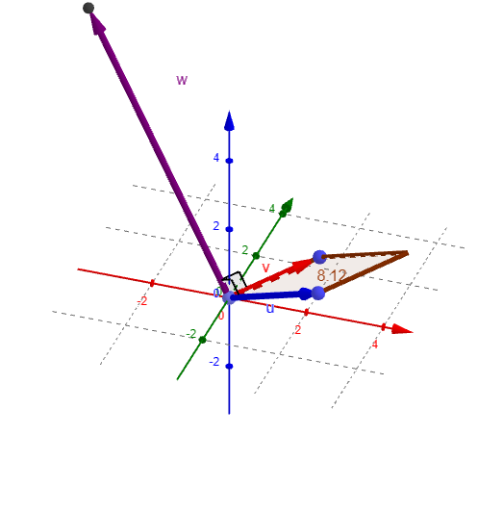
This example dynamically demonstrates the geometric meaning of the vector cross product, visually showing that the cross product of two three-dimensional vectors results in a vector perpendicular to the original plane, whose magnitude equals the area of the parallelogram formed by the original vectors. Core mathematical concepts include vector cross product, spatial vectors, parallelogram area formula, and three-dimensional coordinate system. Construction highlights derived from the 'Construction Summary' using GeoGebra commands/objects: Intersect, Vector, Line, Polygon, Length, Point, Angle. Suitable for high school students and above to understand the physical meaning and geometric application of vector cross product, also applicable for university physics or engineering teaching demonstrations.
GeoGebra Commands & Parameters
Intersect(zAxis, xAxis) → CVector(C, A) → uVector(C, B) → vLine(A, v) → fLine(B, u) → gIntersect(f, g) → DPolygon(D, A, C, B) → q1, d, a, c, bLength(w) → ePoint(a) → EAngle(A, E, F) → αAngle(B, E, F) → β
AI Drawing Prompt Reference
Visualize the vector cross product in a 3D coordinate system by drawing two three-dimensional vectors. First, plot the intersection points of the z-axis and x-axis. Then, draw two vectors starting from these intersection points. Next, create two lines through these vectors with the x-axis and z-axis respectively, and find their intersection point, which is one vertex of the parallelogram. Draw the parallelogram using this vertex and the original two vectors, then calculate its area. Finally, draw a vector from the intersection point of the two original vectors that is perpendicular to their plane and has a length equal to the area of the parallelogram, demonstrating the geometric meaning of the vector cross product.
The prompt above was compiled from the original drawing commands and is for reference only.