
Vector 3D: Geometric Constructions and Spatial Transformations
Loading the math board and drawing, please wait…
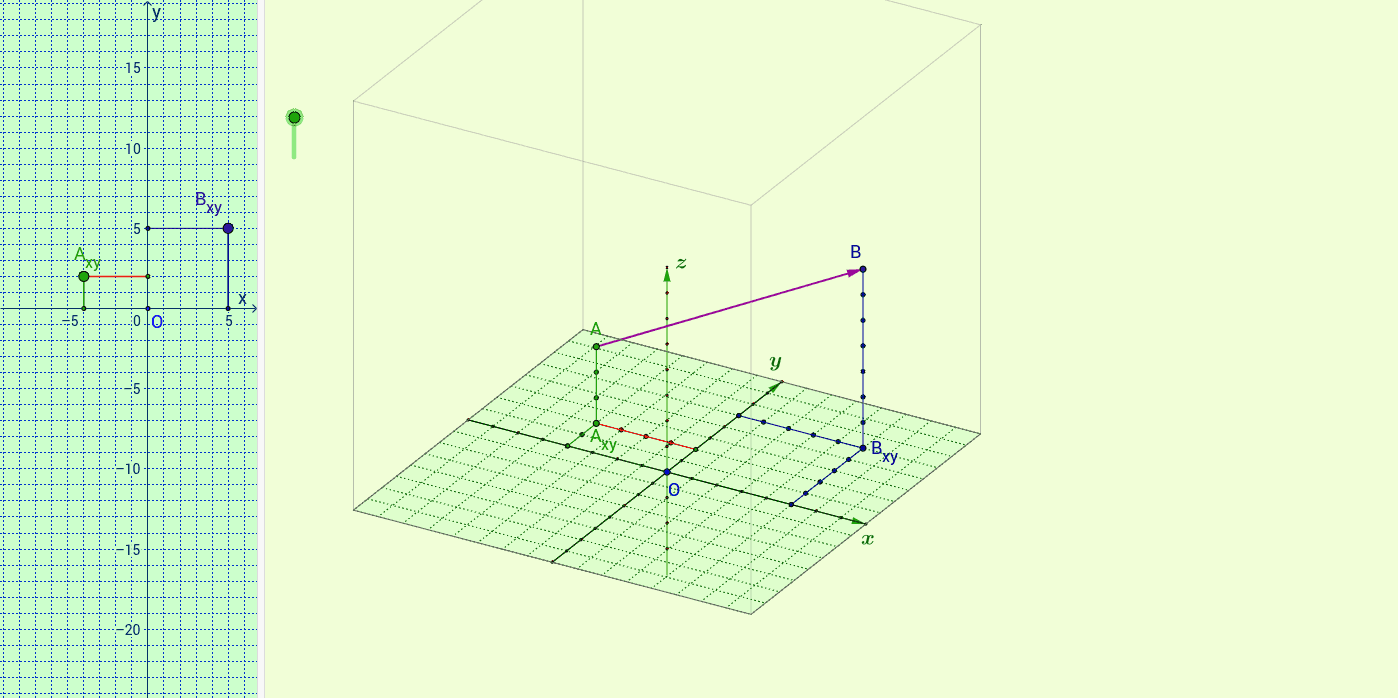
This GeoGebra example demonstrates the geometric construction of 3D vectors and their application in spatial transformations, such as translation and mirroring, to build complex 3D solids like prisms. The core mathematical concepts covered include three-dimensional vectors, spatial coordinate geometry, geometric transformations (translation and reflection), and polygon construction in a 3D coordinate system. To construct these dynamic objects, the example utilizes key GeoGebra commands including Translate, Mirror, Vector, Segment, Line, Sequence, RotateText, Point, Intersect, and Polygon, alongside object lists and interactive buttons to manage coordinates and labels dynamically. It is ideal for high school and university students studying spatial analytic geometry, linear algebra, or vector calculus, serving as an interactive visual tool to bridge abstract vector algebra with concrete 3D geometric shapes.
GeoGebra Commands & Parameters
Translate(O, Vector[u * x_0]) → O_6Translate(O, Vector[u * y_0]) → O_7Translate(O, Vector[u * z_0]) → O_8Mirror(O_6, O) → GTranslate(O, Vector[-0.5 * u * z_0]) → O'_5Translate(O, Vector[-u * y_0]) → O_2Vector(O_2, O_7) → vVector(G, O_6) → wVector(O'_5, O_8) → z_1Segment(O_2, O_7) → cSegment(O_6, G) → dLine(O, O_8) → iSequence(O + i * x_0, i, -u, u) → список1Sequence(O + i * y_0, i, -u, u) → список2RotateText("\copyright uStas\;\;Strelets", 90*°) → надпись24Point(w) → MPoint(w) → LPoint(v) → NPoint(v) → PLine(P, d) → h_1Line(N, d) → i_1Line(M, c) → j_1Line(L, c) → k_1Intersect(h_1, j_1) → D_2Intersect(i_1, j_1) → EIntersect(k_1, i_1) → FIntersect(h_1, k_1) → HPolygon(D_2, E, F, H) → многоугольник2, d_2, e_2, f_2, h_2Vector(A, V) → zSegment(V, U) → lSegment(V, U) → mSegment(B, U) → fSegment(U, B) → gSequence(U + i * z_0, i, 1, z_B) → список1_1Sequence(U - i * x_0, i, 1, x(B_{xy})) → список5Sequence(B + i * x_0, i, 1 + x(B_{xy}), -1) → список6Sequence(U - i * z_0, i, 1, k - 1) → список2_1Segment(U, R) → eSegment(R, U) → jSequence(U - i * y_0, i, y(B_{xy}), 0) → список7Segment(A, Q) → nSegment(Q, I) → pSegment(Q, D) → qSegment(Q, A) → rSegment(Q, I) → sSegment(D, Q) → tSequence(Q + i * z_0, i, 1, z_A) → список3_1Sequence(Q - i * z_0, i, 1, -z_A - 1) → список8Sequence(Q - i * x_0, i, 1, x(A_{xy})) → список9Sequence(I + i * x_0, i, 1 + x(A_{xy}), -1) → список10Sequence(Q - i * y_0, i, y(A_{xy}), 0) → список11Sequence(Q - i * y_0, i, 1, y(A_{xy})) → список12Segment(A_{xy}, C) → d_1Segment(A_{xy}, B_1) → e_1Sequence(N + i * x_0, i, -u, u) → список13Sequence(O_2 + i * x_0, i, -u, u) → список14Sequence(Segment[Element[список13, i], Element[список14, i]], i, 1, Length[список1]) → список15Sequence(M + i * y_0, i, -u, u) → список16Sequence(L + i * y_0, i, -u, u) → список17Sequence(Segment[Element[список16, i], Element[список17, i]], i, 1, Length[список1]) → список18Sequence(U - i * y_0, i, 1, y(B_{xy})) → список4Segment(S, T) → n_1Segment(T, K) → p_1Segment(K, J) → q_1Segment(J, S) → r_1Segment(S, D_2) → s_1Segment(K, F) → t_1Segment(J, H) → a_2Segment(H, F) → b_2Segment(T, E) → c_2Segment(D_2, H) → m_1Segment(D_2, E) → g_2Segment(E, F) → i_2Segment(B_{xy}, W) → hSegment(B_{xy}, Z) → a_1Segment(B_{xy}, Z) → j_2Segment(A_{xy}, C) → k_2Segment(B_1, A_{xy}) → l_2Segment(W, B_{xy}) → m_2Sequence(O + i * z_0, i, -u + 5, u) → список3
AI Drawing Prompt Reference
Please draw a 3D vector geometric construction that demonstrates spatial transformations such as translation and mirroring. First, define the origin O, then perform translations using vectors to obtain multiple points, for example along the x, y, and z axes. Next, apply mirror transformations to these points and construct corresponding vectors. Use these vectors and points to create segments and lines, ultimately forming a complex 3D polygon. The figure also includes auxiliary elements like labels and sequences to help understand spatial relationships.
The prompt above was compiled from the original drawing commands and is for reference only.