
Variations of a Function: Interactive Tangent and Normal Constructions
Loading the math board and drawing, please wait…
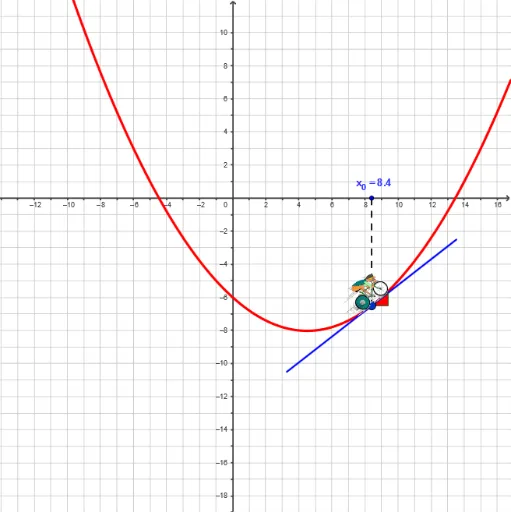
① This GeoGebra example demonstrates how tangent lines, normal lines, and associated geometric objects vary along the graph of a function, providing a dynamic visualization of local function behavior. ② Core mathematical concepts include derivatives (slope of tangent), tangent function, normal lines, vectors, area, volume, and geometric transformations of function graphs, integrating calculus, vector geometry, and geometric construction. ③ Construction highlights: based on the summary, the example uses GeoGebra commands such as Tangent, OrthogonalLine, Circle, Intersect, Segment, Polygon, Vector, Textfield, and Ray, with numerous objects (t, a, b, c, f, T1, T3, A, T4, etc.) forming an interactive network of geometric relations. ④ Suitable for high school to early college students to explore the geometric meaning of derivatives and rates of change, and for teachers to use as a classroom demonstration or for student-led inquiry.
GeoGebra Commands & Parameters
Tangent(A, f) → b_1OrthogonalLine(A, yAxis) → c_1Circle(A, a_2) → dIntersect(d, b_1) → B, CSegment(B, C) → eSegment(A, (x(A), 0)) → gOrthogonalLine(Q, xAxis) → hIntersect(h, b_1) → RPolygon(A, Q, R) → S, r, p, qPolygon(O, P, T, U) → poly1, o, p_1, t_2, uPolygon(V, W, Z, A1) → poly2, v, w, z, a1Polygon(B1, C1, D1, E1) → poly3, b1, c1, d1, e1Vector(G1, H1) → iVector(I1, J1) → jIntersect(o, p_1) → K1Intersect(p_1, t_2) → N1Polygon(K1, L1, M1, N1) → poly4, k1, l1, m1, n1Textfield(f) → ChampTexte1Vector(B_1, C_1) → kVector(B_1, D_1) → lCircle(A, 1.5) → sRay(A, C) → nIntersect(s, n) → E_1,Ray(A, B) → a_1Intersect(s, a_1) → G_1,
AI Drawing Prompt Reference
Draw the graph of a function with a movable point on it. Construct the tangent line at this point and a line perpendicular to the y-axis. Draw a circle centered at the point, intersecting the tangent at two points, and connect these intersections with a segment. Drop a perpendicular from the point to the x-axis, intersect it with the tangent, and form a triangle with the point, the foot, and the intersection. Add several quadrilaterals and vectors to show how these geometric objects change as the point moves. Include a text field to edit the function, and draw a ray and a small circle to indicate direction.
The prompt above was compiled from the original drawing commands and is for reference only.