
Power-Function Derivatives with Multi-Step Motion: Vector-Guided Construction
Loading the math board and drawing, please wait…
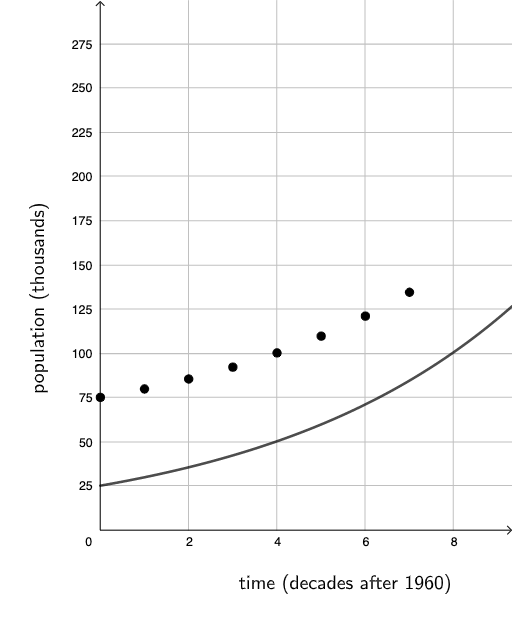
This example demonstrates a “multi-step motion/more movements” construction in GeoGebra to help learners visualize how key geometric objects evolve while studying relationships involving power functions and derivatives. It centers on core ideas such as power-function behavior, the meaning of the derivative as a rate of change, the use of 2D vectors to encode direction and displacement, and logic/conditional constraints to control the construction or display. From the construction summary, the scene uses text objects (text1, text2) for guided explanations, two function objects (f, g) for the mathematical relationships being explored, and a set of key points (A, B, C, D, E, F, G, H) that act as anchors for the step-by-step “movement,” tracking intermediate positions or construction states. It is well-suited for high school through early college, especially for derivative intuition, graphing and transformation-based learning, and GeoGebra geometric construction practice.
GeoGebra Commands & Parameters
f(d) = If[d > 0, (25 * 1.19^(d))]g(x) = (25 * 1.19^(x)) + 50(0, g(0))(1, g(1))(2, g(2))(3, g(3))(4, g(4))(5, g(5))(6, g(6))(7, g(7))
AI Drawing Prompt Reference
Create a dynamic visualization showing a power function and its derivative, featuring a curve that changes with a parameter and a shifted curve. Highlight key points to illustrate the function's behavior and the geometric meaning of the derivative. Use vectors to encode direction and displacement, and include text annotations to explain steps and concepts, suitable for understanding function graphs, derivatives, and geometric constructions.
The prompt above was compiled from the original drawing commands and is for reference only.